




DISCUSS: Reset options at launch
Hold down any of the following keys during launch to bring up this dialog (Command, Option, Shift / Control, Alt, Shift). You have the choice to reset any or all the following options: preferences, media cache, plugin cache, and also bypass third-party plugins from loading. Savvy users already know about these troubleshooting steps, but we have combined them all into one dialog to make it more convenient.
The corresponding key used to bring up the dialog will auto-select that setting in the dialog (e.g. using ‘Option/Alt’ to bring up the dialog will auto-select the ‘Reset app preferences’ checkbox. You can also combine keys that will result in multiple options selected (e.g., ‘Shift + Option/Alt’ will result in auto-selecting ‘Reset app preferences’ and ‘Reset plugin loading cache’). Once the dialog is up, you are free to make any selection you like.
- Shift (reset plugin loading cache)
- Command / Ctrl +3 (Disable third-party plugins)
- Option / Alt (Reset app preferences)
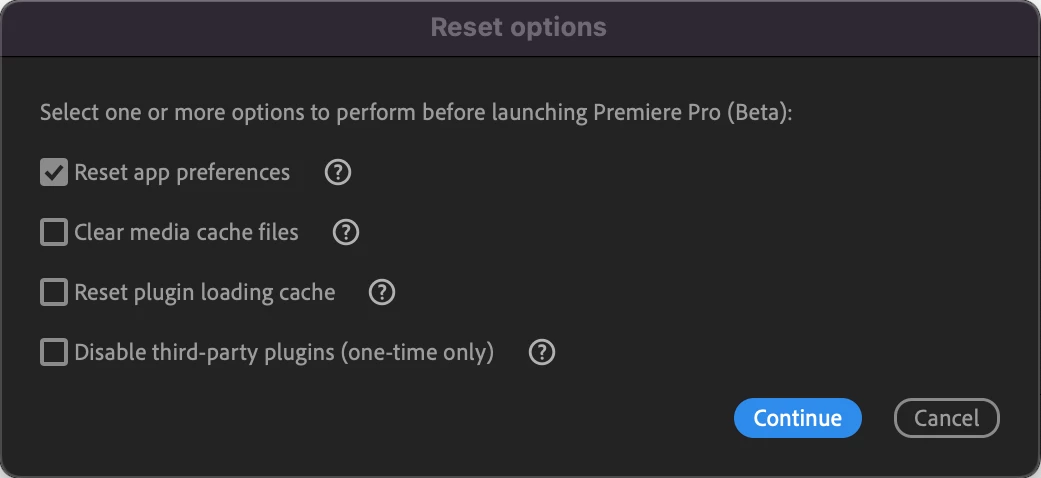
Reset app preferences
App Preferences are user-defined settings for customizing the appearance and behavior of Premiere Pro. Resetting app preferences does not delete custom keyboard shortcut set.
Learn more about preferences: https://helpx.adobe.com/premiere-pro/using/reset-preferences.html
Clear media cache
Premiere Pro stores temporary files in the media cache to improve performance. Selecting this option will clear all files from the media cache.
Learn more about media cache: https://helpx.adobe.com/premiere-pro/kb/clear-cache.html
Reset plugin loading cache
Premiere Pro stores plugin information in the plugin loading cache. If you're having problems with a plugin, try resetting the plugin loading cache to see if it corrects the problem.
Learn more about plugins: https://helpx.adobe.com/premiere-pro/plug-ins.html
Disable third-party plugins (one time only)
Third-party plugins can sometimes make Premiere Pro unstable. Use this option to disable them before continuing with the current Premiere Pro launch to identify if a plugin is affecting your experience.
We want to know what you think. Please join the conversation below.
 AdChoices