



Francis-Crossman17221443
Community Manager
Principal Product Manager
August 19, 2022
Question

DISCUSS: Use ProRes as the default codec for sequence rendering

  • August 19, 2022
  • 9 replies
  • 7794 views

In Premiere 23.0 we’re changing the default preview codec for most new sequences created from media to Apple ProRes 422 LT.  The previous default was I-Frame Only MPEG.
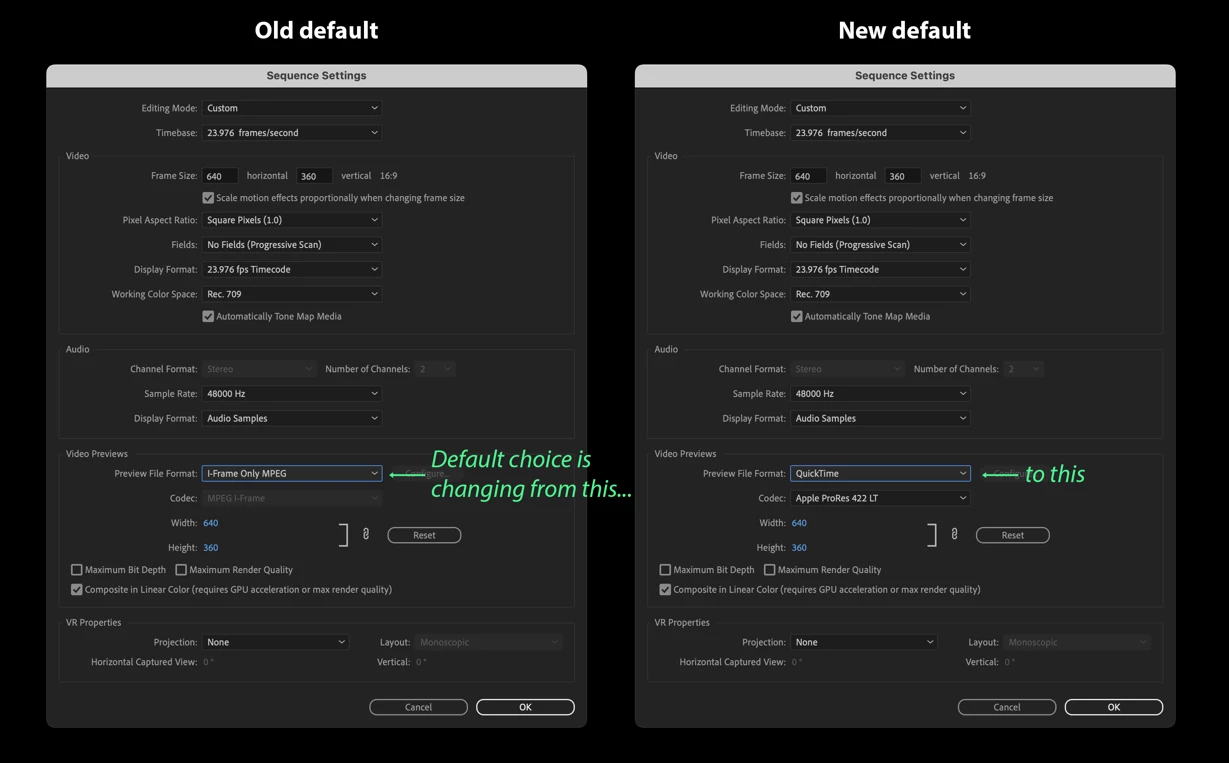


We’re making this change to improve playback and export times when working with rendered preview files.  In most cases, ProRes is a better choice than MPEG for rendered previews in terms of video quality and playback performance, although the speed and hardware acceleration available on your system will also come into play.


Note: This is only a change to the default setting for preview codec for most sequences.  You can always change your preview codec by going to Sequence > Sequence Settings and selecting a different format and codec in the “Video Previews” section.


Why ProRes LT

We chose ProRes LT because it's a good middle ground regarding data footprint vs quality.  It's a very close match in terms of quality with MPEG, so you should not notice any quality degradation.  We could choose ProRes 422 or even ProRes 422 HQ, but those will fill up your hard drive faster.


What are preview files?

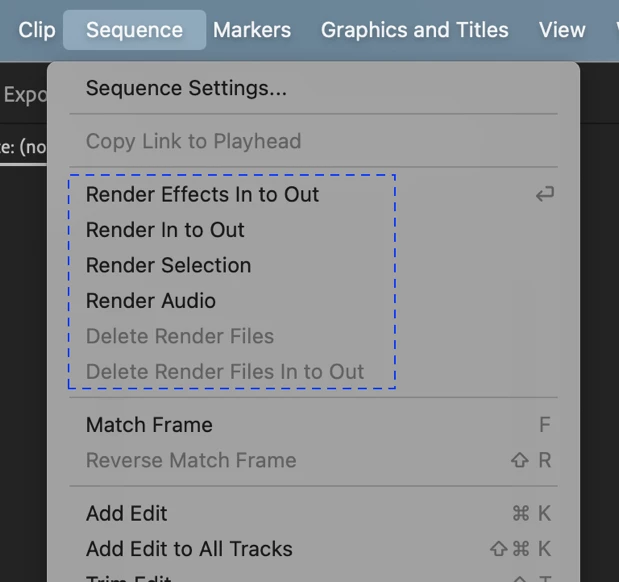
Preview files are created when you render sections of your sequence that do not playback in real-time on your system:


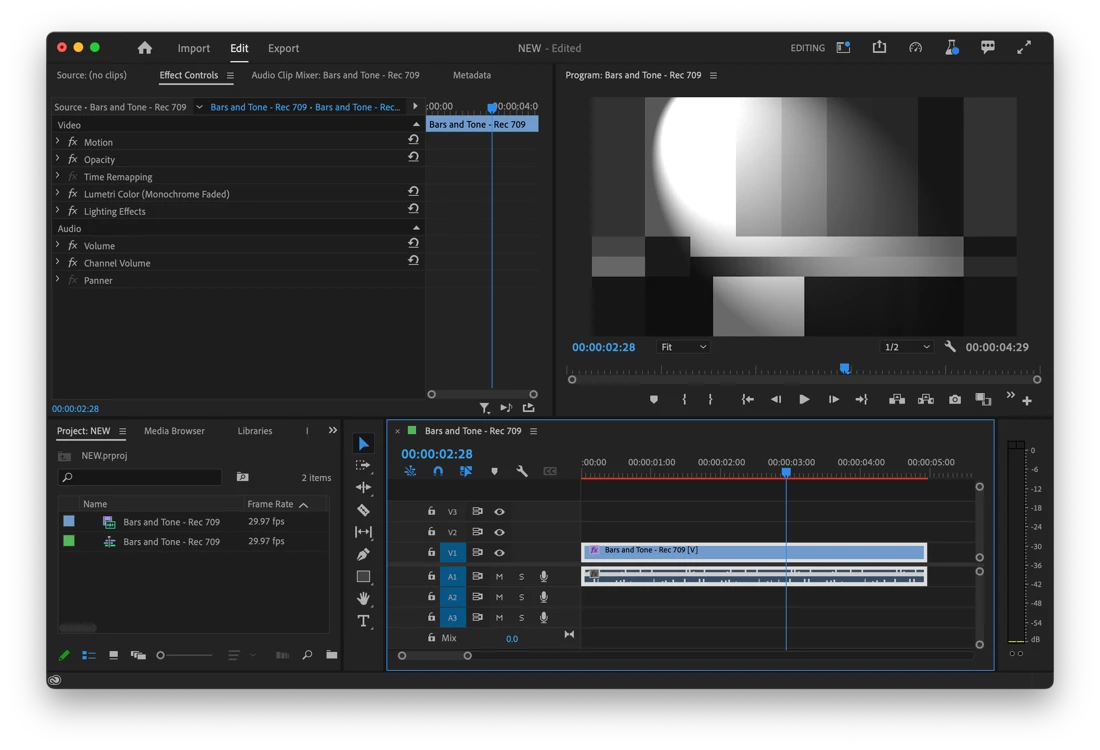
Slower than real-time playback is indicated by a red line appearing in the Timeline panel:
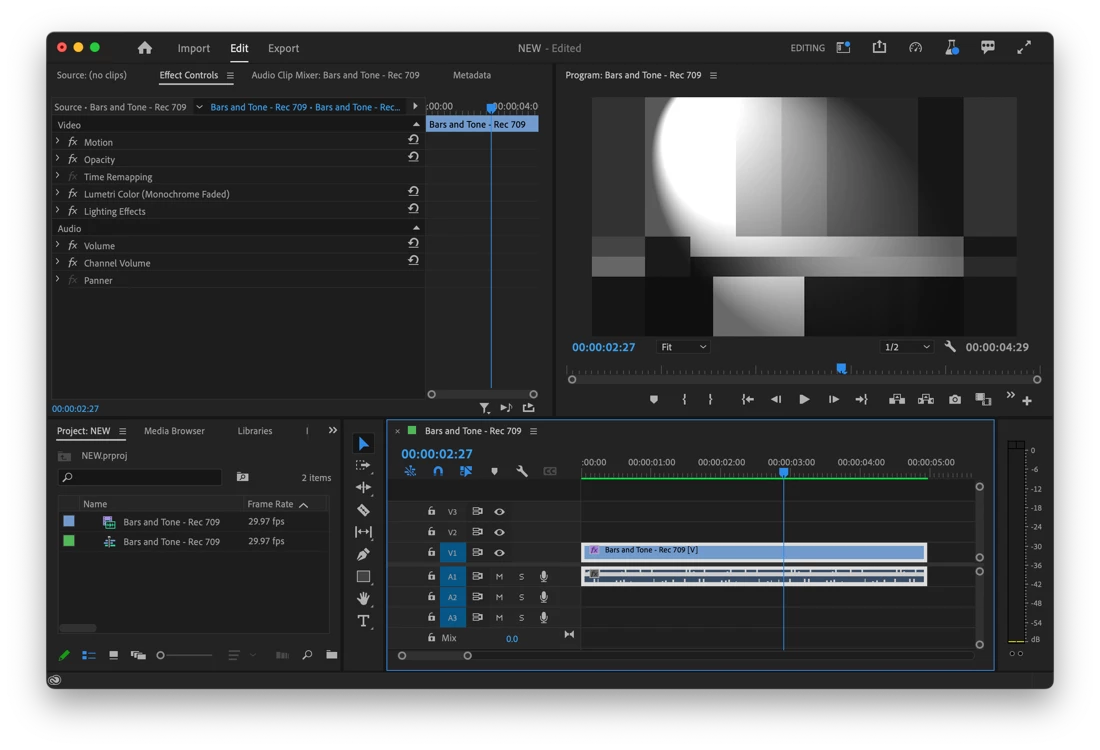
Rendering those sections will show a green line in the Timeline:
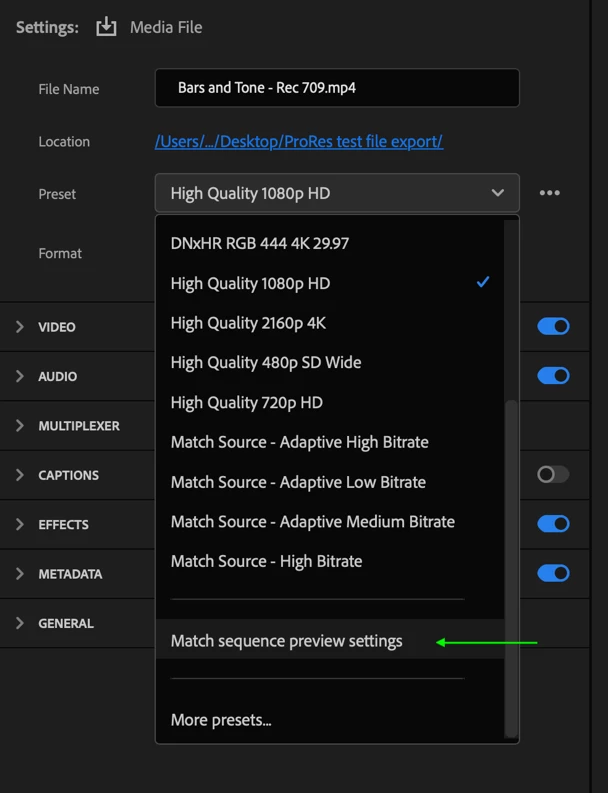
You can also speed up export times if you choose to export to the same format & codec as your preview settings.  The easiest way to do this is by choosing “Match sequence preview settings” from the Preset menu in Export mode:
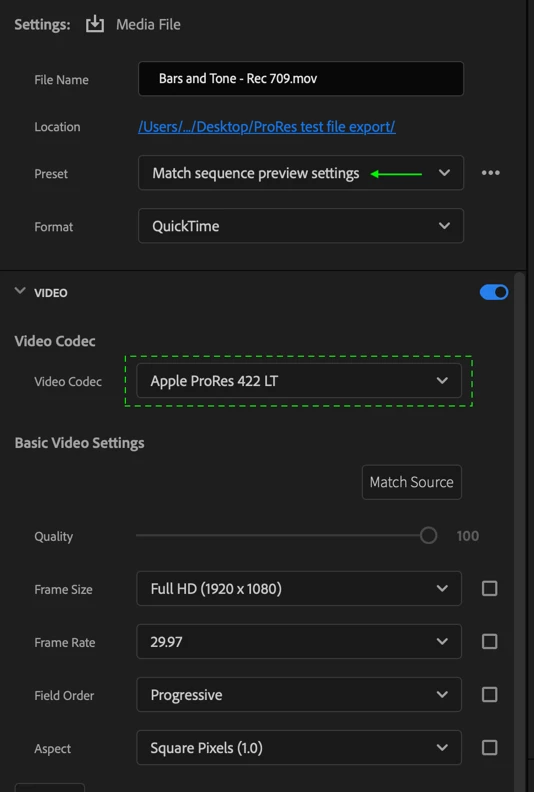


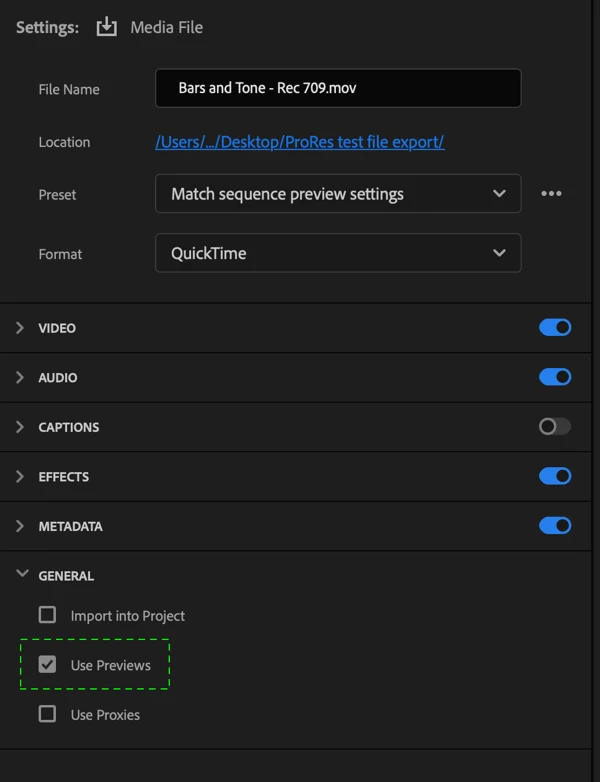
 Choosing “Match sequence preview settings” will also enable the “Use Previews” checkbox under General settings.  This tells Premiere to export using your already rendered preview files, which can shorten export times even further:


Take note:

  • Certain camera files such as XDCAM will default to a preview codec that better matches that format.  This is intentional.


Questions we want to ask the beta community:

  • Do you find sequences rendered with ProRes 422 LT to be more performant than those rendered with the previous default of I-Frame MPEG?
  • Are there camera files you use where you don’t want ProRes to be the default preview codec? 
  • Is ProRes LT the right choice?  Would you prefer ProRes 422 or ProRes 422 HQ?


We want to know what you think.  Please join the conversation below.

This topic has been closed for replies.

9 replies

Inspiring
February 28, 2023

Did this ever get pushed out? I'm on 23.1 and if I start a new project and create a new sequnce it's still defulting to I-Frame Only MPEG as the defualt.

Averdahl
Community Expert
Community Expert
March 1, 2023
quote

Did this ever get pushed out? I'm on 23.1 and if I start a new project and create a new sequnce it's still defulting to I-Frame Only MPEG as the defualt.


By @James5FC9


I don´t have the answer as to when, but i have Apple ProRes LT as the default when i create a new sequence in 23.2 on Windows.

Participating Frequently
September 16, 2022

As others have said in this thread, the biggest issue with the preview workflow now is the inability to render previews in a high quality format like ProRes, and then to be able to chose "use previews" irrespective of the final output codec. This is not only useful for making h264 viewing exports that might require multiple small changes and viewing copies, it was also a VITAL part of out live broadcast workflows where we needed to export to an interlaced broadcast codec for the playout server, but wanted to edit in a progressive timeline (and many other specific workflows).

Taking away this 'because it might confuse people' was a dumbing down of the app, and should have been reversed a long time ago. Such a shame to see a really useful functionailty like this removed.

PS - yes ProResLT is a better base preview codec to MPEG.


Ben

Legend
September 13, 2022

Dear colleagues, for a better on-the-fly editing process, it is necessary to use ProRes LT. As soon as you finish the final editing on the timeline, switch the preview codec to a better one, such as ProRes 422 HQ, which is sufficient to work with 8-bit media (for 10-bit, use ProRes 444) and start painting and graphics. And at the end, output the material with the same preview codec as the final export settings.

Legend
September 13, 2022

And one more nuance that will improve performance in media playback: if you work in a 4k sequence, then lower the preview quality to FullHD 1080P resolution. If you are working in a FullHD 1080p sequence, then lower the quality to HD 1280p. Try this feature and test it in medium and large projects.

Ann Bens
Community Expert
Community Expert
September 11, 2022

Switched to Prores 422 LT about a year ago. Sometimes even set it to Prores proxy.

Participant
September 8, 2022

Ive been using ProRes 422 LT as my video previews default for sequences for a while now and absolutly love that Adobe is now making this a default. I love ProRes 422 LT because when publishing online, its nearly indestinguishable from HQ, while still remianng high quality enough to use for final video (when enabling use previews for export). Its also not too big in file size. ProRes Proxy is just too low quality and should not be the default. Now that Adobe is making ProRes 422 LT the default, Adobe should make a video talking about "smart rendering", which alot of people do not know exists. I hope the ProRes 422 LT as default sticks and comes to vanilla Premiere Pro too

Shebbe
Community Expert
Community Expert
September 1, 2022

Thanks for thinking about these improvements. We have ours set to ProRes 4444 on our template. Our machines are plenty capable of handling it and it makes for fast exports to high quality format.

What I don't get however is why we can't use "Use Previews" for rendering to other formats! If we can get ProRes4444 rendered timelines exported to H.264 (conversion) that's miles faster than having to rerender the entire timeline. On big timelines we tend to export to ProRes4444 and convert with Media Encoder afterwards because it takes 20seconds total instead of say 8 minutes.


If I'm not mistaken this even used to be the case in earlier implementations but got removed afterwards?

R Neil Haugen
Legend
September 1, 2022

I'd love to get an answer to your questions ... but I think the 'to other formats' bit will be answered thusly:


"Use previews" means the app will directly use that clip as the final media. It simply concatenates the timeline into one video file, without rendering/encoding anything.


Which requires that the clip be rendered/previewed to the exact codec that will be the export ... and of course, it must be an intraframe like ProRes, Cineform, and DNxHD/R.


So going to another format/codec would require a different, full encoding process, rather than the concatenation used in "Use Previews".


Is that clear?


Neil

Everyone's mileage always varies ...
Shebbe
Community Expert
Community Expert
September 5, 2022

Thanks Neil,


I do understand the proces behind "glueing" the preview chunks together into a new ProRes or whatever chosen codec preview file. I just think that you can easily do the same but convert afterwards to the requested format.

This would tremendously reduce export times on larger timelines or heavier footage. 

The problem (for us) is that you don't want the timeline render files to be as crappy as proxies/h264 for performance sake. You want a smooth timeline but equivalent to at least ProRes HQ. So when it's finally time to make a final export for heavier projects it's faster to go to the preview format and throw it in Media Encoder instead of waiting on a rerender of the entire thing.

We can keep doing the AME workaround ofcourse but it's tedious and would be a big QoL improvement if implemented into "Use Previews". 

FlyingFourFun
Inspiring
August 26, 2022

Why can we not just pick out own default?  I like to use a higher ProRES,  not sure why Adobe thinks they need to force me to a default, when they could with just as much/little work let the user pick the default they want.

R Neil Haugen
Legend
August 26, 2022

You can of course create custom sequences with any preview format/codec you want, and it will of course be the 'default' for that sequence setting.


And this is just for a preview, remember ... personally, I wouldn't expect a 'preview' file to be full 422/10-bit for instance. It's for editing convenience. As in, when trimming and say you want to trim on the fly ...


If you need a good quality, that would typically be the 'render & replace' option, which uses a different format/codec than the previews.


Neil

Everyone's mileage always varies ...
R Neil Haugen
Legend
August 22, 2022

THANK YOU!


Neil

Everyone's mileage always varies ...
Known Participant
August 21, 2022

I tend to go ProRes Proxy on my machines unless I see a need for ProRes LT. Happy this is coming because I have to tell many new users who complain of laggy playback even after transcoding or using proxies to change their preview codec to ProRes LT or Proxy for a better overall experience. I don't think ProRes 422 or HQ makes sense unless you intend to use them for previews and I think we have to take into account that many first time users may not have been education of storage needs and such. I know they can clear their media cache and delete preview files but that's hoping they actually watch comprehensive basic training on Premiere in the first place.