


stever71725084
Inspiring
September 23, 2025
Answered

Export in premier pro beta error beta 25.6.0 build 74

  • September 23, 2025
  • 1 reply
  • 165 views

I have used premier beta 25.6.0 build 74

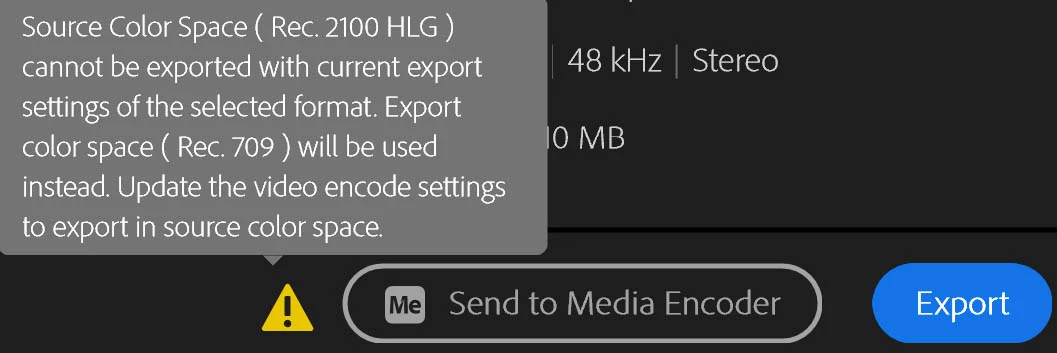
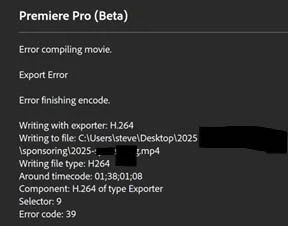
I have used these same settings to export 4 other videos, now after an update, i get this error with no way to fix it. even worse, it will not let me open the file in the non beta 2025 version.

Also, when I click on an inserted jpg on the storyline, so it is selected, it will not allow movement and scaling. I double click in the monitor and the scaling boxes in each corner and the centers never show up. however, if I close and reopen the file, it works perfect.
 

Correct answer stever71725084

I fixed the error by switching to rec. 709. the error triangle went away, but now I have tried in both premier beta and encoder 5 time and get this error message. something is happening at the very end of the video. I even tried shortening it by 3 seconds and same error


I have spent two days producing this video and i am shocked i cannot open it in the stable version, since migrating to beta. 

1 reply

jamieclarke
Community Manager
Community Manager
September 23, 2025

Hi @stever71725084 - This message is telling you that your sequence color setup does not match your export color setup.  Your issue with the project not being backwards compatible is due to the new AI object mask work.

stever71725084
stever71725084AuthorCorrect answer
Inspiring
September 23, 2025

I fixed the error by switching to rec. 709. the error triangle went away, but now I have tried in both premier beta and encoder 5 time and get this error message. something is happening at the very end of the video. I even tried shortening it by 3 seconds and same error


I have spent two days producing this video and i am shocked i cannot open it in the stable version, since migrating to beta. 

stever71725084
Inspiring
September 23, 2025

SOLVED. turns out i was out of disk space. Aparently, Premier pro beta is not smart enough to give me a low disk space warning. freed up space worked perfect just like before. what a rediculous waste of time.