


Inspiring
October 8, 2021
Answered

Footage has a red colorcast on timeline

  • October 8, 2021
  • 3 replies
  • 352 views

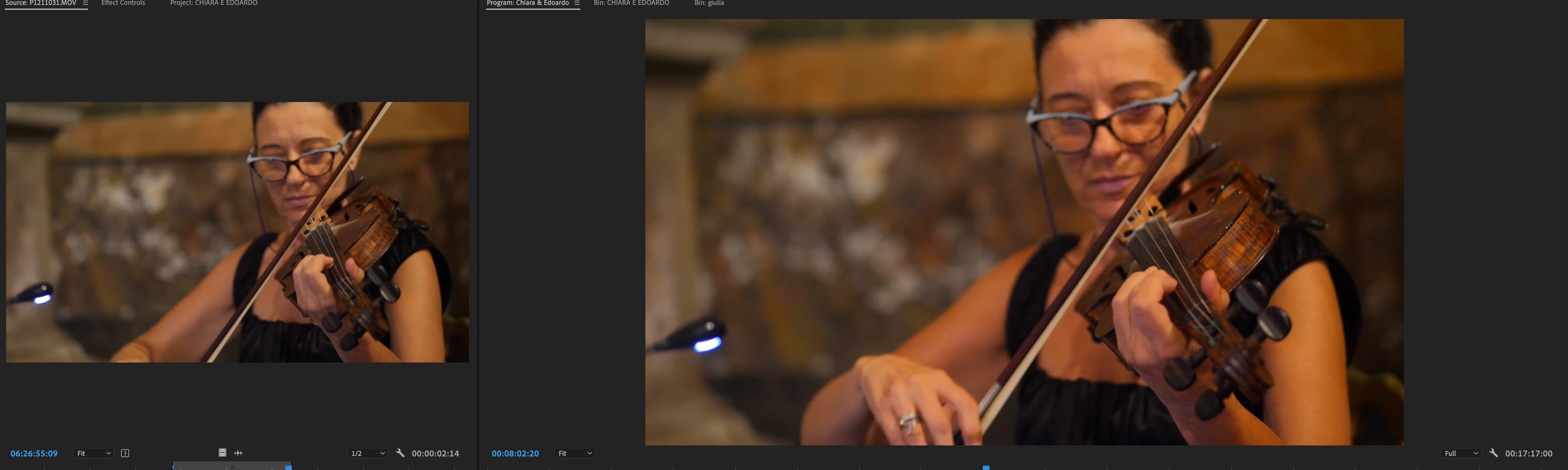
Hello everyone, so as you will see on the attachment, the footage is different is source monitor and in program monitor, so basically it gives more red  on the footage which is really kinda annoying, i hope someone has seen and solved this issue,

Im working on premiere pro Beta version, Macbook Pro M1 
[title edited by mod]

This topic has been closed for replies.
Correct answer ivanp27539531

Huh ... sounds like you've got some sort of issue with your GPU drivers and Premiere or something.


Neil


Well im running on Macbook Pro M1 chipset and is basically my first apple laptop ever, so im not quite familiar if the M1 runs a GPU as its some Apple thing they did

But anyway with the last update from Adobe for the Premiere Beta version this thing got solved 


Thanks again for your guidance and your time

3 replies

R Neil Haugen
Legend
October 9, 2021

Do you have the Display Color Management option in the Preferences checked? It should be for most people.


Neil

Everyone's mileage always varies ...
Inspiring
October 9, 2021

When i turn it on, all of the footage goes black 

R Neil Haugen
Legend
October 9, 2021

Huh ... sounds like you've got some sort of issue with your GPU drivers and Premiere or something.


Neil

Everyone's mileage always varies ...
R Neil Haugen
Legend
October 8, 2021

The Source and Program monitors often give different views of the clip. Partly due to their function. The Source monitor shows the original image as imported, with only the things added via the Source tab (used to be Master Clip tab) added on. While the Program monitor shows the image as adjusted in that specific sequence.


If PrPro is applying a Source clip option to the clip when dropped on a sequence, sometimes that doesn't show in the Source monitor's view. So that might be part of the issue here.


Neil

Everyone's mileage always varies ...
Inspiring
October 8, 2021

Hi Neil,

I appreciate you feedback, so the thing is maybe i dont understand the things quite well, but basically, i am creating sequence from the clip itself, so no any colors or anything like that, basically the clip from the bin to the timeline, and when i export, the red colorcast is not there on the exported footage, basically it is a problem for adjuting the colors, i have tried on the Intel version this is not happening

Hopefully this can get fixed

Inspiring
October 8, 2021

And here is a better sample of it you can see the difference in the skin tones especially

Ann Bens
Community Expert
Community Expert
October 8, 2021

Moved to Beta forum.