Inspiring
January 9, 2021
Answered

HOW CAN I MAKE A SHOW WHEN SOUND CLIPS WONT PLAY?

  • January 9, 2021
  • 2 replies
  • 550 views

Just some tracks.


All tracks play in finder and other apps.

The wave form appears and the playhead moves.


If I go to PPro consumer version, all my labels are missing so

I'm no further ahead trying to make my movie.  PLUS some

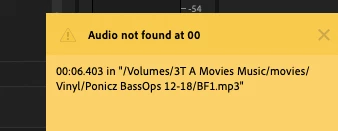
tracks dont play there without even a message below.


This topic has been closed for replies.
Correct answer Ann Bens

If I go to PPro consumer version, all my labels are missing

Make new project and import old one: problem solved.

2 replies

Ann Bens
Community Expert
Ann BensCommunity ExpertCorrect answer
Community Expert
January 9, 2021

If I go to PPro consumer version, all my labels are missing

Make new project and import old one: problem solved.

Inspiring
January 12, 2021

yes this works while new beta is failing.

Inspiring
January 9, 2021

Convert your MP3 files to AIF or Wave and try again.

Inspiring
January 10, 2021

Ok, so far my first try works.  I hope it lasts since the original imports did work.

This will take some time.  OMG even more of those clips have died.

How does this happen?  How come audition can open them.  The are both adobe products.

Puzzled why other mp3s work however.  Also why did they used to work?

And why is the wave form there and the play head moves?

Any ideas?


Also, looking for the easiest way to do this, wondering why putting the clip in the timeline,

and then PPro>edit>edit in Audition>clip,    clip is greyed out.   All sound clips are greyed out

on that route. 


Also going to aiff files is TEN times larger!  Where are all those MBs coming from?
Am I just getting fuzz and air interpolated into the file???


Inspiring
January 12, 2021

OK I did all these things, one by one, like I wrote.

All worked aok.  Today I updated prerelease and

now NO project will even open!  Will I ever edit

this show before covid is over !!???