



Vadym B.
Inspiring
December 29, 2025
Answered

I can't add a video to my timeline. AAAAAAAAAAAAA

  • December 29, 2025
  • 4 replies
  • 251 views

I have used this mp4 video file 1000000 times in other projects of the same format, but this time I can't add it. I have already tried converting it to different codecs, but nothing helped. I often encounter this problem when using other videos. I can't understand what the problem is? Only the audio is added. What is the limitation? The most interesting thing is that this video file was created in Premiere, in the same version of the editor.
Correct answer Ali Jaber

I can't open attached images, I got: Error displaying attachment content.
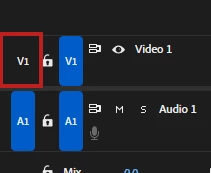
Most likely the source patching for V1 is turned off:

Source patching.jpg

4 replies

Stan Jones
Community Expert
Community Expert
December 30, 2025

I see @Vadym B. sees this in Build 13, and I'm assuming it is source patching. I was debating whether to update, since I am still on Build 4. But Build 14 just dropped, so perhaps I'll gamble on it!


Stan


Ann Bens
Community Expert
Community Expert
December 30, 2025
Ali JaberCommunity ExpertCorrect answer
Community Expert
December 29, 2025

I can't open attached images, I got: Error displaying attachment content.
Most likely the source patching for V1 is turned off:

Source patching.jpg

Inspiring
December 30, 2025

I sometimes run into this, and sure enough the patch is off.  Click the leftmost "V1" then video should drop in.  (If you want to target a different track, click V2, V3 or others.)

Vadym B.
Vadym B.Author
Inspiring
December 29, 2025

I can't finish the project.(