



Ann Bens
Community Expert
Community Expert
August 22, 2021
Question

Import new clips

  • August 22, 2021
  • 1 reply
  • 339 views

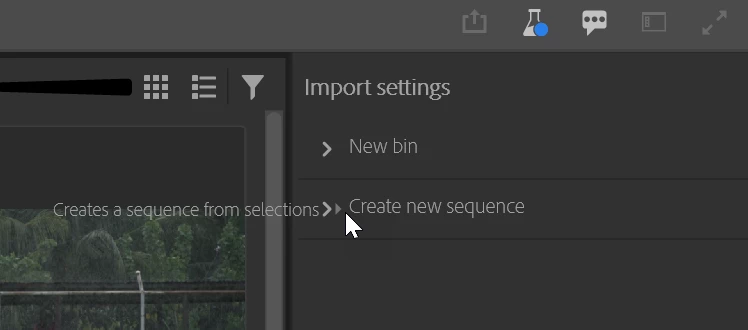
How do I import new clips with the new import panel without making a new sequence in an existing project.

Is this even possible, or am I missing something.

I don't see a way to disable Create New Sequence.


BTW the beta does not draw very well on a 4K monitor W10.
 

This topic has been closed for replies.

1 reply

Stan Jones
Community Expert
Community Expert
August 22, 2021

I'm in Build 63. There is a little toggle button to the right of "Create new sequence" - which is not in your screenshot.


It appears to be on by default the first time I opened it. But turned off, it was sticky, including for creation of a new project.


Unrelated: I just discovered that I cannot File -> Save or Save As etc my project from the Import or Export screens. I must go back to Edit in order to do so. That seems odd. In the "old" format, you can do these things with Media Browser open; you cannot using the Export dialogue.


Stan


Ann Bens
Community Expert
Ann BensCommunity ExpertAuthor
Community Expert
August 22, 2021

Downloaded build 63: it's the same. I twirled the new sequence up in the hope it would not create a new sequence, but alas.

Inspiring
August 23, 2021

Weird, seems to be a UI drawing issue then. The twirldown won't have any impact, but as Stan mentioned there should be one of those "iOS inspired" toggle switches that should appear to the right of the "Create new sequence" text, that should be there regardless of where the expander is twirled down or not. It should appear aligned with the "Maximize video output" button in the header (top right).


I also noticed your tooltip (create a sequence from selections) doesn't render out the light grey bubble background that it's suppose to have. Another indicator of it being a UI rendering issue.


What are your system specs? Are your GPU drivers relatively up to date?