mikecox_
Inspiring
January 9, 2026
Answered

lyout menu

  • January 9, 2026
  • 1 reply
  • 189 views

If I Left click an icon in the Tools panel nothing happens, even after updating.


I wasn't aware of this problem until the new Object Tracking tool was added.


Is there a connection?

Correct answer mikecox_

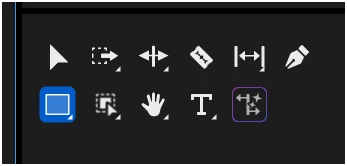
I expected the fly-out menu when I lift clicking the tool.


mikecox__0-1767989881133.png


Nothing hapopens with I click the triangles, but: I just noticed, the Long-press opens the sub-menu.

I seem to  remeber using left click, or clicking the triable to trigger the fly-out; now it's hold right click.

Mysetry solved.

Thanks


1 reply

Adobe Employee
January 9, 2026

Hi @mikecox_ Thanks for reporting this. This does not seems related to Object Tracking. Can you share a screenshot of the tool where you are trying to use left click? Also what action you expect for left click which is not working?

Vikas
mikecox_
mikecox_AuthorCorrect answer
Inspiring
January 9, 2026

I expected the fly-out menu when I lift clicking the tool.


mikecox__0-1767989881133.png


Nothing hapopens with I click the triangles, but: I just noticed, the Long-press opens the sub-menu.

I seem to  remeber using left click, or clicking the triable to trigger the fly-out; now it's hold right click.

Mysetry solved.

Thanks


Using Win 11
MyerPj
Community Expert
Community Expert
January 10, 2026

Hopefully you meant long-press (1/2 second) LEFT mouse.