


Participant
February 20, 2024
Question

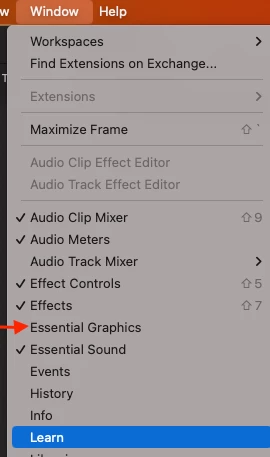
MacOS13.2 (22D49) - Window Tab/Essential Graphic tool does not display in the Workspace

  • February 20, 2024
  • 1 reply
  • 322 views

MacOS13.2 (22D49) - Premier Pro Beta 24.3.0 Build 33 - Window Tab/Essential Graphic tool does not display in the Workspace.

- Restarted the computer

- Restarted the application

- reset the workspace

- I copied a premier beta file from previous work and refreshed the workspace.


My experience is that the tool is not displaying anywhere when clicking in from the Window tab. Also, it is not selected.
 

This topic has been closed for replies.

1 reply

AnnikaKoenig
Community Manager
Community Manager
February 20, 2024

Thanks for reporting this issue! The Motion Graphics team believes that this bug is fixed with the latest beta build (24.3x36). It would be immensly helpful to us if you could check if the problem has in fact been resolved on your end. 

You should also be able to resolve this in builds that still have the bug by clearning the preferences. Hold down any modifier key like shift or cmd/ctrl and then select to delete the preferences in the dialog that pops up.

Participant
February 27, 2024

Thank you so much for releasing the fix. It is working now. Ok to close this case 🙂