


Participating Frequently
November 4, 2025
Answered

New Beta: uninstall, reset, or just update?

  • November 4, 2025
  • 1 reply
  • 146 views

EN: Should we uninstall the previous version and install the new Beta

ES: ¿Deberíamos desinstalar la versión anterior e instalar la nueva Beta?
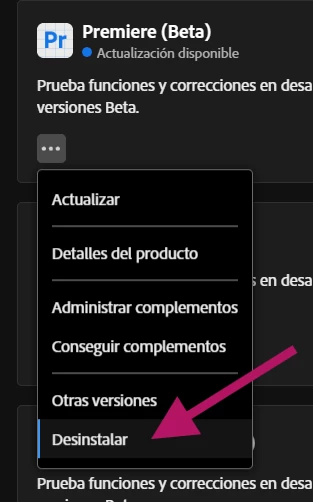
 

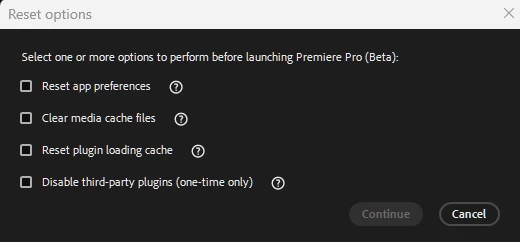
EN: Should we run the Reset process when launching Premiere Pro (Beta) by holding Alt and checking all four options before we start using the new Beta installation?

ES: ¿Deberíamos hacer el proceso de “Reset” al iniciar Premiere Pro (Beta) con Alt sostenido y marcar las cuatro opciones antes de empezar a usar la nueva instalación Beta?
 

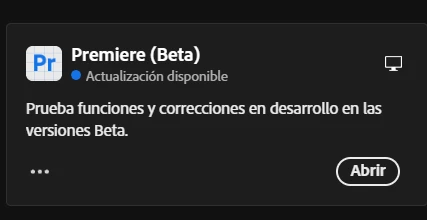
EN: Is it enough to just click “Update” and call it a day?

ES: ¿Basta con hacer clic en “Actualizar” y listo?
 

EN: What’s the correct way to install a new update while carrying over as few errors as possible from the previous version? Is there any best-practices blog for this process which, in my opinion, is much more important than we usually give it credit for?


Thanks.


ES: ¿Cuál es la forma correcta de instalar una nueva actualización para arrastrar la menor cantidad posible de errores de la versión anterior? ¿Existe algún blog de “buenas prácticas” para este proceso que, a mi parecer, tiene mucha más importancia de la que le damos?


Gracias.

Correct answer Stan Jones

@Ramirezyya,


I don't know of a best practices post, but there may be one.


I do not use the Beta version for production work, and I only customize where I want to test something. So there is no downside to what I do every time I update the Beta:


Yes, use the reset to Reset preferences, Clear the cache, and reset the plugin loading cache. I do NOT disable plugins/extension unless there is a problem requiring that step for troubleshooting.


It is rare that you need to uninstall/reinstall. I would only do that if I had a major problem that is not due to a bug being reported by other users.


I DO create a new project for every update. When I'm working on an actual project in the Beta, I'll give it a go to see if it works. If NOT, I would create a new project and import the old project into it.


If there is a major issue with a particular build, I just wait for a new update and hope it is fixed.


When a release (not Beta) version update is available, I clone my system drive so I can roll back as needed.


Stan


1 reply

Stan Jones
Community Expert
Stan JonesCommunity ExpertCorrect answer
Community Expert
November 5, 2025

@Ramirezyya,


I don't know of a best practices post, but there may be one.


I do not use the Beta version for production work, and I only customize where I want to test something. So there is no downside to what I do every time I update the Beta:


Yes, use the reset to Reset preferences, Clear the cache, and reset the plugin loading cache. I do NOT disable plugins/extension unless there is a problem requiring that step for troubleshooting.


It is rare that you need to uninstall/reinstall. I would only do that if I had a major problem that is not due to a bug being reported by other users.


I DO create a new project for every update. When I'm working on an actual project in the Beta, I'll give it a go to see if it works. If NOT, I would create a new project and import the old project into it.


If there is a major issue with a particular build, I just wait for a new update and hope it is fixed.


When a release (not Beta) version update is available, I clone my system drive so I can roll back as needed.


Stan