


Participant
September 27, 2025
Question

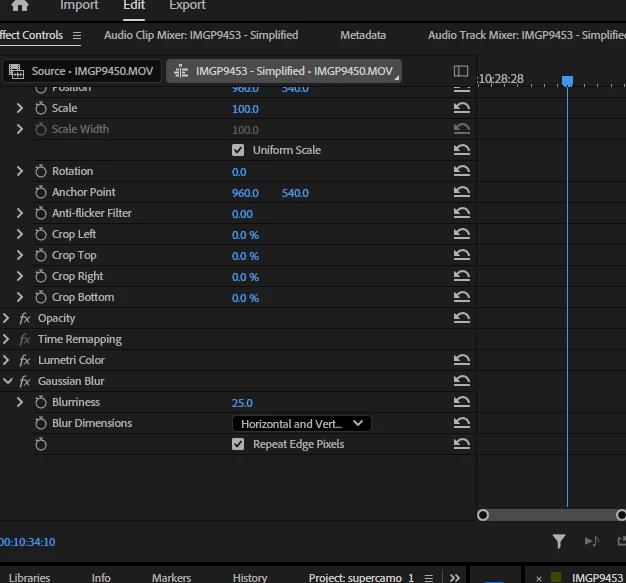
no option to create mask with gaussian blur or mosaic or anything?

  • September 27, 2025
  • 3 replies
  • 1110 views

Im using Premiere Pro (Beta) 


Dragging gaussian blur or even mosaic onto my clip and in effects controls to blur out a specific area in my clip, yet Im given no option to do so.  I've done this in the past many times and never had an issue.  Anyone that has an idea?  No plugins
 

3 replies

Participant
October 20, 2025

Is there any way to use object mask and modify it?   I just want to blur a face, not the whole body, and track it from when the person comes into the camera until they sit down.  I used to be able to do this in the old setup, and have been banging my head against the monitor trying to do this with an ellipse on the face only - am I missing something here?  

Participant
October 21, 2025

Since I had to get this done, I went back to Premiere 2025 to get my motion blur to work.  So in the beta, either I'm doing something wrong, or it doesn't work.   I could not get it to track the motion of the person walking into the frame an sitting down.  So any recommendations or pointing to a tutorial where it is done differently in the beta would be helpful.

Ann Bens
Community Expert
Community Expert
October 21, 2025

To animate a mask you need to be in Frame mode not clip mode.

TrentHappel
Adobe Employee
Adobe Employee
September 29, 2025

With New Masking, the Masking tools have been moved to the Tools panel Now in Premiere Pro Beta: New Masking Tools

EgoooAuthor
Participant
September 27, 2025

Did some more research found out new masking in beta... thanks everyone for your concern 😉

Ann Bens
Community Expert
Community Expert
September 27, 2025

Moved to beta forum: discussions.