




Now in beta: Changes to how Premiere searches for missing media
Hi all,
In Premiere Beta v26.1.1.29 and later, we’ve updated the relinking logic to reduce how often you encounter the manual Link Media dialog.
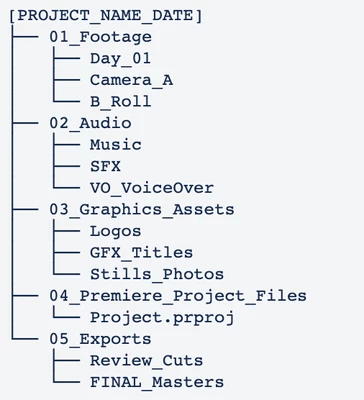
Many editors use a folder structure where the project file and assets live in separate sub-folders under a main directory. For example:
The Change:
-
Current Behavior: Premiere searches for missing media starting from the project file’s location, moving downward. In the example above, it only searches within the
Premiere_Project_Filesfolder. -
Beta Behavior: If the initial search fails, Premiere now "climbs" one level to the parent folder and searches all subsequent sub-folders. In the example above, this would allow it to automatically find assets in your
01_Footageor02_Audiofolders (or any other folders in that struture) without user intervention.
Note: To maintain performance, Premiere will not climb to the parent folder if that folder is the root of a drive. Also, this update only affects the automatic search performed upon opening a project; the manual Link Media dialog plus the ability to cancel the automatic search remain unchanged.
We’d love to hear your feedback on this change!
Regards,
Fergus
 AdChoices