


Inspiring
March 30, 2024
Question

Pan & Zoom Feature Cool, except when it's not.

  • March 30, 2024
  • 1 reply
  • 300 views

I like the Pan & Zoom feature, though I'd like to see a switch to disable it.


Since scroll wheel pans the timeline, if I start scrolling, intending to move the timeline while the curser is over the monitor, the monitor zooms, and I have to restore it to where it is, then move to the timeline panel.


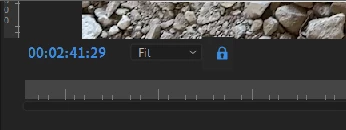
A little lock icon next to the zoom dropdown would be an ideal way to toggle this.


System info
    Application: Premiere Pro (Beta) v24.4.0.32
    OS: Windows v10.0.22631, RAM: 63.83 GB GB, CPUs (logical): 16

This topic has been closed for replies.

1 reply

Shebbe
Community Expert
Community Expert
March 31, 2024

I think a better approach would be to remove the normal scroll = zoom to center functionality. Using Opt/Alt is zooming instead and a user preference setting of having that center zoom or anchored to mouse. Nobody uses both center zoom and mouse zoom at the same time, it's typically a habit thing to prefer one over the other.


This way you'd just prevent accidental adjustments.

Inspiring
March 31, 2024

Yes. That would work too.  Ctl+scroll center zoom; Alt+scroll mouse anchor zoom (on Windows).