



mikecox_
Inspiring
January 3, 2026
Question

Pen Tool v Obkect Masking tool
  • January 3, 2026
  • 1 reply
  • 95 views

mikecox__0-1767475468740.png


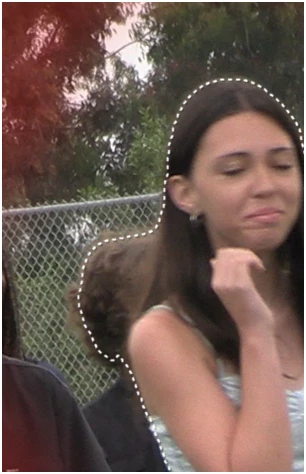
I used to be able to use the Pen tool to pull this seltcted area into the Obkect Mask Tool doesn't appears to work that way; and the Pen Peel doesn't appear to be working anymore; highlighted objcts clear as soon as selected..


How do I get control of the outline and is the pen tool inactive now>

1 reply

Community Manager
January 6, 2026

@mikecox_ Are you referring to being unable to increase the border of the object mask? You can add or remove specific portions to the object mask by using the "+" or "-" in the program monitor while your object mask is selected. 
Screenshot 2026-01-06 at 10.57.01 AM.png
You can access pen tool by long pressing on the masking item in the tool bar. 

Screenshot 2026-01-06 at 10.57.27 AM.png

Please let us know if you are referring to something else.


mikecox_
mikecox_Author
Inspiring
January 7, 2026
I want to adjust the mask; to unselect the boy at her neck. But I can't select any part of the mask.
 
know, or knew, how to do it with the Pen took; that no longer works.
 
The Pen tool used to have a flyout sub-menu, but it no longer does; none of the toolbar Icons has the flyout menus they used to have
 
That's the problem! the Object Mask tool icon has no sub menu.
 
What's happened to the flyout sub-menus?
Using Win 11