


anna clio
Participant
June 16, 2021
Answered

Please help, can't open Premiere Pro Beta

  • June 16, 2021
  • 2 replies
  • 676 views

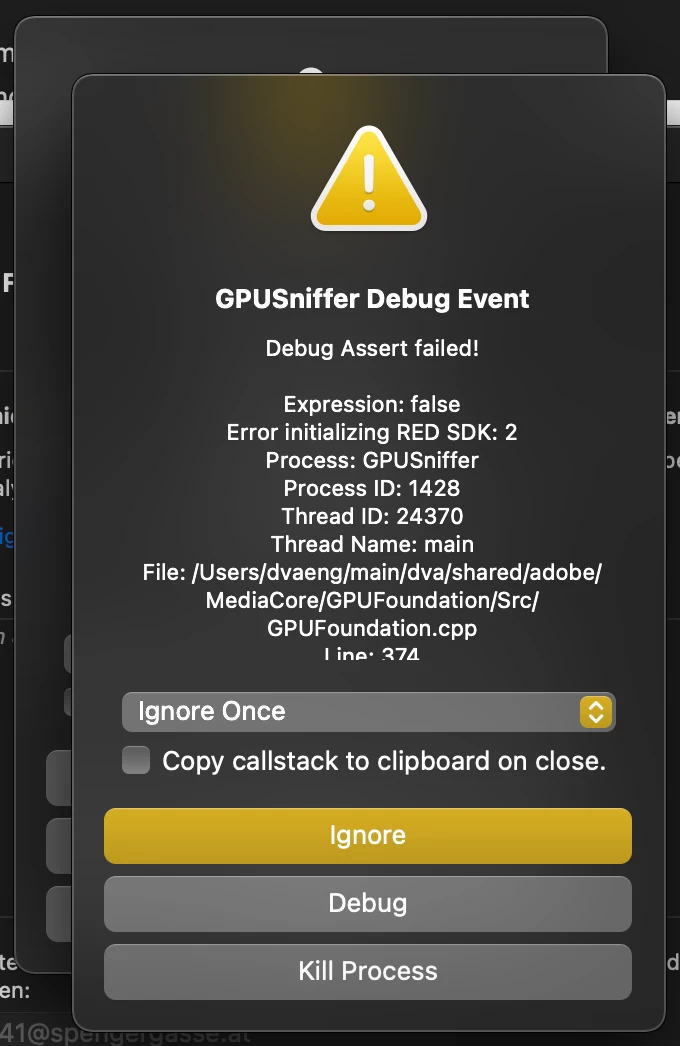
Hi, i just wanted to open Pr Beta, but it won't. Heres the failure note i get (but like 5 times with 5 different Thread IDs. What should i do & how do i get rid of the problem?

Thanks for helping!
 

This topic has been closed for replies.
Correct answer mattchristensen

@anna clio Sorry this is happening, we will have a fix for this soon. In the mean time you can open the drop down menu that says "Ignore Once" and change it to "Ignore Always", then click "Ignore". Once you do that for each pop up you can use Premiere Pro normally.

2 replies

mattchristensen
Community Manager
Community Manager
June 17, 2021

@anna clio Today's build of Premiere Pro in Creative Cloud fixes this issue, so please update to Premiere Pro Beta 15.4 build 35 (15.4.0.35).

mattchristensen
Community Manager
mattchristensenCommunity ManagerCorrect answer
Community Manager
June 16, 2021

@anna clio Sorry this is happening, we will have a fix for this soon. In the mean time you can open the drop down menu that says "Ignore Once" and change it to "Ignore Always", then click "Ignore". Once you do that for each pop up you can use Premiere Pro normally.

