


Participating Frequently
October 10, 2026
Question

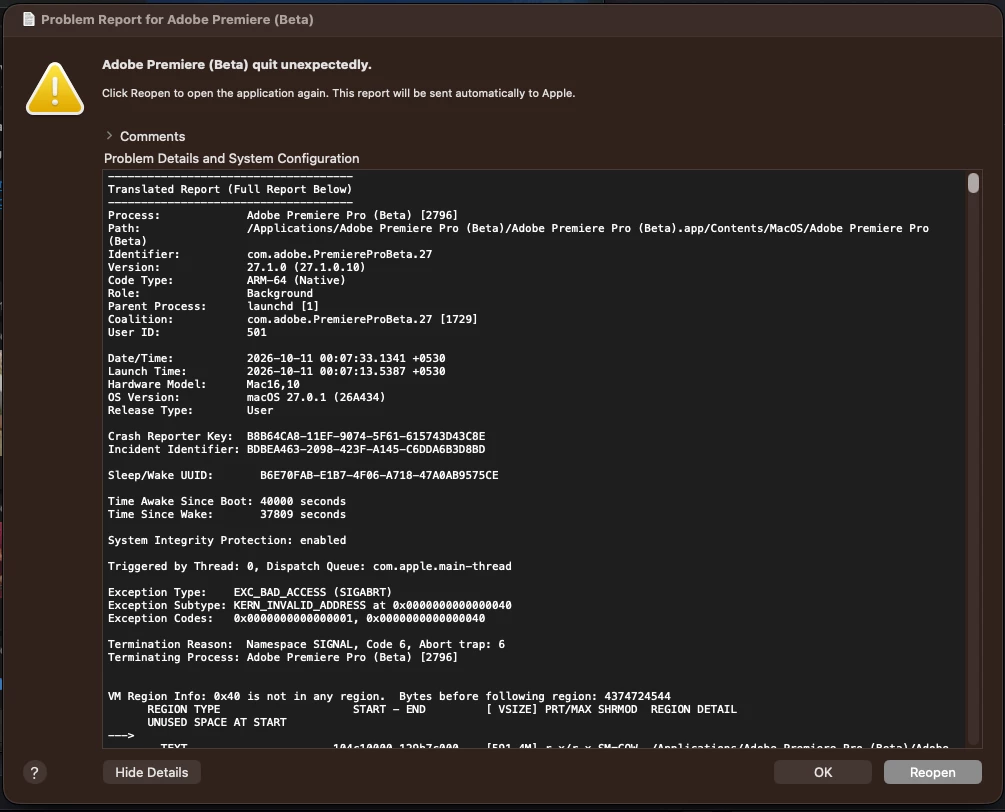
Premiere pro Beta Version Can't Open


When I launch the installed Premiere Pro Beta Version 27.1, it crashes and closes automatically; I am not sure why. Initially, the beta option did not appear in the Creative Cloud app, but I managed to get it to show up with the help of the Adobe community and ChatGPT. However, the beta version itself refuses to open.
 

    3 replies

    Participant
    October 15, 2026

    hey hope this helps, I had the same issue and Gemini helped me


    Method 1: Allow it via macOS Security Settings

    1. Go to System Settings on your Mac (click the Apple menu in the top-left corner).

    2. Click on Privacy & Security in the left sidebar.

    3. Scroll down to the Security section on the right.

    4. You should see a message stating that Premiere Pro (Beta) was blocked. Click Open Anyway next to it.


    Translate
    Ann Bens
    Community Expert
    Community Expert
    October 13, 2026

    Your question will be moved by a mod to the beta forum shortly.


    Translate
    Community Expert
    October 13, 2026

    Thanks for including the crash report, it helps narrow things down.

    A few things will help pin it down:

    1. Check the release version. Does the regular, non-beta version of Premiere Pro open normally on the same Mac? This tells us whether the problem is specific to the beta.
    2. Reset the beta’s preferences and plugin cache. Hold Shift+Option while launching Premiere Pro (Beta), and keep holding until the splash screen appears.
    3. Share the full crash report. The part that identifies the cause is further down the report, under the section for the crashed thread (Thread 0). Scroll down in the crash dialog and copy that section, or find the full report file:
      1. In Finder, choose Go > Go to Folder (Shift+Command+G).
      2. Enter ~/Library/Logs/DiagnosticReports and press Return.
      3. Look for the most recent file starting with “Adobe Premiere Pro (Beta)” and ending in .ips.
      Attach that file or paste the Thread 0 section here.
    Translate