
Known Participant
April 14, 2024
Question

Proxy appending _Proxymov Suffix instead of _Proxy

  • April 14, 2024
  • 2 replies
  • 617 views

I'm running Windows Premiere Pro (Beta) V24.5.0 BETA (Build 6)

The Project Ingest settings are set to:
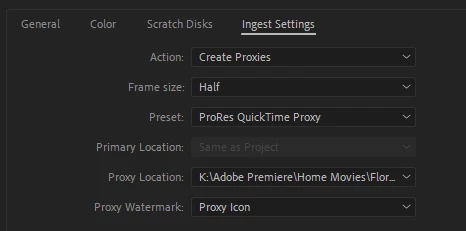
All the video files within the project have had Proxy files generated for them such that C0574 which is an MP4 video file would have C0574_Proxy.mov as the proxy file.


Now the Proxy files are not being recognised at all.  I imported a new video file and it generated a proxy named C0573_Proxymov.mov


I manually deleted all the existing proxy files and reran "Create Proxies" across all the video files in the project.


Every one was created with a suffix of _Proxymov and none of them are recognised in Premiere.


I then closed the project; manually renamed all the Proxy Files and reopened the project again.


They are still not being recognised.


This issue has just started today.


Not sure what to try next and any suggestions would be welcome.


This topic has been closed for replies.

2 replies

Shebbe
Community Expert
Community Expert
April 15, 2024

Can confirm _Proxymov.mov here too. Doesn't make much sense _Proxy as suffix is enough.

gmc99Author
Known Participant
April 15, 2024

Pleased it isn't just me.

Participating Frequently
April 18, 2024

Yes... can conform, that while making Proxies in Beta 24.5.0 version,  AME makes files with such suffix "_Proxymov", which then results in "Filename_Proxymov.mov" and doesn't attach them after encoding is done.

For me it happens when i make Half size ProRes Quicktime Proxies from Sony ilme-fx3 MXFs.
Trying attaching them as is in bulk won't do a thing.
But there is possible workaround for now. While using file rename utility of your choice,
for example Total Commander or other, selecting created Proxy files,
removing that "mov" part from filenames,
and then attaching them in Premiere will do the trick.

gmc99Author
Known Participant
April 14, 2024

I opened the same project in Premiere Pro 24.3.0 (Build 59).

All the proxy files are now present and working.

I then opened it again in Premiere Pro (Beta) V24.5.0 BETA (Build 6) and they are gone.

I think I will just use the normal version for now.