Participant
October 26, 2024
Answered

Saving Track Styles now that Essiental Graphics panel is gone

  • October 26, 2024
  • 4 replies
  • 629 views

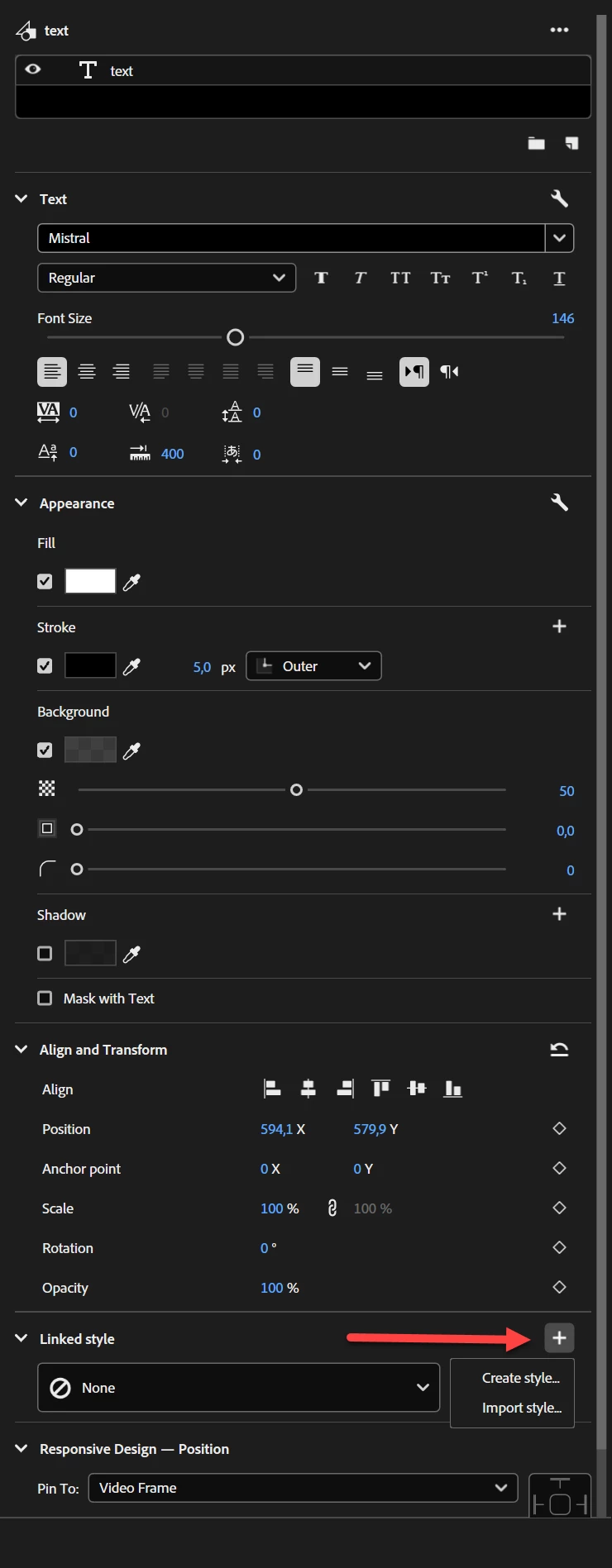
I'm trying to save a track style in Premiere Pro (BETA) V 25.1.0 on Mac. The "Essential Graphics" panel has been replaced with the "Properties" panel and now I can't find how to save track styles for caption formats. Any idea on how to do this?


Thanks!

Correct answer Ann Bens

Properties Panel


4 replies

Participant
January 17, 2025

It doesn't show up if you are in the wrong "Workspace".

WHY ADOBE?!?!?!?!!?!?!!?!!! This one thing causes an undue amount of stress troubleshooting these random issues EVERYTIME!!!

MyerPj
Community Expert
Community Expert
January 17, 2025

I beleive the properties panel has been added to all/most default workspaces. If you didn't have it in a saved workspace, then you just need to (find space) and add it. 

Ann Bens
Community Expert
Community Expert
October 26, 2024

Moved to beta forum.

Ann Bens
Community Expert
Ann BensCommunity ExpertCorrect answer
Community Expert
October 26, 2024

Properties Panel


Participant
October 29, 2024

This was driving me crazy. Thanks so much!

MyerPj
Community Expert
Community Expert
October 26, 2024

Here's the Premiere Beta forum, beta questions should be asked there.

R Neil Haugen
Legend
October 26, 2024

Are you in the graphics Workspace out of curiosity?

Everyone's mileage always varies ...
Participant
October 29, 2024

I was looking on the Properties panel but missed the "+" next to "linked styles." Thanks for looking into it!