Inspiring
October 25, 2024
Answered

Simple credit roller in newest version 25.1.0

  • October 25, 2024
  • 7 replies
  • 9458 views

How do i do a  Simple credit roller in newest version 25.1.0, essential graphics is gone, and has the new properties panel but how can i do a simple roll crawl like before cheers

Correct answer Ann Bens


7 replies

Participating Frequently
April 2, 2025

It's 2025, Adobe remove the crawl text from the legacy text tool and it's still missing in the current text tool.

I know we can animate text position etc. but it's not a smart way if we need to cover some video length or if the text content is changed

Community Expert
April 2, 2025


No, you don't need to animate text position - just use the Roll checkbox mentioned in the Correct Answer for this thread.

Participating Frequently
April 5, 2025

As i said, there's no crawl option.

Roll only works with vertical movement

Inspiring
March 30, 2025

I thought I'd check this out and it works OK here.  At 24fps it seems a bit jittery, but that's before rendering, so I assume it's OK.


Raises a question, though:


If I wanted to add a logo or graphic element to the roll, (as seen in movies when the union badge scrolls up at the end of the credits), how would I do that?

R Neil Haugen
Legend
March 30, 2025

An issue with rolls and crawls is they will appear somewhat jerky if the movement is not even pixel movement per frame movement.


So say 2, 4, or 6 vertical frame movement divides evenly.  will not appear jerky.


But if the vertical movement is say 1.5 pixels per frame, it will appear jerky. So sometimes changing the length of the crawl can fix this.

Everyone's mileage always varies ...
Participant
March 29, 2025

For the amount of money I pay Adobe monthly, I shouldn't have to work this hard to find answers. 🙄 I'm actually really annoyed right now.

Participant
March 12, 2025

I'm still looking a 2025 answer. version 25.1.0 has taken away the simple scroll function. 


Warren Heaton
Community Expert
Community Expert
March 12, 2025

Hi, @Stl Rich:


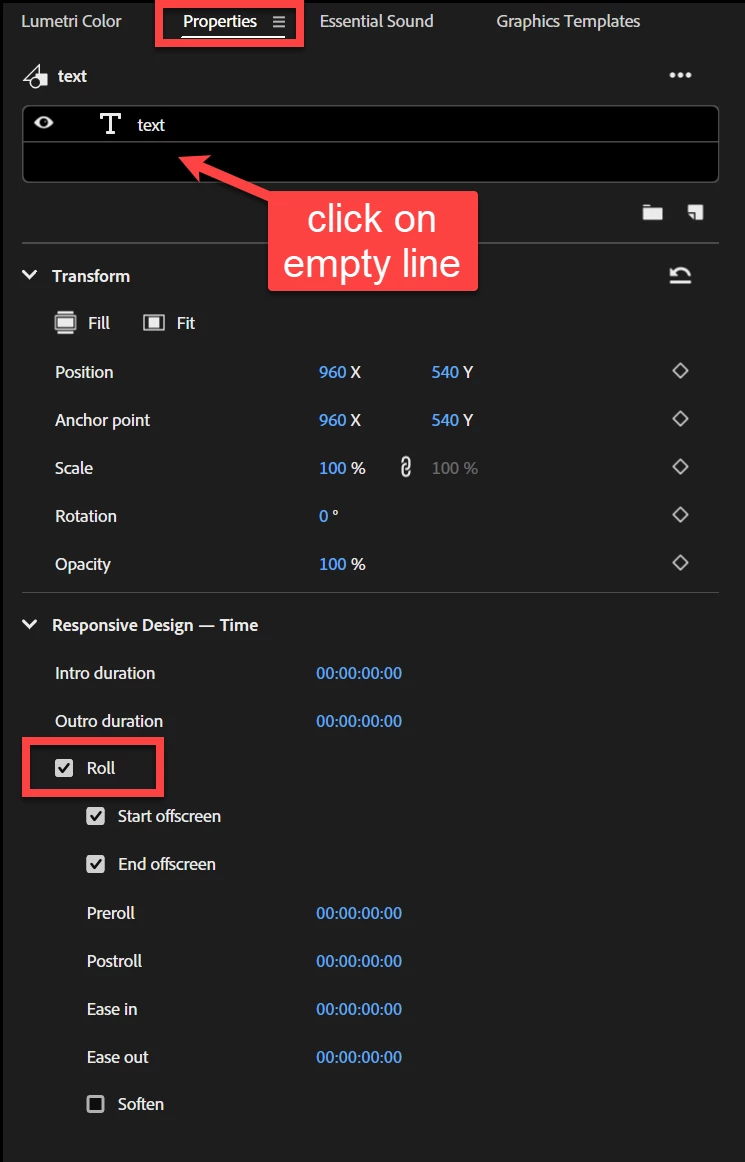
Did you see the screenshot in a reply from Ann Bens back on October 26, 2024?


That shows the Roll option in the Properties panel.   This panel changes based on what is selected, so be sure to select the Text Object.


Participant
March 29, 2025

Thank you Warren. Yes, I can see "roll" on the Properties Panel. I also see Paul Murphy's note on how to get there.


Thank you again

Ann Bens
Community Expert
Community Expert
October 26, 2024

@emmetr21808029 

Are you using the beta version (25.1)?

Ann Bens
Community Expert
Ann BensCommunity ExpertCorrect answer
Community Expert
October 26, 2024


R Neil Haugen
Legend
October 26, 2024

The trick for those of us not used to constantly changing "context aware" UI panels, is simply learning where to click to get further controls to show up.


I have many years of computer image working, both stills and videos, and this is a struggle still.


As clearly for some others.

Everyone's mileage always varies ...
Warren Heaton
Community Expert
Community Expert
October 26, 2024

A key thing about the Properties panel is that it changes based on what's selected in the Timeline.  To create a credit roll, something that it can be applied to has to be selected.

R Neil Haugen
Legend
October 26, 2024

That's clearly the most confusing part of using a "context aware" panel for regular UI duties. You have to select something before you can see the controls.

Everyone's mileage always varies ...
Warren Heaton
Community Expert
Community Expert
October 26, 2024

The behavior is consistent for the Properties panel in Photoshop, Illustrator, After Effects, and InDesign, but I guess the question is how many Premiere Pro users are coming to it from that experience if at all.  Hopefully, users not familiar with it will come to appreciate how it functions.


When it comes to the Properties panel regardless of which Adobe app I'm in, I've aways been a little leary about additional settings for what is selected that the Properties panel might not be showing that exist elsewhere in the application.  Nonetheless, I think it helps to make applications that are very deep when it comes to settings and properties to be adjusted easier to use. 


Community Expert
October 26, 2024

Go to Graphics and Titles > New Layer > Text and type or paste the text you want to roll.

With your graphic clip selected in the Timeline, go to Window > Properties. Without any layers in the graphic selected, scroll to the bottom of the Properties panel and tick Roll.

Inspiring
October 26, 2024

Cheers paul