


Inspiring
August 26, 2021
질문

Strange error window at the opening of Premiere Pro beta

  • August 26, 2021
  • 3 답변들
  • 1651 조회

Hello,

I update Premiere Pro Beta each day. And from yesterday update, I have this error window each time I open Premiere Pro Beta (here with Premiere Pro Beta v22.0.0.70) :
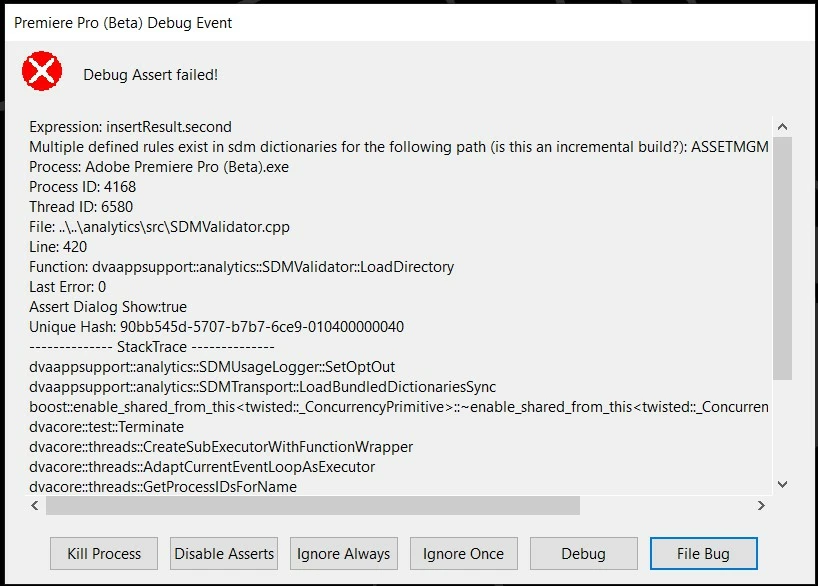


As there is no little cross on the error window, I restart my computer.

Does an adobe employee has noticed the same problem ?

이 주제는 답변이 닫혔습니다.

3 답변

Inspiring
August 28, 2021

Ok, I have just download the last version of Premiere Pro Beta (v 22.0.0.72), and the problem has disappeared : for all videos, I have the sound and image.

Inspiring
August 28, 2021

Great to hear! There are many benefits being on the latest and greatest version with all the new features, but it's also risky when things are being tested. Some releases will break in an effort to introduce a new feature or test out a fix for a bug report. That break can sometimes be a quick fix daily update or in my case, a bug can take months to figure out before a fix is pushed out. If it is a mission critical project, stick with the public released version for stability. 

Inspiring
August 27, 2021

Ok, I have just installed the last version of Premiere Pro Beta (v 22.0.0.71), and the problem of error window has disappeared (no error window at the opening of Premiere Pro Beta).

But in the project panel, if I import some videos, when I try to play them in source panel, I have the sound only without the image.

Inspiring
August 27, 2021

What type of video media are you importing?  AVCHD, H.264, ProRes, etc?

Inspiring
August 27, 2021

I have imported two types of video in project panel for the test : MP4 and TS.

Participating Frequently
August 26, 2021

I hace them same problem.

Inspiring
August 26, 2021

These are normal errors that happen when new features are being beta tested and implemented. The debug asserts usually go away in the next build release. Press ignore always and you should still be able get into Premiere. If Premiere crashes during this process, file a bug report with the steps you took to make Premiere crash.

Participating Frequently
August 26, 2021

Yes, I can open Premiere anyway, but the problem is that the two screens stay black... I have my sequence, but can't work with it. I have a important project that I need soon... I unfortunately edited in Premiere Pro Beta and I can't work on it.


Do you know how I can get back to the version before? I did not find any solution for this so far...