Paola_Ch
Participant
Jun 11, 2026 9:33 AM UTC
Answered

Where is the Vignette regulation in Premiere (Beta)?

Goodmorning maybe my question may sound stupid…
I can’t find the Vignette regulation in Premiere (Beta) in the Color Mode section.
Thank you for help

    Alexis Van Hurkman
    Alexis Van HurkmanCorrect answer
    Community Manager
    Oct 1, 2026 4:49 PM UTC

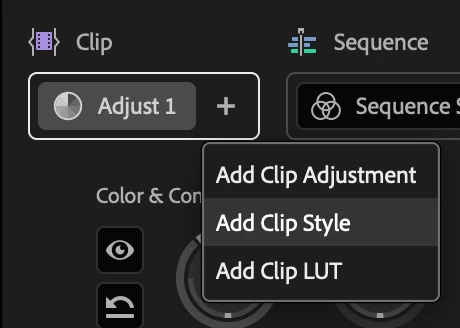
    You can add a Style operation to the clip level using the plus icon. Once applied you can add any module in Style to an individual clip. Operations can be dragged from the clip to the sequence level as well, and among clip, group, and sequence if you have groups you’ve created. Any operation can be applied at any level of the grade. Hope that answers your question!


    4 replies

    Alexis Van Hurkman
    Community Manager
    Alexis Van HurkmanCommunity ManagerCorrect answer
    Community Manager
    Oct 1, 2026 4:49 PM UTC

    You can add a Style operation to the clip level using the plus icon. Once applied you can add any module in Style to an individual clip. Operations can be dragged from the clip to the sequence level as well, and among clip, group, and sequence if you have groups you’ve created. Any operation can be applied at any level of the grade. Hope that answers your question!


    Translate
    Ann Bens
    Community Expert
    Community Expert
    Sep 17, 2026 12:04 PM UTC

    New color mode has vignette but have not figured out how to do one clip instead of the whole sequence 

    Translate
    MyerPj
    Community Expert
    Community Expert
    Sep 17, 2026 3:45 AM UTC

    There is the Vignette effect, which you can add modify while in the color panel, drop it into the properties panel. I thought I read somewhere it is coming to the new panel. This is got to be better than going to  ‘old PP’ just for that.

    Translate
    Participant
    Sep 17, 2026 3:18 AM UTC

    I’d also love to know! It used to be so easy to find in the Lumetri panel but now I have to fix vignetting in the old Premiere Pro while editing everything else in the beta version.

    Translate