missya1815
Participant
August 26, 2020
Question

Graphics menu not loading!

  • August 26, 2020
  • 14 replies
  • 8010 views

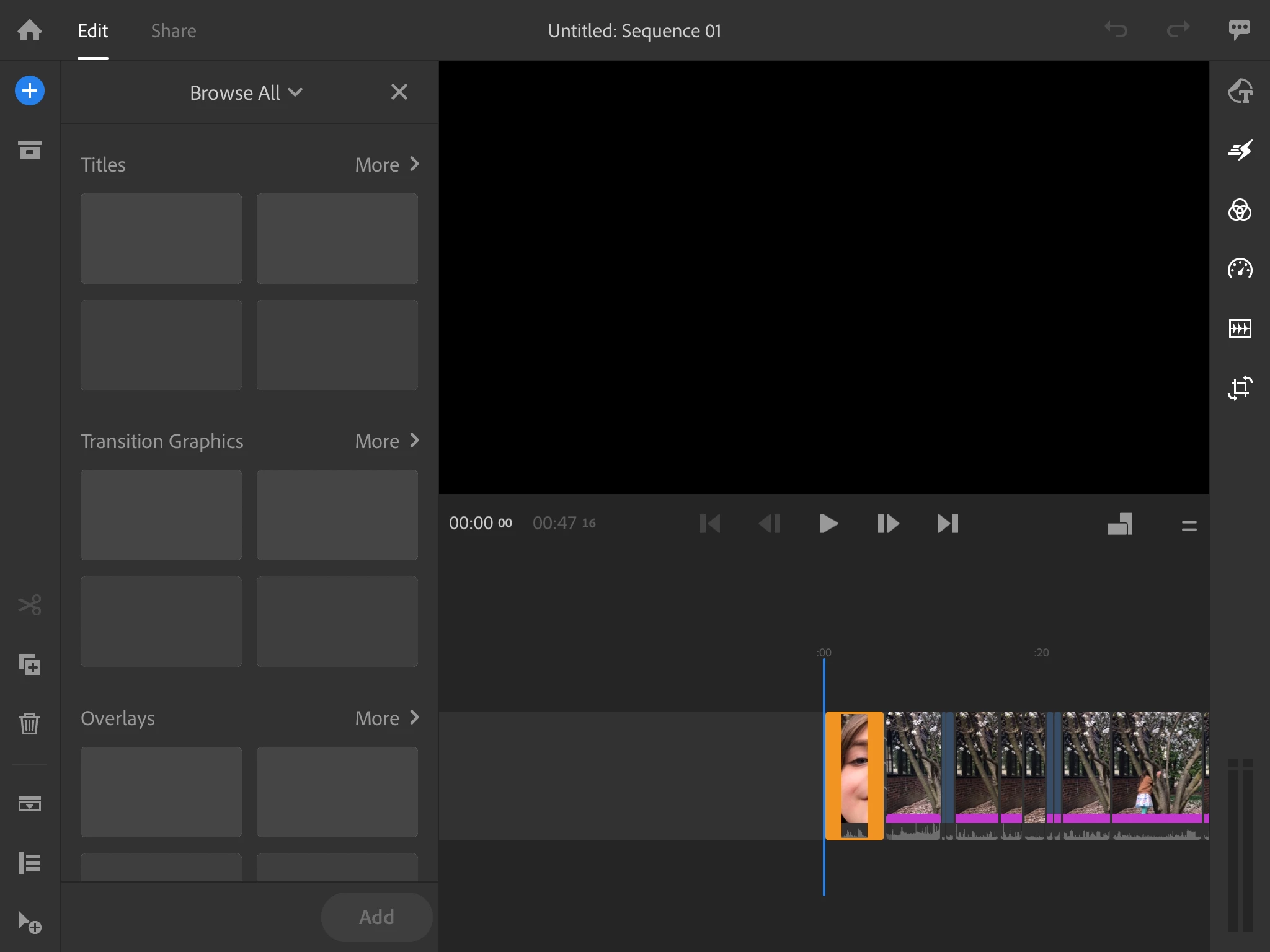
Please help!  The graphics menu in Rush is not loading for myself or my students!  We are seeing a blank preview screen.  Check out the attached screenshot.

This topic has been closed for replies.

14 replies

Participant
December 20, 2021

I'm sure this isn't a universal fix, but it worked on my Samsung Note 20. I just duplicated and renamed the file I was working on and then I was able to load and use the graphics. I have no idea how or why it worked, but it did. I only duplicated it because I wasn't able to use the rename function. Another glitch?

MicheleRF

Participant
December 20, 2021

I am using the adobe rush in my Samsung Note 8 recently. I download it through Playstore. But today when i start to input the graphics onto my project ,  the graphics wasn't responding. It loaded whenever i clicked the toolbar. Plz fix or teach me how to repair. Attached is the screen recording of my error. 

October 19, 2021

How is this still an issue a year later? Am on version 2.0.0.1741 on my Android 11 OnePlus 8 and just seeing this:

Have tried signing out of and back into CC, force-closing the apps, clearing caches etc.

Participant
November 4, 2021

Yup, seeing the same thing in Android. Very aggravating...tried rebooting my phone, etc...to mo avail.  This is insane that this has been a problem for well over a year.

Participant
December 27, 2020

Installing the beta version fixed it for me.

Participant
December 27, 2020

Hi there


Can you help me ???


How can i download the beta version??


Thanks.

petergaraway
Adobe Employee
Adobe Employee
January 6, 2021

Here's how to install the beta version of Rush:

1. Open the Creative Cloud app

2. Click the Beta Tab on the left

3. Locate “Premiere Rush (Beta)" > Click on Install 


This version should be released to the public in the next week or two. Thanks!

Participant
December 18, 2020

My solution that worked for me was to open the Adobe Cloud app on my PC and sign out and sign in. The graphics came back.

petergaraway
Adobe Employee
Adobe Employee
December 16, 2020

Hello all, 


For any users still experiencing titles not loading, can you please share with me the following information -  


  1. What computer and Operating System do you have? 
  2. What version of Rush do you have installed? 
  3. When signing into Rush, are you signing with a "Personal Account" or Company or School Account"? 
  4. Including a screen recording showing the issue would be very helpful


Thanks in advance for these details. 


Peter

Participant
December 17, 2020

Hi Peter,

In answer to your questions:

1. Dell Precision 5550 running Windows 10 Enterprise

2. Rush 1.5.40 (Build 35)

3. Adobe for Enterprise

4. Screen recording on YouTube can be found here (note that the "rolling" load animation in the graphics frame never resolves - for the sake of avoiding a twenty minute file, I didn't bother filming it for long)

petergaraway
Adobe Employee
Adobe Employee
December 17, 2020

Thanks for the response, Emma. Before we dive deeper, can you try the following if you have not already 

  1. Close Rush and all Adobe apps.
  2. Open the Creative Cloud Desktop app and sign out.
  3. Sign back into the Creative Cloud Desktop app and re-launch Rush.


Let me know the results, and we'll go from there. Thanks!


Peter

Participant
December 13, 2020

This is still an issue - I am on a mac and all my creative cloud apps are fully updated.  Why isn't this fixed yet?

Participant
December 12, 2020

Exactly the same problem here, with fresh WIN 10 and v1.5.40

Participant
December 9, 2020

Hey just wanted to reply saying I am having the same issue, graphics just spinning, and I installed Rush on Windows 10 today and verified that it is up to date. 


Participant
November 30, 2020

OK, I see the graphics bug was posted in August and it's now November 30th.  I bought Rush as a simple solution to edit videos AND add titles.  If I can't add graphics and titles it's completely useless https://www.loom.com/share/3347ecd503cc4e64956479b4cfad4ae9

What is the simple fix or when is an update taking place?  The workaround described in the last post from Adobe is too complicated:

Thanks for the update. There are two different things you can try. 


1. With build 1.5.38, a workaround would be to turn off WiFi and go to the Saved section of the browser. At this point, you can see all bundled graphics/titles and add what you want - then you can go back online.


2. Install a Rush beta build. Open the Creative Cloud app, click the Beta Tab on the left, and install the “Premiere Rush (Beta)"


Apologies for the frustration. We're working trying to resolve these issues with specific accounts. 


Participant
December 6, 2020

Same here.  Just installed the recommended updates but now nothing loads in the +Graphics menu.  Doesn't feel like a "specific user account" issue to me.

petergaraway
Adobe Employee
Adobe Employee
December 18, 2020

Hello! 


If signing out and back into Creative Cloud does not help. We hope the remaining issue will be fixed in our next release that will be available in a few weeks. That fix is available now in our beta release.

It would be very helpful to know if the issue is resolved for you in the beta version. If not, we'll need to work with you to determine the root cause.


Here's how to install the beta version of Rush:

1. Open the Creative Cloud app

2. Click the Beta Tab on the left

3. Locate “Premiere Rush (Beta)" > Click on Install 


Thanks for your help. Really sorry for the hassle.