
March 9, 2020
Answered

pixelated video glitch in Premiere Rush?

  • March 9, 2020
  • 50 replies
  • 45967 views

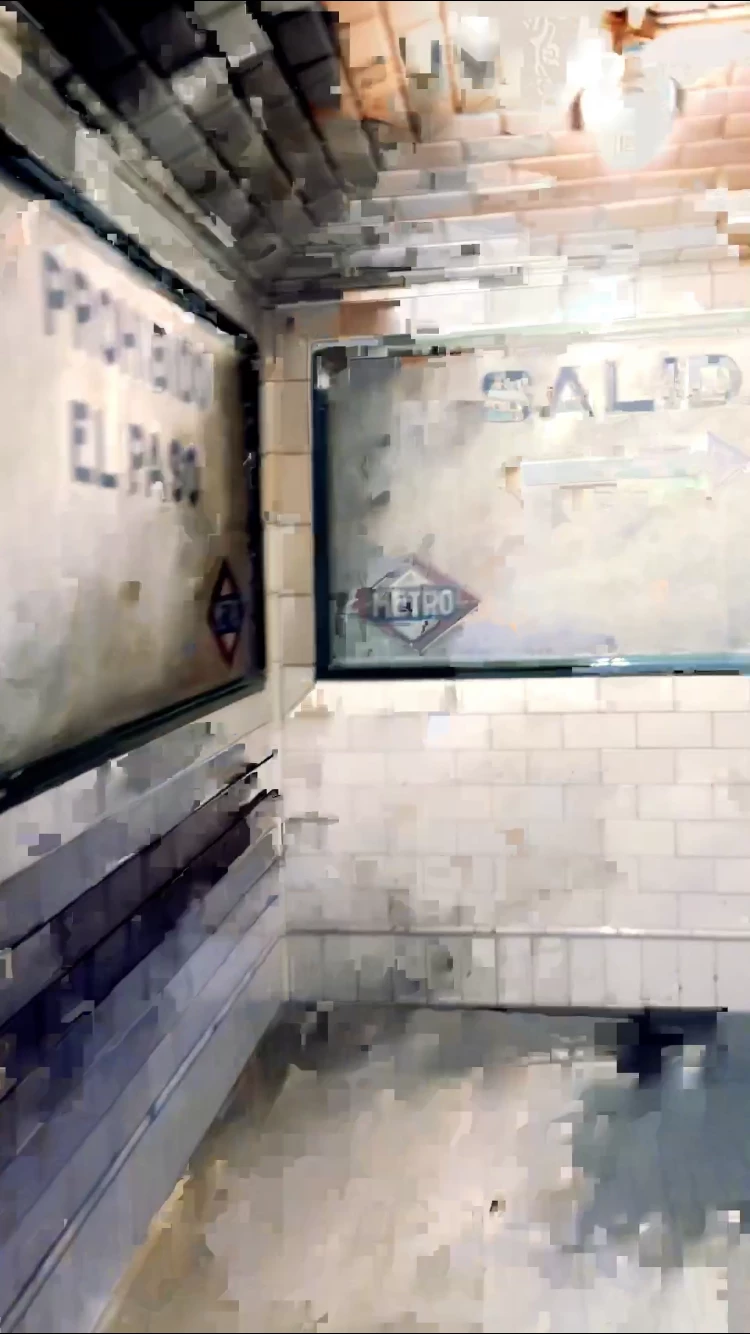
hoping someone can help me get to the bottom of this Rush glitch- I've been editing my videos on the app for a month now with no problems but now I'm seeing a bunch of my media in the video I'm currently editing get really pixelated, the pixelation varies per frame whenever I try to re-Edit or re-import the original media ( photo below is of one of the frames). It's like wack-a-mole trying to get this video pixelation free and I feel like I'm going insane! Any advice will be SO welcomed! 

Title edited by mod
 

    Correct answer _tonygee_

    Before exporting, try scrubbing through the video timeline using your finger pushing the timeline from beginning to end. In my experience I found the app buffers the entire video when you scrub through the frames especially when there are cuts between frames.


    Then export.


    During export keep an eye on the preview window -the glitch should no longer appear.


    Hope this helps.

    50 replies

    Participant
    November 2, 2022

    Recording screen with mac screen record.  Then I drag and drop into adobe rush and sometimes the videos get pixilated.  Not all the time but some times.  Any way to fix that?


    _tonygee_Correct answer
    Inspiring
    November 3, 2022

    Before exporting, try scrubbing through the video timeline using your finger pushing the timeline from beginning to end. In my experience I found the app buffers the entire video when you scrub through the frames especially when there are cuts between frames.


    Then export.


    During export keep an eye on the preview window -the glitch should no longer appear.


    Hope this helps.

    Inspiring
    May 10, 2023

    Also my suggestion is only temporary and NOT a fix of the ROOT CAUSE of the problem. The (glitch) issue STILL EXISTS. 

    Participant
    August 3, 2022

    I switched over to LumaFusion. Best decision ever. Just as easy to use, if not better. Gice a try everyone, adobe isn't going to fix this issue. I look back and watch my old YouTube videos created with adobe

    premiere and it pisses me off when I see those glitches. 

    Participant
    October 23, 2022

    First time using Rush, iPhone 14 Pro, this glitching problem is affecting a clip right in the middle of my video. Is there really no solution after all this time?

    ianissitt
    Participant
    June 21, 2022

    I just found that if you go to Transform, then do H flip. Play clip. Then hit H flip again to return it. It looks to re-render the clip and fix the pixels. Might have cracked it. 

    Pyjouss
    Participant
    August 3, 2022

    That did not do the trick for me. Glitches temporarily disappear in the timeline but quickly show up again and are always in the export.


    seriously Adobe, how many hours of editing have to be lost for you to:

    • recognize the issue, and
    • fix it?
    Participant
    June 1, 2022

    I'm finding this very common in every video I edit in rush that is over 20 seconds, once I get a video more than 20 seconds after I render it and save it to my photos app on my iPhone 13 there's always 1 clip that gets pixelated for a couple seconds or the saturation gets dulled on one of the clips and I can't fix this issue, I try to re export and re edit the clips but then other clips become glitchy and in saturated when I fix the previous ones, very annoying, love the app and functionality of the video editing but what's the use if you cannot export ur video properly in the end. I am deleting the app unless they fix this feature. 

    Fatback Media
    Participant
    May 26, 2022

    I am having the same issue on iPhone 13 Pro Max. Adobe, please fix this. I pay $35/year for this app and this is not the quality I expect from Adobe. 

    Participating Frequently
    May 27, 2022

    This is ridiculous.  I'm using an iPhone 12 Pro, shooting in 4k 60fps and editing in Rush on an M1 MacBook Pro, using basic transitions and a few timing changes, exporting as 1080p 30fps.  The output video looks absolutely shocking - pixellated and glitchy.  I'm fed up with using tools and immediately having to google for why they don't work as advertised.  It's a joke.

    nikkishag78355859
    Participant
    May 27, 2022

    I ended up using cyberlink powerdirector. I honestly believe once they move things to the cloud they couldn't figure out how to stop it from glitching. Premier does the same thing. Now the software's awesomeness sucks because they can't figure out how to make it work in the cloud. Bring back the software downloads for video editing!!!!!

    brownpaperdad
    Known Participant
    May 25, 2022

    Same glitchiness.  Editing video on iPhone 12 Pro Max, video shot with same.

    stouthouse5
    Participant
    May 13, 2022

    same thing - glitches after export. Not there before export. Using Rush on ipad. Tried syncing to desktop and now all my files are missing - UGH. COME ON ADOBE - according to this thread, this is not a new thing. I pay $$$ for all your apps because you guys are the best in the industry... this shouldn't be going on. 

    Participant
    March 26, 2022

    Not the best fix, but this is what I do on my iPad. I noticed that cutting (using the scissor) rather than adjusting the length your clips (dragging the beginning or end of clip) reduces the glitch. Again this method reduces it but it still does not eliminate it 100%.  Then I play the video before exporting and watch for any glitches (again this is annoying if you have a long video). Once I find the glitch I just cut that section out, the glitch is usually about a second long. So I just end up sacrificing that portion. Or you can delete that whole clip and import the clip again and start over hoping it won’t glitch or glitch in a different spot of that clip. 

    Participant
    February 24, 2022

    Has this problem been fixed? I have the iPhone 13 pro max and it is giving me the same problem. When I export the video then there is random pixelated clips where there shouldn't be

    lionelm74434265
    Inspiring
    February 24, 2022
    Two tracks to follow :
    👉 Try to record video in "Most compatible" in General settings → Camera →
    Format

    👉 If you still have glitches, try to replace .mov by .mp4 (on Mac osX just
    type "mp4" instead of "mov" and it converts automatically) BEFORE you
    import it on Rush.

    I tried this and it worked once. I don't know if it fixes the issue
    sustainably.

    --

    Lionel Myszka
    Formateur, consultant, réalisateur.


    02 30 96 12 43
    06 82 49 59 18
    www.lumiere-communication.com
    Abonnez-vous à la newsletter Les Capteurs, vidéo sur smartphone.

    Nouveau : un mémo gratuit pour réussir vos tournages [image: arrow]
    Inspiring
    February 23, 2022

    What I realized when using RUSH on iPhone 12Pro and iPad Pro M1 (regardless of hardware), the memory management (either buffering or cache) is poor. This becomes more cisible when your project has many cuts (10+).

    In edit mode, when scrubbing forward or back, glitches will appear between segment cuts where the cut was not cleanly committed to memory. When this happens the scrub preview will reveal the pixelated image. Pixelation will also hold true in playback/preciew.


    On Export, this poor buffer quality of the (cut/segment) image data is reflected in the output file.

    This can be traced back in edit mode timeline precisely every time.


    To temporarily remedy the glitch, you can manually scrub through the video timeline slowly allowing each cut to buffer properly. Playback should then reveal a clean project.


    Once scrubbing reveals no glitches, you can then export a clean file.


    Hope this helps.