chand71365165
Participant
November 10, 2021
Answered

Adobe 3D stager weird screen bug

  • November 10, 2021
  • 6 replies
  • 3719 views

after i installed trail version of Adobe 3D stager i have this some weird screen issue is it only happening to me or is it randomly happening to the users

This topic has been closed for replies.
Correct answer JMathews

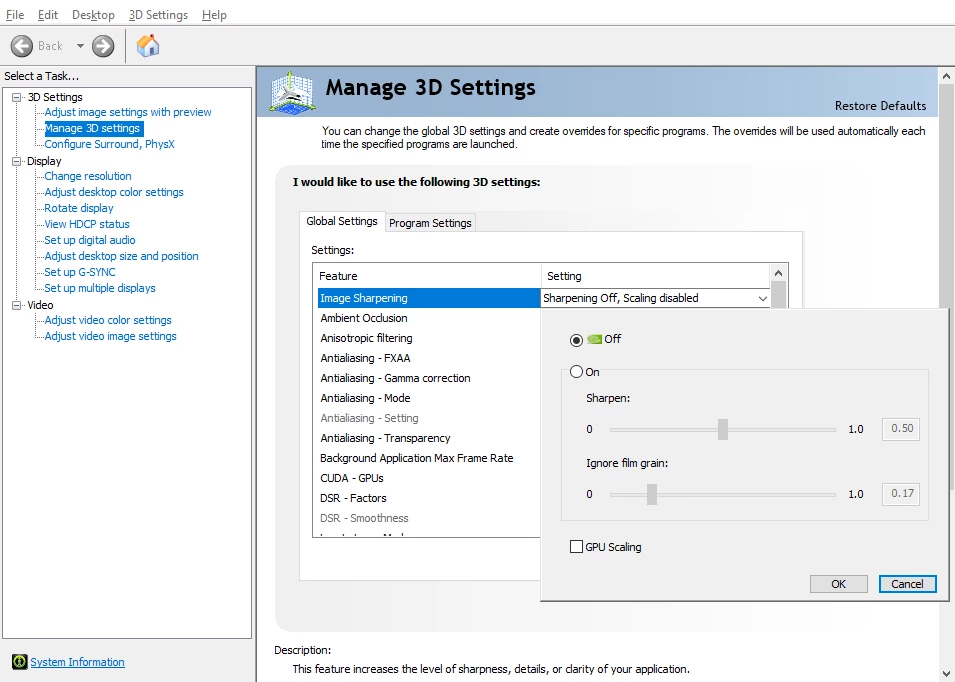
Hello!  This is an issue with a specific NVidia setting, we believe.


  • Open the NVidia Control Panel
  • Select Manage 3D settings from the left hand navigation bar
  • In the right-hand Manage 3D settings pane select
    • Global settings tab
    • Feature: Image Sharpening
  • Set image sharpening to "Sharpening off"


If you would prefer to have sharpening on globally, you can also switch to the Program settings tab and override this setting for specifically Stager.



6 replies

Participating Frequently
October 19, 2022

I'm having the same issue!  What is being done to resolve this??? I recently intalled the trial version and my NVIDIA sharpening was already off by default.  Turning the sharpening on or off does not affect the problem.  I have an NVIDIA GEFORCE RTX 2080 TI with the latest drivers.


Participating Frequently
October 19, 2022

*** ISSUE RESOLVED!*** 

I spent a good 45min or so with Adobe tech support.  Although I had the latest NVIDIA driver installed according to the GEFORCE Exprience app installed on my PC, the Adobe tech found a newer one which we installed via remote connection.  Unfortunately it did not resolve the issue and he recommended I contact NVIDIA to perform a clean install.

I found this YouTube video: https://youtu.be/hF9aWp6W7JA and followed the directions and it worked!

The Adobe Tech support is awesome as that was what was needed.  For those that don't know, the clean install using the custom installation removes all the previous drivers and only installs the newest one instead of just overwriting the old files which may have become corrupted.  So there you have it.  Thank you Adobe Tech Support for the excellent advice! 👍👍👍


JMathews
Community Manager
JMathewsCommunity ManagerCorrect answer
Community Manager
December 3, 2021

Hello!  This is an issue with a specific NVidia setting, we believe.


  • Open the NVidia Control Panel
  • Select Manage 3D settings from the left hand navigation bar
  • In the right-hand Manage 3D settings pane select
    • Global settings tab
    • Feature: Image Sharpening
  • Set image sharpening to "Sharpening off"


If you would prefer to have sharpening on globally, you can also switch to the Program settings tab and override this setting for specifically Stager.



Adobe Principal Product Manager, 3D & Immersive
Participant
December 16, 2021

This fixed the issue, thank you very much!

Joseph Labrecque
Community Expert
Community Expert
December 3, 2021

This is happening to me too. Hopefully a fix is on the way. 

Participant
November 28, 2021

Here is a screen cap of the issue. I forgot to mention this is with the full Adobe 3D stager software on the annual plan. Sampler, Designer, and Painter do not have this issue, but it's particularly bad in stager. It keeps doing that no matter what graphics settings, monitors, or preferences I use (including light mode)


Any help fixing this would be much appreciated!


November 30, 2021

i have the same issue, did you fix that?

Participant
November 28, 2021

Same, it makes the experience working with the program pretty terrible


Stager is the only app in the suite that does this thankfully/unfortunately

Participant
November 28, 2021

I forgot to provide some more details. The UI is constantly drawing these artifacts progressively regardless of my resolution or display settings, both before and after updating my graphics driver to the latest version.


Here is a screenshot of the artifacting halfway through:


Here are my specs: (Windows 10 w/AMD Ryzen 9 3950X and NVIDIA GeForce RTX 2080 SUPER)


Operating System: Windows 10 Home 64-bit (10.0, Build 19042) (19041.vb_release.191206-1406)
Language: English (Regional Setting: English)
System Manufacturer: Micro-Star International Co., Ltd.
System Model: MS-7C35
BIOS: A.30 (type: UEFI)
Processor: AMD Ryzen 9 3950X 16-Core Processor (32 CPUs), ~4.0GHz
Memory: 32768MB RAM
Available OS Memory: 32718MB RAM
Page File: 37935MB used, 14723MB available
Windows Dir: C:\WINDOWS
DirectX Version: DirectX 12
DX Setup Parameters: Not found
User DPI Setting: 120 DPI (125 percent)
System DPI Setting: 96 DPI (100 percent)
DWM DPI Scaling: Disabled
DirectX Database Version: 1.0.8
DxDiag Version: 10.00.19041.0928 64bit Unicode

----

Card name: NVIDIA GeForce RTX 2080 SUPER
Manufacturer: NVIDIA
Chip type: NVIDIA GeForce RTX 2080 SUPER
DAC type: Integrated RAMDAC
Device Type: Full Device (POST)
Device Status: 0180200A 
Display Memory: 24369 MB
Dedicated Memory: 8010 MB
Shared Memory: 16359 MB
Current Mode: 1920 x 1080 (32 bit) (60Hz)

KINOX
Participant
November 26, 2021

Hello,


I also have this screen there...

