


Inspiring
Jun 24, 2022 8:52 AM UTC
Answered

Can't open two Stager project files

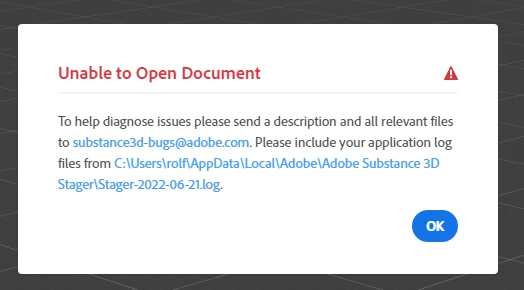
I made two scenes in Stager. After saving them, closing the app and restarting the PC later that day, the files would't open anymore. I did as I was told by the error message and emailed links to the project files and the log file to substance3d-bugs@adobe.com (on 21 June 2022). I haven't received an answer as of yet but I need to access those files next week. 

  • Is there anything I can do to make the files work again?
  • Is there anything I can do to prevent that happening to other projects?


Build 1.2.1-20220610.r.8098-e714b91
Windows 10 

This topic is closed to new replies. Start a new post to keep the conversation going.
JMathews
JMathewsCorrect answer
Community Manager
Jul 18, 2022 7:45 PM UTC

Apologies for the delay - we are catching up on issues after being out of office for summer shut down.

For anyone experiencing issues loading a file please email aubstance3d-bugs@adobe.com with the files attached so we can take a look.  

Adobe Principal Product Manager, 3D & Immersive

4 replies

JMathews
Community Manager
JMathewsCommunity ManagerCorrect answer
Community Manager
Jul 18, 2022 7:45 PM UTC

Apologies for the delay - we are catching up on issues after being out of office for summer shut down.

For anyone experiencing issues loading a file please email aubstance3d-bugs@adobe.com with the files attached so we can take a look.  

Translate
Adobe Principal Product Manager, 3D & Immersive
Participant
Jul 4, 2022 8:54 AM UTC

Can`t open my Stager Files! 

Translate
DerFremdeAuthor
Inspiring
Jun 24, 2022 8:56 AM UTC
  • Or should I not expect an answer and start working on rebuilding the two scenes? 
Translate
Ares Hovhannesyan
Community Expert
Community Expert
Jun 24, 2022 2:39 PM UTC

Can you share file to test?

Also can you open it in another 3d app, export as OBJ and FBX and reimport in Stager? 

Translate