Participating Frequently
February 7, 2024
Answered

Copy Paste Png on same object

  • February 7, 2024
  • 2 replies
  • 751 views
I can't copy and paste the same png file twice onto the same 3D object...does anyone have a solution?

 

This topic has been closed for replies.
Correct answer Ares Hovhannesyan

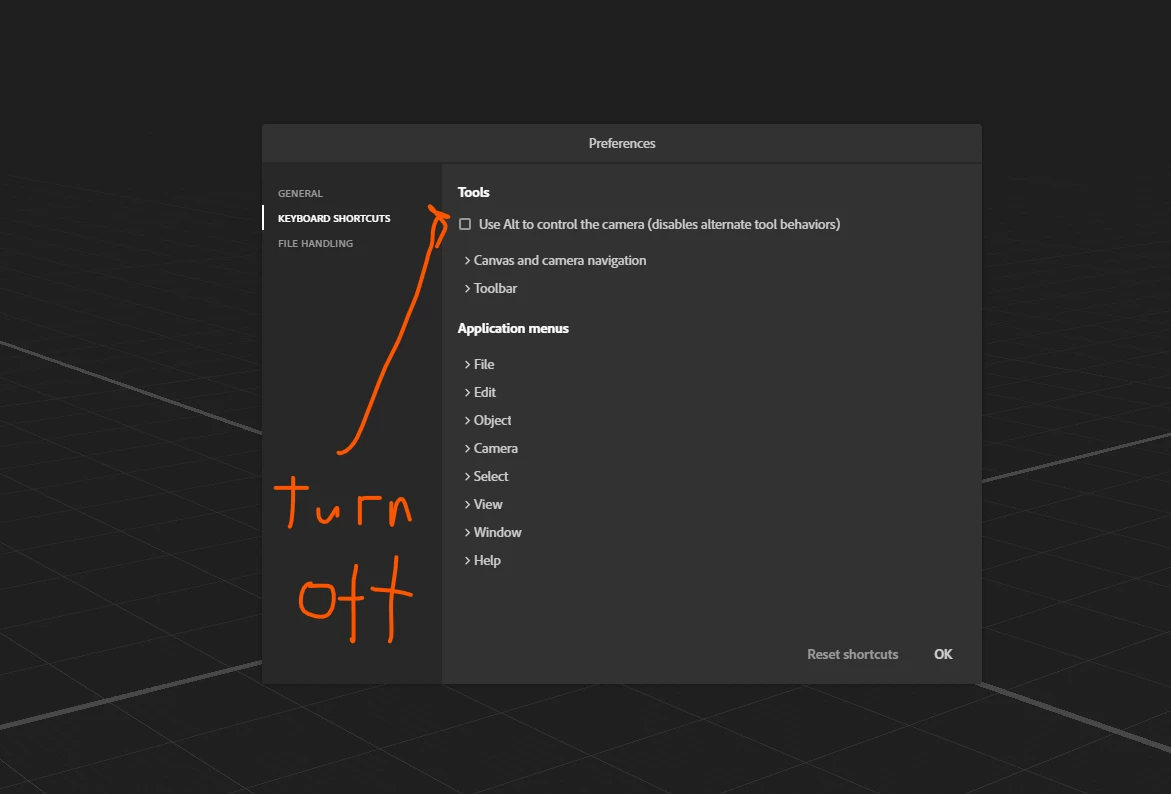
I use latest version, But in Preferences there is an option that allows to use "ALT+DRAG" for creating a copy (from object and decal in Stager) as in any application - and not for controling camera. Unfortunately, by defaul that has been turn on, so why you are not able to copy it. Turn it off. I prefer to turn it off.


2 replies

Ares Hovhannesyan
Community Expert
Community Expert
February 7, 2024

Press Alt and drag decal on material to duplicate it. May this can help in your case.

Participating Frequently
February 8, 2024

Hi Ares, first of all thank you very much, but what version of stager do you have?
Because when I do it nothing happens.

Ares Hovhannesyan
Community Expert
Ares HovhannesyanCommunity ExpertCorrect answer
Community Expert
February 8, 2024

I use latest version, But in Preferences there is an option that allows to use "ALT+DRAG" for creating a copy (from object and decal in Stager) as in any application - and not for controling camera. Unfortunately, by defaul that has been turn on, so why you are not able to copy it. Turn it off. I prefer to turn it off.


Cyril Dellenbach
Community Manager
Community Manager
February 7, 2024

Hi @Marco29857515vuy4,


To make sure I'm understanding the workflow properly; you need to copy paste A decal from the properties panel?


If so, this is indeed not possible unfortunately. That being said, why not saving the resource in your own Library and drag & drop it as many time as needed on the 3D model?


Let me know.

Cyril Dellenbach (Micro) | QA Support Artist | Adobe
Participating Frequently
February 7, 2024
correct, but I need to place the image in the same position as the other one in order to then edit it in Photoshop and give it other specifications for the materials...
 
Cyril Dellenbach
Community Manager
Community Manager
February 7, 2024

Unfortunately, you'll have to place it manually on top of the previous one. However, the .PSD rendering won't separate the different decals into different layers.


Regards,

Cyril Dellenbach (Micro) | QA Support Artist | Adobe