


Inspiring
October 25, 2022
Answered

Missing mask layers after rendering in Stager

  • October 25, 2022
  • 2 replies
  • 745 views

Hello, i struggle with rendering a scene:

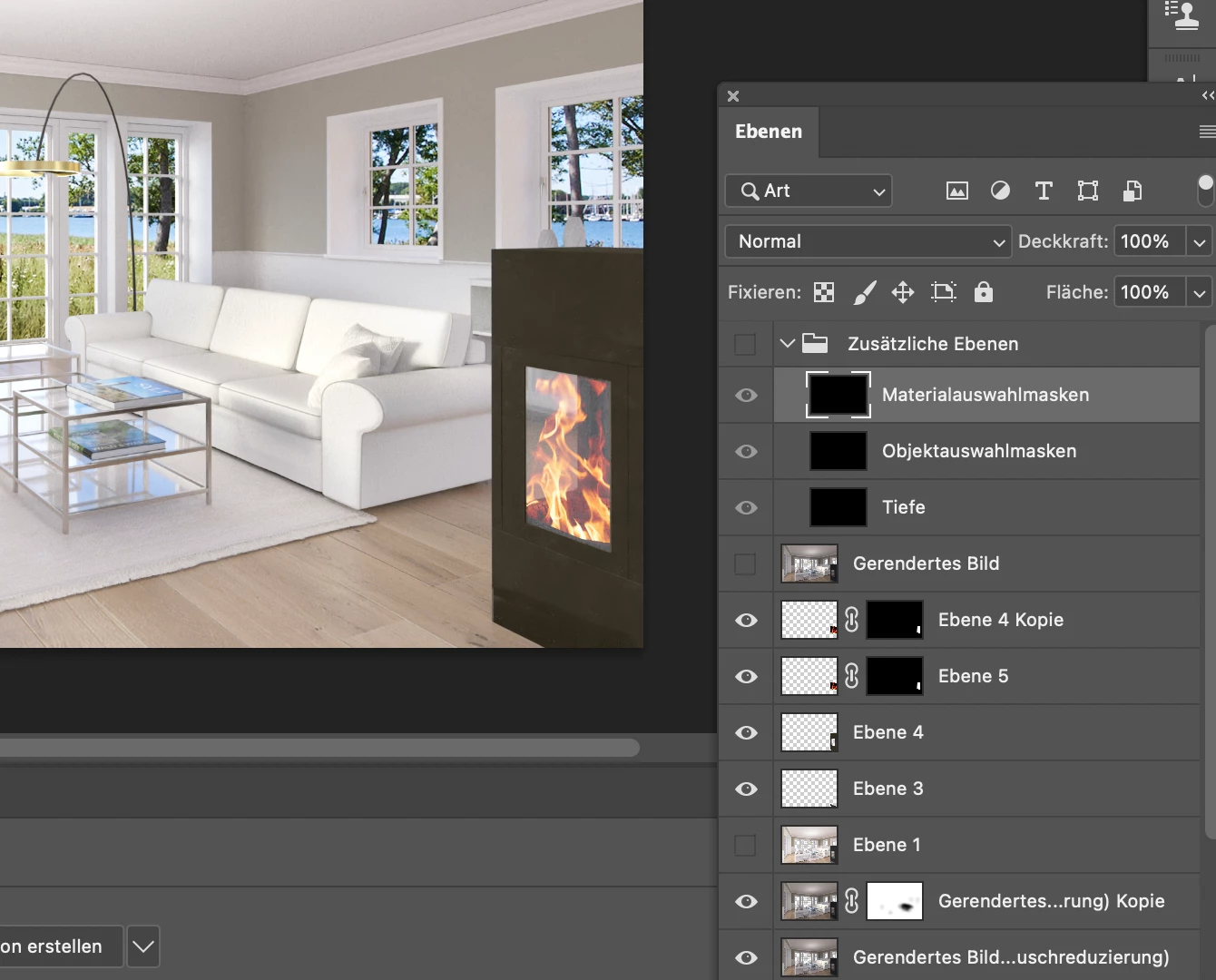
Rendering is ok but i miss the layers with the material, mesh or depth maskings. The layers of the three are just black...

I rendered an other just simple scene, and it worked well...

Is ther a way to check what i might have done wrong?

MacBook Pro M1, Monterey 12.6 , 16gb ram, Stager 1.3
This topic has been closed for replies.
Correct answer AEllard

Hi @Laas Tietje! This is a known bug and the engineers are currently investigating it. However, there is a work around solution!

  • First enable the ground plane under the environment > properties > ground
  • (Shadow opacity can be changed or set to 0 if not needed)
  • Then render the scene as normal

The exported Photoshop document should have its proper masking layers.

2 replies

Inspiring
October 26, 2022

Thank you for yr reply! I did as described, but unfortunately it didn't help in that file... the Masks are still black.

Adobe Employee
October 26, 2022

Hi @Laas Tietje! We are not able to diagnose working files directly on the forum website. Can you email the Stager scene file and log file that you are seeing the masking issue in to Substance3d-bugs@adobe.com so we can investigate. If the file is under 20 MB you can attach it directly to the email.  If it's larger, you can send via a file transfer link like Creative Cloud assets, Dropbox, We Share, One Drive, Google Drive, or similar.

Participant
December 22, 2022
Hello! Has the problem with saving layers after rendering been solved in version 1.3.2 of the program?

PSD file after rendering has black adjustment layers layer. Thanks


AEllardCorrect answer
Adobe Employee
October 25, 2022

Hi @Laas Tietje! This is a known bug and the engineers are currently investigating it. However, there is a work around solution!

  • First enable the ground plane under the environment > properties > ground
  • (Shadow opacity can be changed or set to 0 if not needed)
  • Then render the scene as normal

The exported Photoshop document should have its proper masking layers.