


Inspiring
November 7, 2022
Answered

Possible To Change Material On A Copy Of An Object WITHOUT changing original

  • November 7, 2022
  • 1 reply
  • 1283 views

Hello !

In 3D Stager, I have one object in my scene. I duplicated the object, and it made the duplicate of the object with the same material I had added to the orgiinal object. ( So far so good ) I then tried to change the material on the second object ( a duplicate of that first object ) but --- it changes the material on my original object !

I don't want this to happen, - any help appreciated ! I have seared high and low for an answer and cannot find a thing, thank you if you can help ! 🙂
This topic has been closed for replies.
Correct answer AEllard

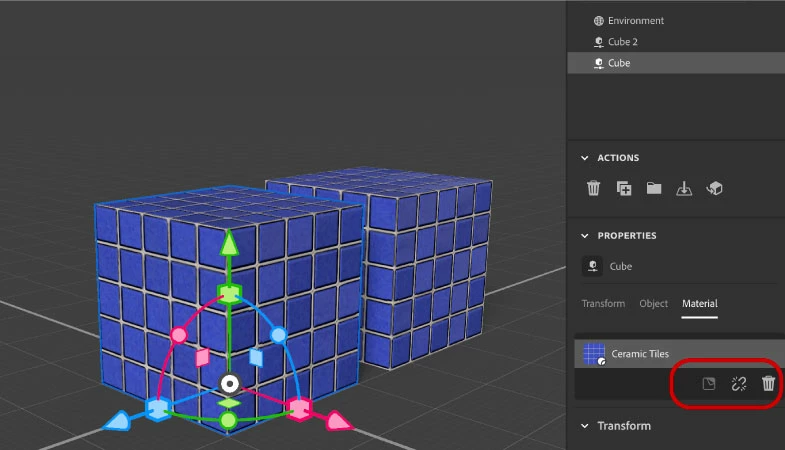
Hi @Animation Guy! It sounds like the materials are linked together. After duplicating an object, go to the properties material panel and click on the symbol that looks like a chain being broken. This will unlink the shared material.


1 reply

AEllardCorrect answer
Adobe Employee
November 7, 2022

Hi @Animation Guy! It sounds like the materials are linked together. After duplicating an object, go to the properties material panel and click on the symbol that looks like a chain being broken. This will unlink the shared material.


Inspiring
November 8, 2022

Hello AEllard !

Just saw your reply now !  Thank you SO much for the reply, I appreciate it greatly !  This is awesome !

Thank you.