Chris S. Stovall
Participant
July 8, 2023
Answered

Still unable to export from Painter to Stager - July 08, 2023

  • July 8, 2023
  • 3 replies
  • 964 views

I've been playing with the Adobe Substance suite of tools, and it's just... well.... not quite there.

I would love for the "Send to Stager" actually to work. 


Yes, it sends over a model with the Normal map for the work done in Painter, but this does not appear in Stager. No textures, no materials or colors. Not even a model with everything baked in.


What am I missing here?

Loom video of the experience 

This topic has been closed for replies.
Correct answer Cyril Dellenbach

Hi again Chris,


And sorry for the delay in response.


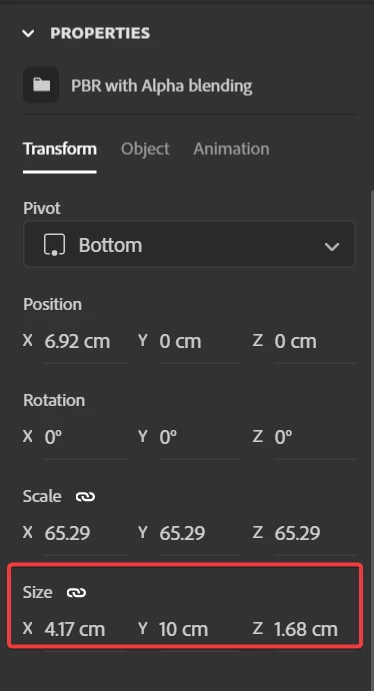
For the scale issue, I'm still investigating. To be honest, we don't seem to have any unit-related bugs when sending from Painter to Stager. However, your mesh doesn't seem to have a units problem either. In the meantime, I recommend using the Size Parameters to accurately set up the scale of your objects in Stager.


For the missing color, The Shader used in the Substance Painter project is PBR-Spec-Gloss. This shader doesn't allow Base Color, but uses Diffuse instead. Since Stager uses Base Color, the Diffuse sent from Painter isn't recognise, so no colors on the model.


You'll either have to

  • export the Diffuse as a bitmap and drag and drop it manually on the Base Color slot,
  • or switch the Shader in Substance Painter, add a Base Color channel, and send once again to Stager.


Best regards,


3 replies

Cyril Dellenbach
Community Manager
Cyril DellenbachCommunity ManagerCorrect answer
Community Manager
July 18, 2023

Hi again Chris,


And sorry for the delay in response.


For the scale issue, I'm still investigating. To be honest, we don't seem to have any unit-related bugs when sending from Painter to Stager. However, your mesh doesn't seem to have a units problem either. In the meantime, I recommend using the Size Parameters to accurately set up the scale of your objects in Stager.


For the missing color, The Shader used in the Substance Painter project is PBR-Spec-Gloss. This shader doesn't allow Base Color, but uses Diffuse instead. Since Stager uses Base Color, the Diffuse sent from Painter isn't recognise, so no colors on the model.


You'll either have to

  • export the Diffuse as a bitmap and drag and drop it manually on the Base Color slot,
  • or switch the Shader in Substance Painter, add a Base Color channel, and send once again to Stager.


Best regards,


Cyril Dellenbach (Micro) | QA Support Artist | Adobe
Cyril Dellenbach
Community Manager
Community Manager
July 10, 2023

Hi @Chris S. Stovall,


No problems on my side either. From your video, I don't see anything abnormal. Would you mind sending me your .SPP file and the log from Painter and Stager (Help>get logs...)? You can obviously send those privately if you don't wish to share on this thread.


Let me know,


Cyril Dellenbach (Micro) | QA Support Artist | Adobe
Chris S. Stovall
Participant
July 10, 2023

Sure thing. Here are the files:


I have a couple of new insights as well. When I use the "Start Painting" demo files, it actually works. When I use other templates, it does not. Some see it as a file that needs to be imported, while others import only part of the data and import the model as a ridiculously reduced size. See image below.

Apparently, I can't attach a zip or an SPP to this form, so I'm open to suggestions on how to get this file to you.


Cyril Dellenbach
Community Manager
Community Manager
July 10, 2023

You can send me the .SPP file at cdellenbach@adobe.com


Cyril Dellenbach (Micro) | QA Support Artist | Adobe
Ares Hovhannesyan
Community Expert
Community Expert
July 9, 2023

Work for me, Here is capture of Painter and Stager after exporting model from Painter. It auto opens Stager and loads into Stager Scene.