


Participant
March 11, 2023
Answered

Strange red reflection when lights are on one object

  • March 11, 2023
  • 2 replies
  • 942 views

Hi all,

I am new to using 3D modeling software, so I am probably missing something simple. I am making a collage of different models that I downloaded froma few different sites, and one of the models reflects red whenever light is shone on it. I've rendered out a still and it still happens.

I have imported the models into Stager, arranged them how I wanted, and when I get to lighting only the Earth reflects red. I've checked the lighting hue, but it's not that. What am I missing?

This topic has been closed for replies.
Correct answer Ares Hovhannesyan

Hi, 

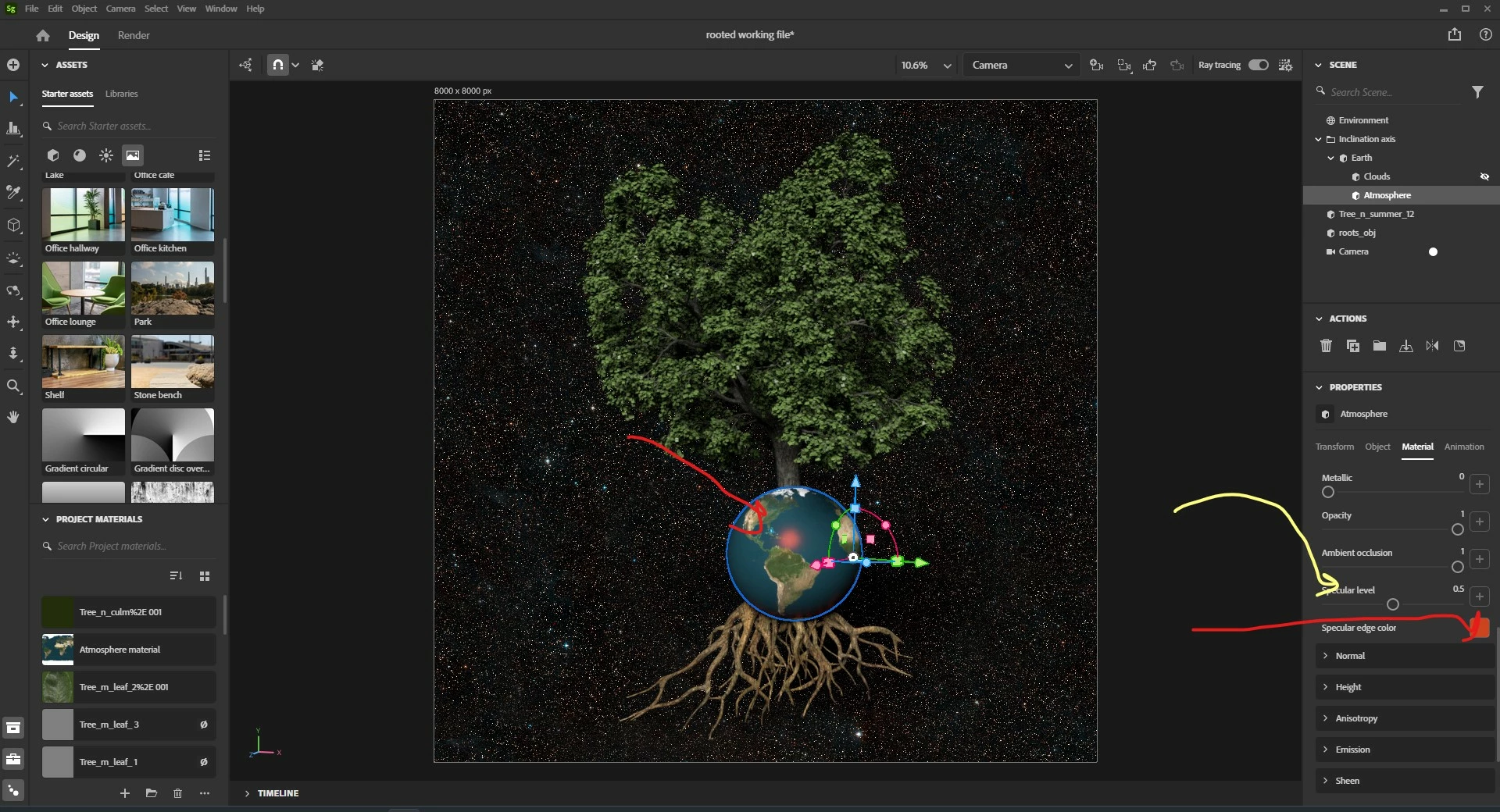
Your Atmosphere Material have the Red Color Specular Edge. You can change the Specular Level (yellow arrow) or click on red icon and change color. I think the reason is in this color.


2 replies

Adobe Employee
March 13, 2023

Hi @James2602974439w3!

To check if there are non-physical lights within the Stager scene:

  • Click environment in the scene panel
  • Select the lights in the properties panel

In this section, all used non-physical lights and image based lights are listed. You are able to delete and add these lights by clicking on the unwanted light, then clicking on the trash can icon.


Participant
March 13, 2023

Hi and thanks. Adding/deleting lights doesn't seem to help. I deleted all of the lights, then added an enviornemnt light, but the same thing happens, even when I check the temperature of the light. The wierd reflection is only on one of the objects in the composition, and this doesn't happen in Blender, only in Stager. So, if I try to use a green light to cancel out the red, it turns all of the other objects gree becuase they aren't having the same issue. Here's a link to my file:

https://drive.google.com/file/d/1gRQoQgNuyNoS7zQ8qpmNJr6J8cbySJ_l/view?usp=share_link

Adobe Employee
March 14, 2023

Hi @James2602974439w3!


We are not able to diagnose working files directly on the forum website. To help us evaluate, can you please email us your Stager log file to Substance3d-bugs@adobe.com so we can investigate. If the file is under 20 MB you can attach it directly to the email.  If it's larger, you can send via a file transfer link like Creative Cloud assets, Dropbox, We Share, One Drive, Google Drive, or similar.

Ares Hovhannesyan
Community Expert
Community Expert
March 12, 2023

We need to see your file to understand what lights have been applied.

1.Please try to "Match Image" that will create lightening from your image.

2. Use different Environments Light Assets from Assets Panel.   

Participant
March 13, 2023

Hi Ares- here's a link to my file. I suspect it's something wrong with the object, but I don't know enough to be sure. Thank you for your help. 

https://drive.google.com/file/d/1gRQoQgNuyNoS7zQ8qpmNJr6J8cbySJ_l/view?usp=share_link

Ares Hovhannesyan
Community Expert
Ares HovhannesyanCommunity ExpertCorrect answer
Community Expert
March 14, 2023

Hi, 

Your Atmosphere Material have the Red Color Specular Edge. You can change the Specular Level (yellow arrow) or click on red icon and change color. I think the reason is in this color.