



Participant
March 8, 2022
Answered

Texture on outside of objects (changing object silhouette from materials)

  • March 8, 2022
  • 2 replies
  • 521 views

Hi,


New to the 3D-world.

Is it possible in Stager to have a meterial that have bumps outside of the object. For example I want a cube with paint on it that should look like a rough roller painted it. I tried to have that effect on this stone but the top is smooth, but i want it to have texture on the outside.


Is this possible?

This topic has been closed for replies.
Correct answer JMathews

Yes!  This process is called displacement. 🙂  I made a note to write a guide for our documentation on this feature but here's the short version:

  • Add your object/model
  • Apply your materials.  The material needs to have a 'height' map.  For most Substance materials this will be generated automatically.  If it's a custom material you're making you'll want to create a grayscale image where gray is flat, black is recessed, and white is protruded.
  • In the Stager interface select the object, go to the properties panel, and select the object properties tab.  Scroll down if needed and enable the displacement section.  You may not see any effect YET.
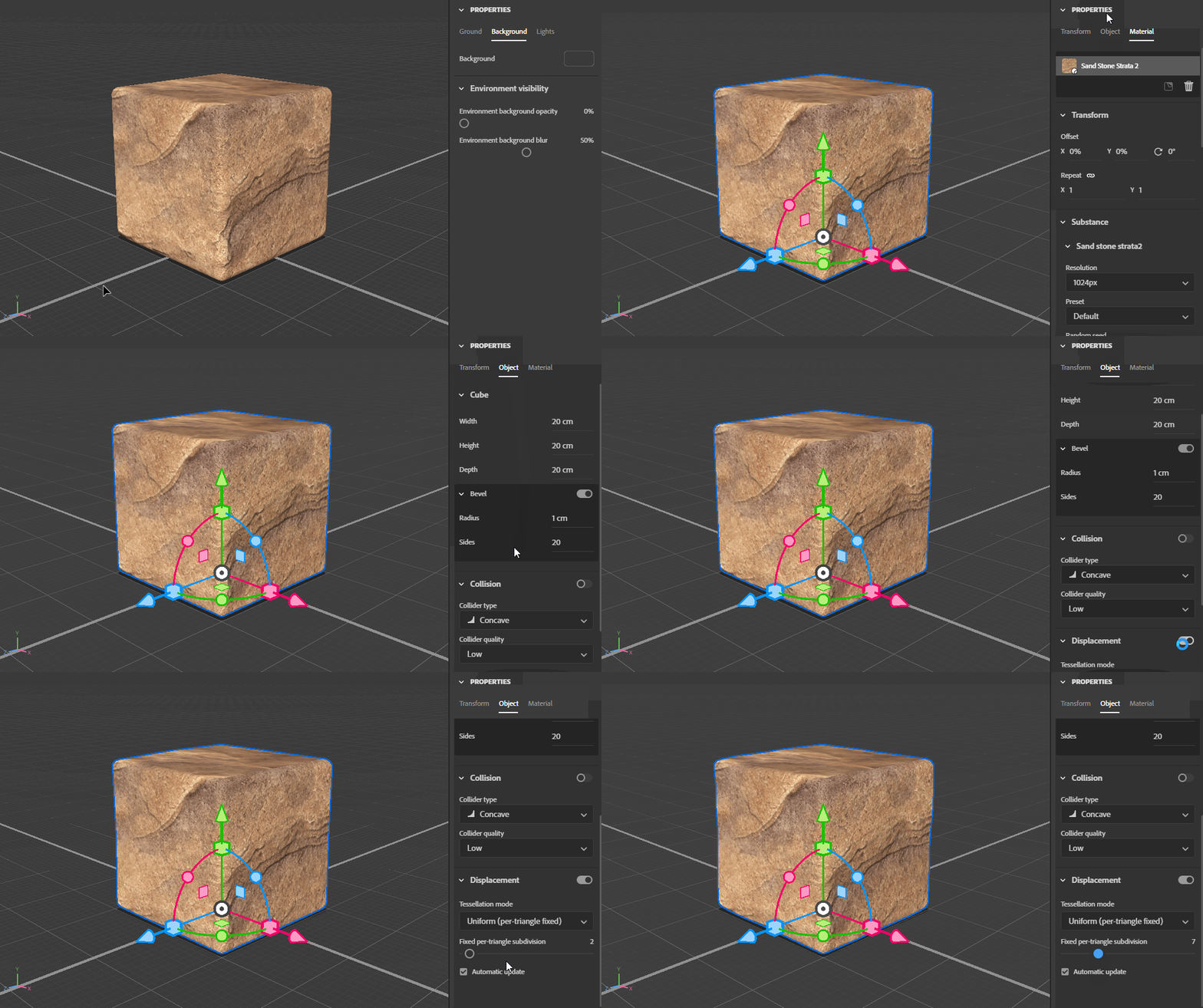
 

  • Switch to the material tab
  • Scroll down to the 'height' section
  • Adjust the height scale
  • Potentially adjust other things like material tiling
  • Witness the glory that is displacement
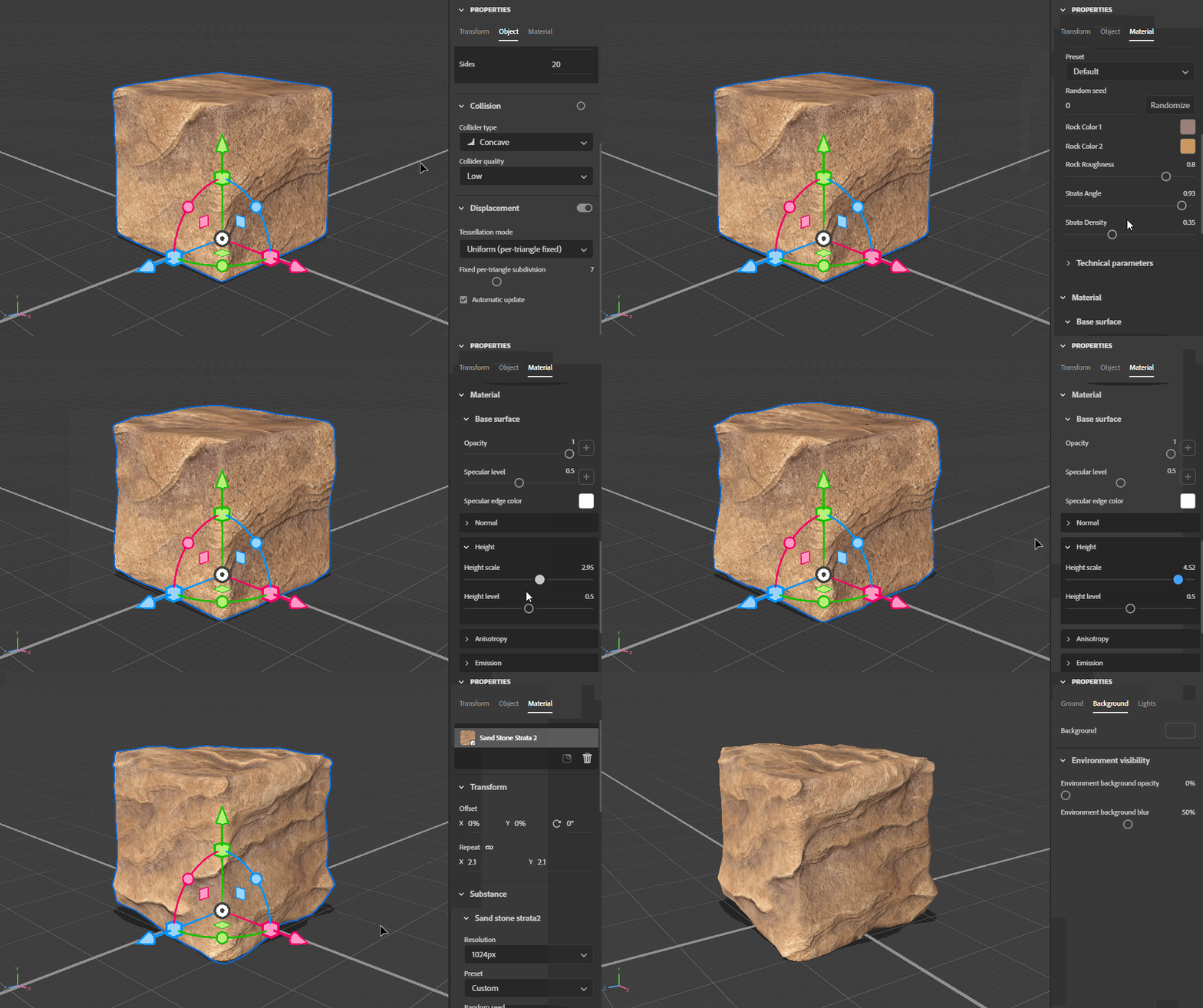


Note that in the object displacement settings you can also control something called tessellation.  Tessellation is a process that basically controls the resolution of the actual 3d surface so it has enough geometry detail to represent the material.  Lower tessellation will be faster but 'chunky'.  Higher tessellation will be slower but show all the fine detail.  You can setup tessellation per obejct so you could have less geometry on background objects, for example.

2 replies

JMathews
Community Manager
JMathewsCommunity ManagerCorrect answer
Community Manager
March 9, 2022

Yes!  This process is called displacement. 🙂  I made a note to write a guide for our documentation on this feature but here's the short version:

  • Add your object/model
  • Apply your materials.  The material needs to have a 'height' map.  For most Substance materials this will be generated automatically.  If it's a custom material you're making you'll want to create a grayscale image where gray is flat, black is recessed, and white is protruded.
  • In the Stager interface select the object, go to the properties panel, and select the object properties tab.  Scroll down if needed and enable the displacement section.  You may not see any effect YET.


  • Switch to the material tab
  • Scroll down to the 'height' section
  • Adjust the height scale
  • Potentially adjust other things like material tiling
  • Witness the glory that is displacement


Note that in the object displacement settings you can also control something called tessellation.  Tessellation is a process that basically controls the resolution of the actual 3d surface so it has enough geometry detail to represent the material.  Lower tessellation will be faster but 'chunky'.  Higher tessellation will be slower but show all the fine detail.  You can setup tessellation per obejct so you could have less geometry on background objects, for example.

Adobe Principal Product Manager, 3D & Immersive
Participant
March 9, 2022

Yes!!


This is exactly what i´m after. Your walkthrough worked perfect!

Thanks for the fast reply!


/Marcus

Ares Hovhannesyan
Community Expert
Community Expert
March 8, 2022

You have to use one material for all sides of cube or you can use selection tool to place separate material on separate side of cube. Use height, normal, ambient occlusion property to achieve final result. To better understand how materials properties work please review Adobe Standard Material | Substance 3D Sampler

Participant
March 8, 2022

Thanks Ares!


But if you look att my screenshot, I have played around with Normal and height. On the top and right side it still looks smooth. As if materials with bumps and things like that only can go inwards if that makes sense. To me it does not look realistic.