
oksanag21296527
Participant
March 1, 2018
Question

A problem with placeholder Chapter Name

  • March 1, 2018
  • 1 reply
  • 416 views

Hello!

I have questions about placeholder/field Chapter Name.

I work in RoboHelp 2017.  I added Chapter Name to the Header on my master page and I hoped that I would have a chapter name in the header on all pages which use this master page, but I see only <<PD Chapter Name>>
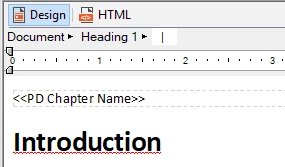
I tried to printed documentation in PDF and I had the error - "Error! Use the General tab to apply Heading 1 to the text that should be displayed here."

I don't understand what this error means?

For example, I have a heading with name "Introduction" in my topic and I want the "Introduction" to added to the header.  Please tell me, what should I do to have a heading name in the header? Is it possible?

This topic has been closed for replies.

1 reply

Captiv8r
Legend
March 3, 2018

Is this some situation where you are linking to FrameMaker? I've never seen a placeholder or a field in RoboHelp that is named "Chapter Name".

Or did you perhaps create a variable named Chapter Name?

Cheers... Rick

Peter Grainge
Community Expert
Community Expert
March 3, 2018

PD Chapter Name is for inserting into Printed Documentation layouts where it takes the name of the book the topic is in. In your screenshot it looks like you are trying to use it with ordinary topics. Is that the case?

Please see the Sticky Topics regarding which forum to post in and including your version of RoboHelp.


See www.grainge.org for free RoboHelp and Authoring information.

@petergrainge

Use the menu (bottom right) to mark the Best Answer or Highlight particularly useful replies. Found the answer elsewhere? Share it here.
Peter Grainge
Community Expert
Community Expert
March 3, 2018

To be clearer, when you generate a printed document, you can use a master page and that's when you would use PD Chapter Name.


See www.grainge.org for free RoboHelp and Authoring information.

@petergrainge

Use the menu (bottom right) to mark the Best Answer or Highlight particularly useful replies. Found the answer elsewhere? Share it here.