
Known Participant
June 4, 2009
Question

A strange layout problem...

  • June 4, 2009
  • 1 reply
  • 1427 views

Hey everyone

I have to make a small  accompanying site with Robohelp, and there seems to be some problems. No matter how many times I generate and compile, the result I get in the browser isn't the same as what I see in the WYSIWYG. Any suggestions?

I added the screenshots so you can see what I mean...

thanks in advance!

greets,

C4B
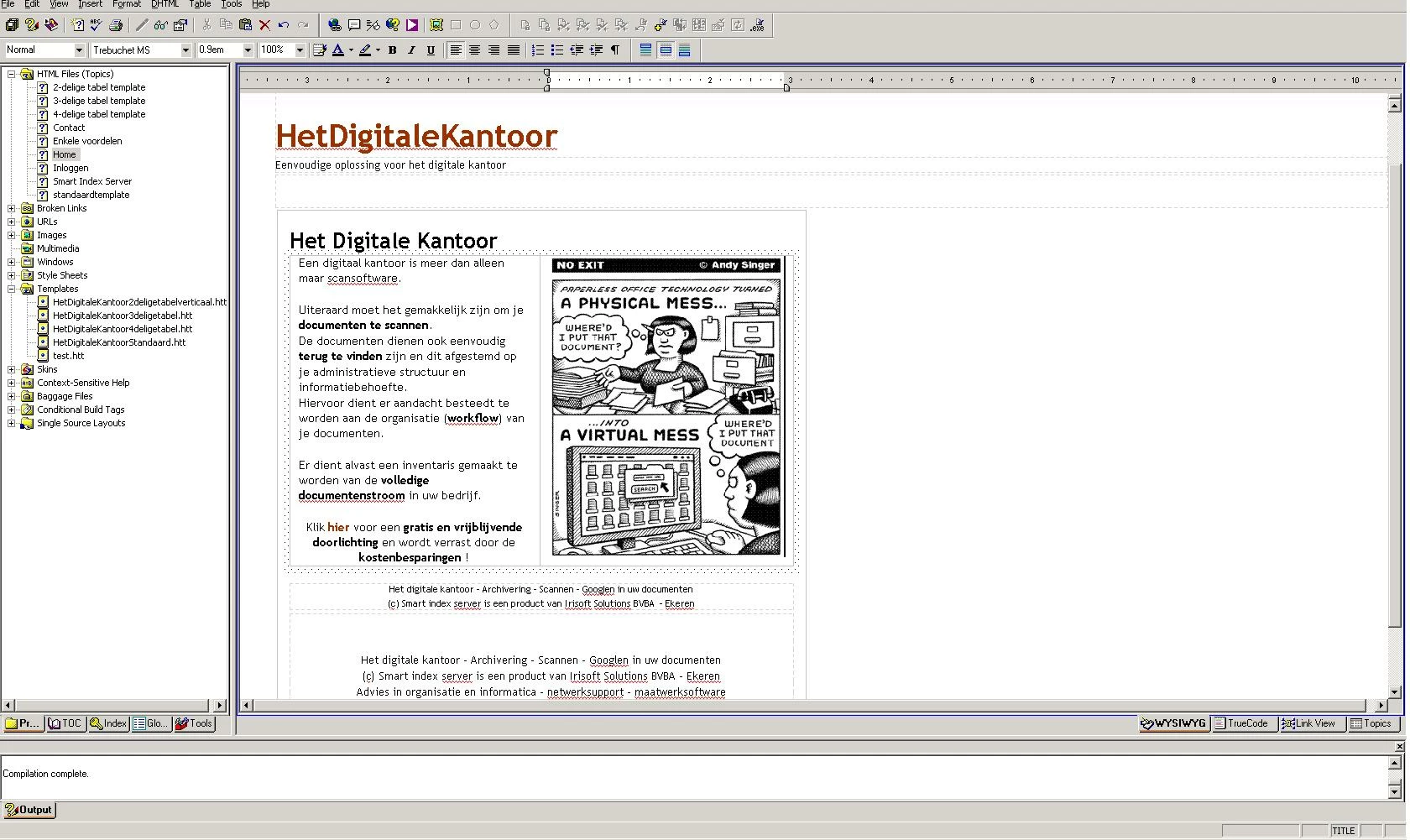
This is what it should look like. As you can see, the image is far more to the right so the text isn't forced into some tiny little box. The text just flows along aside the image and stops just about near the edge of the image...

this is what it looks like in the browser. I know the quality of the screenshot is pretty crappy, but I hope you can tell the difference: the text has obviously been forced into a text box with an a lot smaller width than the one that was shown as a preview in Robohelp...

    This topic has been closed for replies.

    1 reply

    June 4, 2009

    I can't tell from the images quite how you laid out the text with the graphic, so bear with me.

    I have found tables to be the best way to control column sizes in published WebHelp. If you are not in a table, I recommend it.

    If you are already in a table, do you have your text in one column and your image in the next column? If you haven't, I would try that - you can specify the sizes of the two columns in pixels, or as a percentage of the window, and you can (I think) specify that the table is x% of the window and the image is y pixels, leaving the text column to spread out or condense based on the size of the window. These are all things HTML can do, but RH does sometimes play with your table formatting, so I can't guarantee results.

    If you are already in a table, what is going on with the paragraph that is centered under the text/image block? Don't put that paragraph in a table row with merged cells. End the table and put in that paragraph as centered text. I have my doubts about merging HTML table cells - I know it's possible, but I get hosed up badly every time I try.

    Just some things to start with - and BTW, I adore your cartoon!

    Captiv8r
    Legend
    June 4, 2009

    Hi there

    I posted a reply to this earlier and see it isn't here. My web connection was tossing its cookies and throwing a tantrum at the time so it looks like the post failed to update.

    I do agree with what Elisa says about tables and using them to control layout.

    What I intended to post earlier suggested that the image seems to show you already are using tables. I suggested adjusting the table to perhaps 100% of the width of the page (or another value) as it appears you have constrained the table to a specific width and that's what you don't like.

    Cheers all... Rick