
Inspiring
October 9, 2019
Answered

About the expand and collapse icon in TOC of the generated file in RH 2019
  • October 9, 2019
  • 2 replies
  • 498 views


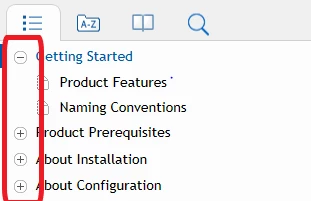
In the above TOC, is it possible to remove these plus and minus icons? Also, where is the code available for this setting in generated file. Is it in css or js? This is the file generated using Robohelp 2019 version.
This topic has been closed for replies.
Correct answer Karin Albrecht

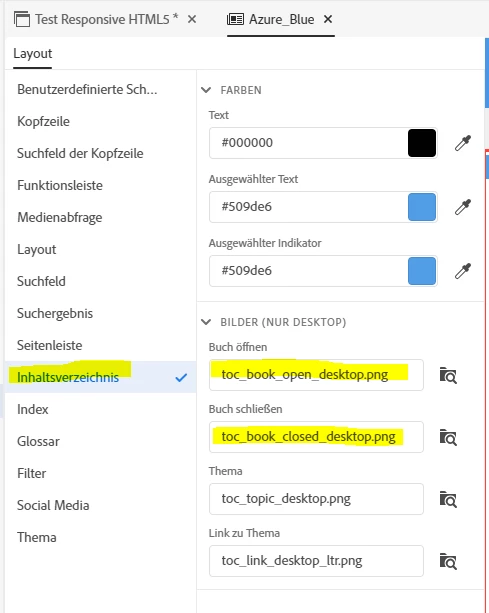
You can remove or change these icons in the output definition. Select the desired skin and click "Edit". The skin editor opens. There, in the section TOC, the used images are listed and can be changed. The screenshot is from the new UI, but it works similar in RH Classic. It just looks a bit different.


2 replies

Karin AlbrechtCorrect answer
Legend
October 9, 2019

You can remove or change these icons in the output definition. Select the desired skin and click "Edit". The skin editor opens. There, in the section TOC, the used images are listed and can be changed. The screenshot is from the new UI, but it works similar in RH Classic. It just looks a bit different.


Inspiring
October 17, 2019
I have enabled it in the layout. Fixed.
Jeff_Coatsworth
Community Expert
Community Expert
October 9, 2019

Classic or new UI? What layout are you using?