


Inspiring
December 2, 2022
Question

Add custom "Topic Page Button" to exit/close help

  • December 2, 2022
  • 5 replies
  • 670 views

Running RH 2020.7, Windows


I would like to add a custom Topic Page Button to the top nav frameless skin that will use the following Javascript to close the help:


window.open('',' self').close()


I can insert that bit of javascript, tied to an image, directly in the body of topics that achieves the desired end result - I click it and the entire help (web browser tab) closes. However, I've tried every config iteration I can think of for the OnClick field/param and I can't get the corresponding topic page button to close the help. 
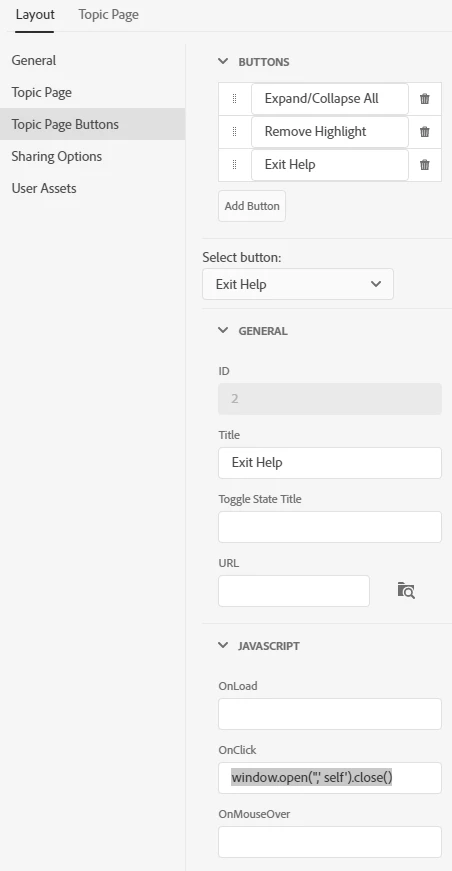


Thoughts?


This topic has been closed for replies.

5 replies

Peter Grainge
Community Expert
Community Expert
December 14, 2022

I have an answer from Adobe Engineering.


The only Events for frameless skins are these:-

• EVT_EXPAND_COLLAPSE_ALL: Toggle Collapse All/Expand all dropdowns and expanding texts
• EVT_SHOW_FAVORITES: Show bookmarks panel
• EVT_SHOW_FILTERS: Show DCF panel
• EVT_SHOW_BOOKMARKS: Mark current topic as favourite
• EVT_SHOW_SHARE: Open share topic panel
• EVT_REMOVE_HIGHLIGHT: Remove search highlight
• EVT_PRINT_TOPIC: Print current topic

You will recognise these are already showing in various fields in the editor.


For your purposes the steps are:-

1. Add a new custom button
2. Leave OnClick field empty
3. Type # into the URL field
4. Create JavaScript file which adds event listener for click event and add it into the user assets section.


I hope that helps.

________________________________________________________

My site www.grainge.org includes many free Authoring and RoboHelp resources that may be of help.


Use menu (bottom right) to mark as Best Answer or to Highlight particularly useful replies. Found the answer elsewhere? Share it here.
Community Expert
December 12, 2022

The scripting guide for the latest version of RH is in the online help in the Appendix. It doesn't cover anything about the requirements for the buttons in the skin though.

Peter Grainge
Community Expert
Community Expert
December 12, 2022

I have a feeling the issue of adding a Close button has been asked before without resolution. There is an old scripting PDF at https://helpx.adobe.com/content/dam/help/en/pdf/RoboHelp-Scripting-Reference-2019.pdf but I think it is for the Classic versions and it does not include on the standard events in a clean project.


I have asked Adobe if there is a later version or you can try Adobe Support. See https://helpx.adobe.com/contact/enterprise-support.other.html#robohelp for your Adobe Support options. The email link tcssup@adobe.com is recommended as it reaches a team dedicated to Technical Communication Suite products including RoboHelp. 

________________________________________________________

My site www.grainge.org includes many free Authoring and RoboHelp resources that may be of help.


Use menu (bottom right) to mark as Best Answer or to Highlight particularly useful replies. Found the answer elsewhere? Share it here.
RoboFanAuthor
Inspiring
December 11, 2022

So, can anyone at least tell me what goes in the OnClick field generally-speaking -- a file name reference, a file name with file path reference, actual code (e.g., javascript), reference to a section in another file, etc.?

RoboFanAuthor
Inspiring
December 2, 2022

Update. I also tried creating a standalone javascript file (I named it EVT_EXIT_HELP.js) with the script, then uploaded it to User Assets for the skin, then specified EVT_EXIT_HELP.js in the OnClick field, and then compiled and clicked the button in the output. No go.