Inspiring
June 8, 2016
Answered

Add Item to RH15 Quick Access Toolbar

  • June 8, 2016
  • 1 reply
  • 508 views

I don't know what the name of the function was in earlier versions - I just knew what icon to click. What I need to do in RH15 is display topics in a browser WITHOUT generating output.

I went through every tab in the Customize User Interface dialog, and didn't see anything that looked like it would do this. What is the name of this function, and which tab is it under?

Thanks!
This topic has been closed for replies.
Correct answer Captiv8r

Okay, gotcha. Here's what you need to do.

First, ensure a topic is open in the editor and has focus. Just click a word or something to ensure focus is there.

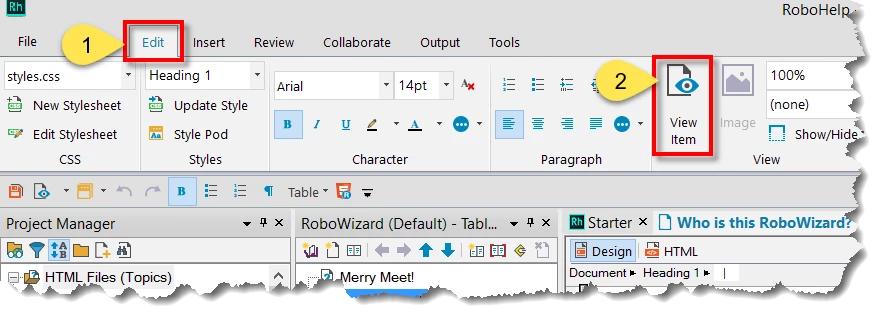
Then click the Edit tab and you should see this icon:

That's the new look of the Preview icon.

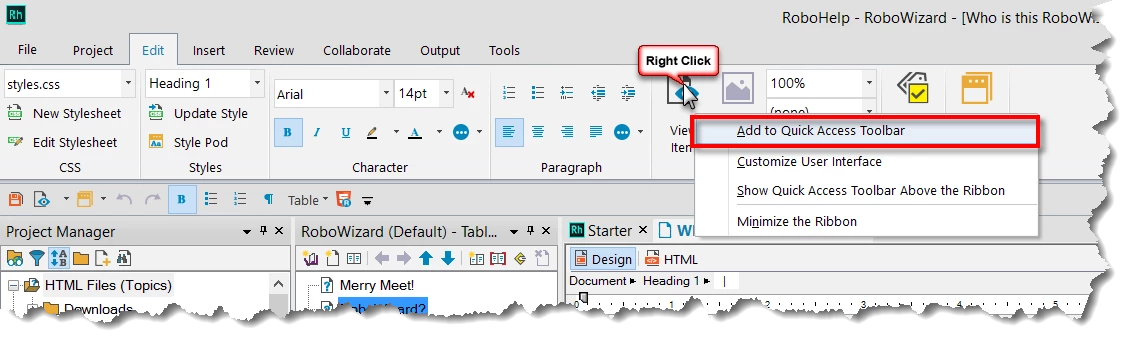
An easy way to add it to your Quick Access Toolbar is to just right-click it and choose to add it!

Cheers... Rick

1 reply

Captiv8r
Legend
June 8, 2016

Hi there

I'm not sure what you are referring to. I know when you preview you have the ability to choose a browser installed on your system, but that requires you click the button on the top right of the preview window.

Is this perhaps what you are referring to?

I took a look at RoboHelp 11 and nothing is jumping out at me.

Cheers... Rick

spotcheckAuthor
Inspiring
June 9, 2016

I don't have that - in fact, the pair of glasses is what I was looking for. It used to always be right there, and now it's buried. Is that window you provided an image of a pod? If so, what is the pod name?

This is what I see:

Captiv8r
Captiv8rCorrect answer
Legend
June 9, 2016

Okay, gotcha. Here's what you need to do.

First, ensure a topic is open in the editor and has focus. Just click a word or something to ensure focus is there.

Then click the Edit tab and you should see this icon:

That's the new look of the Preview icon.

An easy way to add it to your Quick Access Toolbar is to just right-click it and choose to add it!

Cheers... Rick