Inspiring
May 22, 2017
Answered

Add Topic Title on Topic Page

  • May 22, 2017
  • 1 reply
  • 489 views

I created a new Master Page in my RoboHelp2015 project. Previously when I created a new topic, the topic title automatically appeared in the title when I opened it to edit. But with the new Master Page, it does not. Is there a specific code that I need to add to my Master Page? Currently, I have text in place of the title in the Master Page.

This topic has been closed for replies.
Correct answer Captiv8r

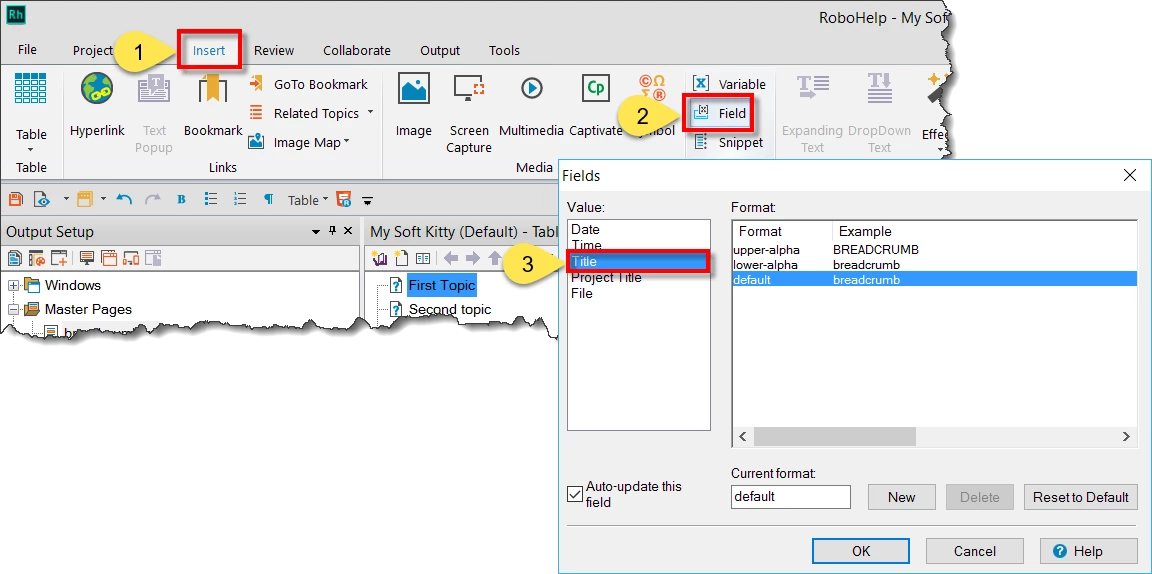
When you are editing the Master Page, put the cursor where you want the Title to appear. Then click the Insert tab followed by Field and choose Title. Then format as a Heading 1 and you should be set!

Cheers... Rick

1 reply

Captiv8r
Captiv8rCorrect answer
Legend
May 22, 2017

When you are editing the Master Page, put the cursor where you want the Title to appear. Then click the Insert tab followed by Field and choose Title. Then format as a Heading 1 and you should be set!

Cheers... Rick

LmledererAuthor
Inspiring
May 22, 2017

Thank you very much, Rick! That was it!