



Almtuna
Inspiring
November 29, 2022
Question

Add viewport to each htm file (Azure Blue template, resp html5)

  • November 29, 2022
  • 4 replies
  • 645 views

I'm using FrameMaker 2019 to generate online documentation, as responsive html5. Based on the Azure Blue template.

I need to add a viewport row to the header of each generated htm file.

<meta name="viewport" content="width=device-width">


This is the desired htm result:
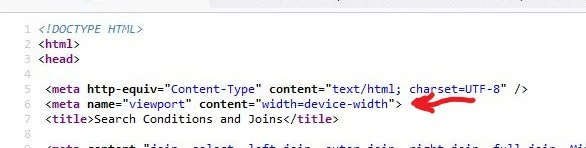
I.e. I need to add row 6.


Which Azure Blue template file do I need to edit?

(I know this is the RoboHelp forum, but as I understand it the Azure Blue template is same.)

    This topic has been closed for replies.

    4 replies

    Almtuna
    AlmtunaAuthor
    Inspiring
    December 1, 2022

    I submitted a bug-report yesterday.

    Today I got an e-mail saying:

    Issue - tracker.adobe.com/#/view/FRMAKER-12541 status updated from 'Open' to 'Ready for Sprint'

    Almtuna
    AlmtunaAuthor
    Inspiring
    December 6, 2022

    I have a perl-script now, to add the viewport row to each htm file.


    Another manual step to forget... Sigh.

    Almtuna
    AlmtunaAuthor
    Inspiring
    December 7, 2022

    However, with the viewport added to each htm file, https://search.google.com/test/mobile-friendly now says the documentation is fine. I.e. I expect much better Google indexing (which means the users will eventually find our documention.


    Peter Grainge
    Community Expert
    Community Expert
    November 30, 2022

    @Amebr Using FrameMaker.

    ________________________________________________________
    My site www.grainge.org includes many free Authoring and RoboHelp resources that may be of help.

    Use the menu (bottom right) to mark the Best Answer or Highlight particularly useful replies. Found the answer elsewhere? Share it here.
    Community Expert
    November 30, 2022

    Yes but I assume it ties in with a particular Robohelp version and I assume the skin setup would be similar to whichever version that is.

    Jeff_Coatsworth
    Community Expert
    Community Expert
    November 30, 2022

    @Amebr - sort of - the FM ability to "publish" (not generate) HTML5 output directly out of FM (& not go through RH - which is the "older" option) utilizes a headless version of RH Classic "under the hood (or bonnet)" (lol) which doesn't expose as many controls over the process as RH does. Your point about messing about with seed files is totally accurate; updates would blow your changes away.

    Community Expert
    November 29, 2022

    Is the Robohelp you're using New UI or Classic? If it's Classic you should be able to edit the.two slp files (topic and search results I think?). If it's New UI then you might be able to edit some seed files in the installation directory, but it's not something I'd recommend - the changes would likely be overwritten with any updates, and probably wouldn't transfer for any upgrades.


    In RH 2019 New UI, there's a Post-Generation Script field where you can add a script file that can modify the output files as you'd like. But I don't know if that is available through Framemaker. You'd also need to know how to write such a script, which unfortunately I can't help with.

    Community Expert
    November 29, 2022

    Do be careful editing the slp files, and I recommend ONLY opening them in a third party text editor, not through the Robohelp interface. There used to be a bug that corrupted those files when edited using the RH internal text editor, and I don't know if they ever fixed it.

    Peter Grainge
    Community Expert
    Community Expert
    November 29, 2022

    I don't know if there is a way to edit the template files, I doubt it. If no one offers a solution to that, I would use a find and replace tool to find some way to inject it in the output files.


    If you were using RoboHelp directly it would be easy enough to inject it in the source topics once only.

    ________________________________________________________

    My site www.grainge.org includes many free Authoring and RoboHelp resources that may be of help.


    Use the menu (bottom right) to mark the Best Answer or Highlight particularly useful replies. Found the answer elsewhere? Share it here.