Inspiring
August 18, 2010
Question

Adding separator lines or spaces in WebHelp ToC

  • August 18, 2010
  • 1 reply
  • 1281 views

Is it possible - and not horribly complicated - to add separator lines or some empty spaces in WebHelp Table of Contents?

I would like to group the "books" and top level topics, separating them somehow, but adding empty items or simple HTML like <br> or <hr> in the .hhc file is not doing anything.

This is what the graphics designer is asking for:
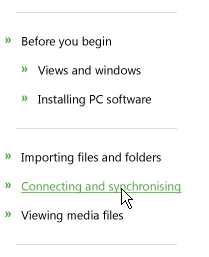
I am running RH7 and using a somewhat adjusted version of the "Default" skin.

This topic has been closed for replies.

1 reply

Willam van Weelden
Inspiring
August 18, 2010

Hi,

Go to whthost.js in your output and search for the function TocWriteClassStyle. You can amend the toc style by changing the style in this function.For instance: to have all your element in the toc have a 10px margin above and below, add:

sStyle+="A {margin-top:10px;margin-bottom:10px}\n";

before "sStyle+="</STYLE>";". Add any regular css and selectors you like.

The A targets all hyperlinks (pages and books with links.) With DIV .parent .stub and .child you can target the books specifically. Play around a bit to see what happens.

Note that you're changing an output file. The file will be overwritten every time you generate the help. Simply copy the file to a safe location and paste the file in your output.

Greet,

Willam

perttimeAuthor
Inspiring
August 19, 2010

Thanks Willam.

That works, except it does not quite do what I really want to do

Adding something like "{border-top:"+gsABgColor+" 1px solid; " adds a border but it does it everywhere where that style is applied.

What I am asked to do is group some of the main level "books" together, so I'd have to be able to determine exactly where the separators go and where not.

It is not the end of the world if accomplishing this is too tricky. I am not going to do something I'd have to do manually in 34 languages...

Willam van Weelden
Inspiring
August 19, 2010

Hi,

I'm sorry, but I don't understand exactly what you want to acomplish. Do you mean that you need a border for every top level? do you need to group specific books in the top level? Do you need a separator below the book at top level when the book is opened (Grouping the subbooks)?

Greet,

Willam