
November 23, 2011
Answered

Adding tooltip to WebHelp Search box

  • November 23, 2011
  • 1 reply
  • 710 views

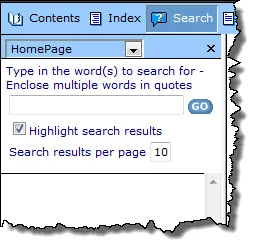
I'd like to provide a tooltip or inductive text for the Search text box in WebHelp. Specifically, I want to tell users to enclose multiple words in quotation marks, since this format returns the most relevant results. Is there a way to add a tooltip to the Search box or even just additional text to the line that starts: "Type in the word(s) to search for:"?

We're using RoboHelp HTML 9. It would be great to know how to do this programatically, but, if necessary, I don't mind editing output files

Thanks!

Diana
This topic has been closed for replies.
Correct answer Peter Grainge

Something like this?

File > Project Settings > General Tab > Advanced > LNG File Tab

There you can change FtsInputPrompt to your own string.


See www.grainge.org for RoboHelp and Authoring tips

@petergrainge

1 reply

Peter Grainge
Community Expert
Peter GraingeCommunity ExpertCorrect answer
Community Expert
November 23, 2011

Something like this?

File > Project Settings > General Tab > Advanced > LNG File Tab

There you can change FtsInputPrompt to your own string.


See www.grainge.org for RoboHelp and Authoring tips

@petergrainge

Use the menu (bottom right) to mark the Best Answer or Highlight particularly useful replies. Found the answer elsewhere? Share it here.
November 23, 2011

Brilliant; it works!  I just need to figure out how to format it better, but this is a great start. Thanks much!