
Participant
November 18, 2017
Question

adobe.com wrong browser redirect

  • November 18, 2017
  • 2 replies
  • 568 views

Hi adobe,

1. If you visit adobe.com on macos with chrome (latest, tested with version 61 or 62) you will get redirected to "upgrade your internet explorer" page.

Internet Explorer 10 no longer supported
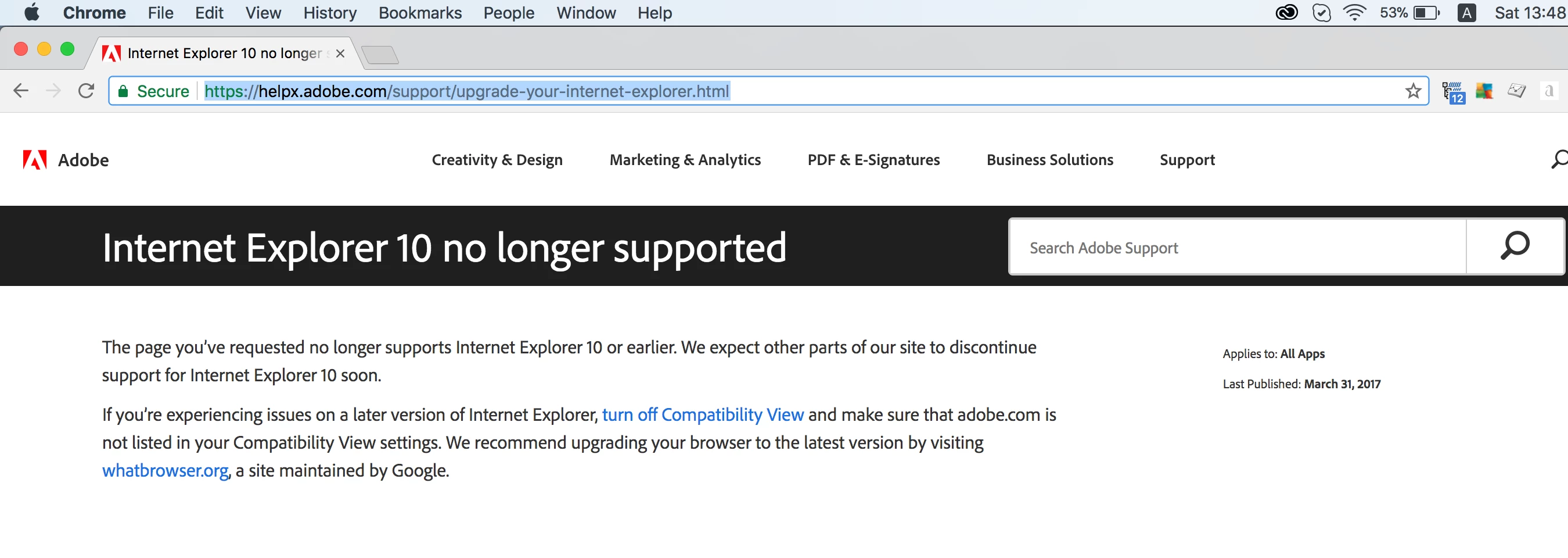
Clearly the browser identification is not working properly.

2. I had hard time figuring out where should I report problems with your website. I am doing it here because I gave up searching for more appropriate place. I hope this information will go up to whoever is responsible for the website support.

Thanks!

This topic has been closed for replies.

2 replies

MadisonLeupp
Community Manager
Community Manager
November 22, 2017

Hi crystalstorm,

Can you try deleting your cookies and cache in Chrome? I just tested on a mac on Chrome 61 and was able to navigate to adobe.com OK. You may also want to try in incognito mode.

Let me know if this helps!

Thanks,

Madison

Peter Grainge
Community Expert
Community Expert
November 20, 2017

It's not the right place to report this but I see your difficulty. Every Contact option relates to a product. I have flagged this with an Adobe contact and hopefully they will be able to assist.


See www.grainge.org for RoboHelp and Authoring information

@petergrainge

Use the menu (bottom right) to mark the Best Answer or Highlight particularly useful replies. Found the answer elsewhere? Share it here.