


Question
Adobe RoboHelp when generating Responsive HTML5 output for web pages containing mixed Chinese and English content. And the searching with exact phrase search is not working
Our technical team encountered significant search indexing issues with Adobe RoboHelp when generating Responsive HTML5 output for web pages containing mixed Chinese and English content.
Here are the specific issues observed:
- Issue 1: Chinese content cannot be searched when output language is set to English
- Behavior: When the Preset output language is set to English, searching Chinese keywords in the search bar (web content item, not browser function) returns no results.
- Behavior: When the Preset output language is set to English, searching Chinese keywords in the search bar (web content item, not browser function) returns no results.
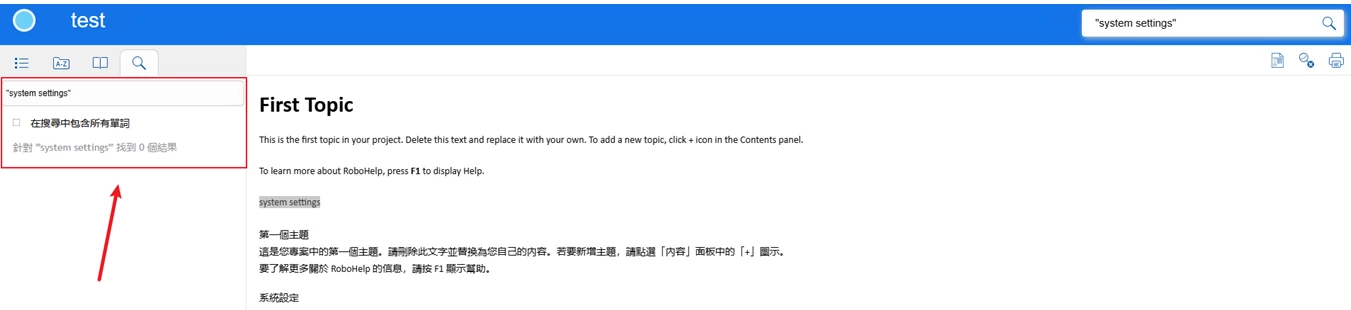
- Issue 2: Quoted exact search for English words fails when output language is set to Chinese
- Behavior: When the Preset output language is set to Traditional Chinese (Taiwan), unquoted searches for both Chinese and English keywords work properly. However, when performing an exact phrase search for English terms enclosed in double quotes (e.g., "system settings"), it has a very high failure rate and almost always returns "No results found", even though the exact term exists in the topic.
Environment:
- Product: Adobe RoboHelp (2026 Release)
- Build Version: 2026.09.43 (Windows)
- Output Preset: Responsive HTML5
We would like to know if this is a known/unfixed bug in Responsive HTML5, or if there is a specific setting we might have missed that can fix this (Frameless output is not our option) ?
Thank you in advance to anyone who takes the time to reply and share their thoughts! 🙇🏻
 AdChoices