Inspiring
July 18, 2022
Answered

After update project RH 2019->2022: Skin Orange Logo and background image change not possible

  • July 18, 2022
  • 5 replies
  • 1291 views

When updating from RH 2019 to 2020 for a Frameless edition, I had modified an Orange skin in RH 2019. In 2020 I cannot use this skin. The project is not calculated. So for 2020 I have to modify the skin again. (This just the back story my problem starts here:) I can't replace the logo and the background image of the homepage in RH 2020. At first everything looks fine. But as soon as I save the skin, the images are deleted and get placeholders.
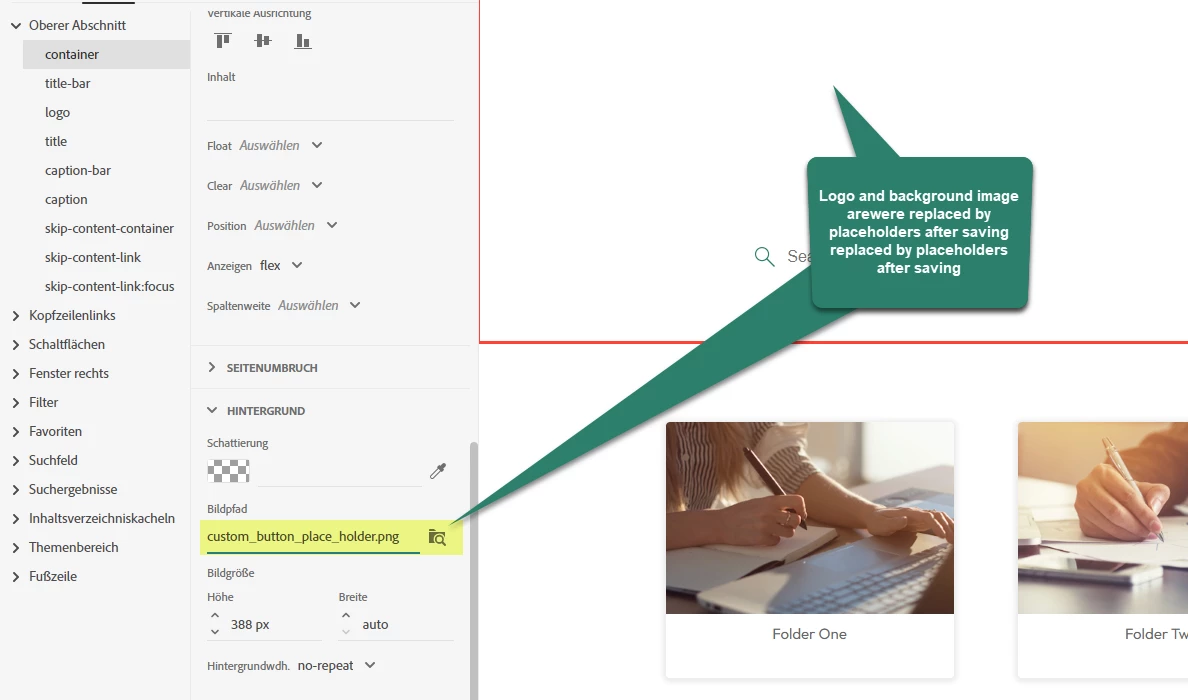

Graphic size, format of the graphic (png, gif) does not change anything, it happens with all graphics. I also restarted RH and made new attempts with the original orange skin. In 2019 I had no problems at all. I had used the same images.
 Is 2020 more sensitive here as well? What to do?

This topic has been closed for replies.
Correct answer Peter Grainge

I applied your images to a new project with the Orange skin.


I used Local Files to add your images to the skin but I don't think that would be any different to if I had put the images in Assets > Images. RoboHelp would just have copied them to the skin.


I could close and reopen the skin and the new images stuck. Here they are in the output.


Obviously the image needs a bit of editing but that's a separate issue.


Please try in a brand new project and see if that works. Let us know.

________________________________________________________

My site www.grainge.org includes many free Authoring and RoboHelp resources that may be of help.


5 replies

Peter Grainge
Community Expert
Community Expert
July 25, 2022

Am I confused here? You are saying there is a bug but I got the image to stick and so did you in another project so what exactly is the bug? 


It seems to be one project that has this issue, correct? In that project you tried a new skin and that had the same problem. Can you share the project? If you can, then see the Contact page on my site and send the project as instructed there. Do make sure you include a link to this thread and please do not email the project direct.

________________________________________________________

My site www.grainge.org includes many free Authoring and RoboHelp resources that may be of help.


Use the menu (bottom right) to mark the Best Answer or Highlight particularly useful replies. Found the answer elsewhere? Share it here.
A-BelAuthor
Inspiring
July 25, 2022

No, I have not tried the other projects yet. I just meant that importing the skin doesn't work. You had suggested that as a help.
I'll get back to you if the error shows up in other projects as well. Thanks a lot

Peter Grainge
Community Expert
Community Expert
July 25, 2022

I just exported a skin from one project and imported to another. It worked fine.

Try creating two new projects with just the default stuff in it and try between them. 

________________________________________________________

My site www.grainge.org includes many free Authoring and RoboHelp resources that may be of help.


Use the menu (bottom right) to mark the Best Answer or Highlight particularly useful replies. Found the answer elsewhere? Share it here.
Peter Grainge
Community Expert
Peter GraingeCommunity ExpertCorrect answer
Community Expert
July 20, 2022

I applied your images to a new project with the Orange skin.


I used Local Files to add your images to the skin but I don't think that would be any different to if I had put the images in Assets > Images. RoboHelp would just have copied them to the skin.


I could close and reopen the skin and the new images stuck. Here they are in the output.


Obviously the image needs a bit of editing but that's a separate issue.


Please try in a brand new project and see if that works. Let us know.

________________________________________________________

My site www.grainge.org includes many free Authoring and RoboHelp resources that may be of help.


Use the menu (bottom right) to mark the Best Answer or Highlight particularly useful replies. Found the answer elsewhere? Share it here.
A-BelAuthor
Inspiring
July 20, 2022

1. all the graphics were in the assets/images directory: it is not the location.
2. even without testing, I believe you can insert the graphics in a new project. It is not because of the graphics.
3. the problem is an update problem from RH 2019-> RH2020.
Do you mean that I don't migrate projects but quickly recreate everything?

Peter Grainge
Community Expert
Community Expert
July 20, 2022

I did not say anything was wrong with the way you access the graphics or the graphics themselves. I simply reported what worked for me so that you could try that way to see if it made a difference. I doubt it will but as it worked for me I thought it worth you giving it a try.


What I meant was simply create a new project not related to your existing project. It will have one topic that is fine for this purpose. Create an Orange skin in that and try to add your images. Do they stick there and does that generate an output. If the skin works there, we know for sure it's your project.


We can worry about what to do next after that.

________________________________________________________

My site www.grainge.org includes many free Authoring and RoboHelp resources that may be of help.


Use the menu (bottom right) to mark the Best Answer or Highlight particularly useful replies. Found the answer elsewhere? Share it here.
Peter Grainge
Community Expert
Community Expert
July 19, 2022

Can you send me those images? Attach them to the email address on the Contact page on my site.


Please include in the email the location you are inserting the images and in which skin. It would help if you use the English language for where you are adding the images but don't worry if you can't. 


I will try in a new project and see what I get. 

________________________________________________________

My site www.grainge.org includes many free Authoring and RoboHelp resources that may be of help.


Use the menu (bottom right) to mark the Best Answer or Highlight particularly useful replies. Found the answer elsewhere? Share it here.
Community Expert
July 18, 2022

Do also check whether the logo looks okay in the output. In testing I've noticed that sometimes the skin editor gets confused but the output is fine.

A-BelAuthor
Inspiring
July 19, 2022

Yes, I have used a new skin. I have shown the workflow and the result in the movie.

https://youtu.be/jUSH1qz_EPo


I have checked these directories:
.\[project folder]\publish\skins\[skin name]
.\[output folder]\Template\[skin name]
They contain the logo file Signet_white_42x42.png and no
Customer_button_place_holder.png file

Am I doing something wrong or is this a support case?


Peter Grainge
Community Expert
Community Expert
July 18, 2022

Looking at the titles of your previous posts and the highlight text, it does look as if you have been having some skin problems and I can't help wondering if it is time to start again with a new copy of the skin.


Obviously you won't be keen on that so all I can suggest is trying Support. See https://helpx.adobe.com/contact/enterprise-support.other.html#robohelp for your Adobe Support options. The email link tcssup@adobe.com is recommended as it reaches a team dedicated to Technical Communication Suite products including RoboHelp. 

________________________________________________________

My site www.grainge.org includes many free Authoring and RoboHelp resources that may be of help.


Use the menu (bottom right) to mark the Best Answer or Highlight particularly useful replies. Found the answer elsewhere? Share it here.