
Participating Frequently
September 16, 2013
Question

After upgrading RH9 to RH10, pop-ups no longer 'auto-size' when called from program

  • September 16, 2013
  • 1 reply
  • 2373 views

This is not the same issue as the current RH10 fix for webhelp resolves.

We've noticed that, once a HTML help file (eg. helpfile.chm) is generated in RoboHelp 10, the pop-ups no longer display as auto-sized.   They do if the .chm file is opened by itself but no longer do when the file is accessed as context sensitive help within the program being used.

Has anyone else experienced this?  The pop-up windows opened are wAAy too small now to be effective.

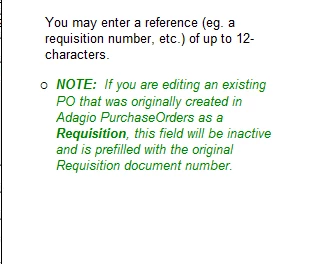
RoboHelp9 compiled and called from program:
RoboHelp10 compiled and called from program:
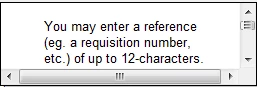
At first I thought there might be some kind of character limitation that the auto-size is working with but it's more the pop-up box size that's the issue.  Any number of characters (and this is font dependant of course) that won't fit into the ~2 1/2"w x ~3/4" h box (or ~6cm w x ~2 cm h) causes the vertical and horizontal scrollbars on the pop-up box to become active, rather than the box simply auto-sizing to fit the text as it did when previous versions of RoboHelp were used.

The main font hasn't changed (Arial 10-pt).  I should be able to pop-up more than 89 characters (including the line return and realizing that the number of characters can change as the characters are proportional) into a pop-up without this problem occurring.  Previously, we could enter over 256 characters without an issue. 

We use various programming tools and the problem with pop-up auto-sizing occurs when chm files compiled using RoboHelp 10 HTML Help are called from within all of our programs.  Help projects not yet converted to RoboHelp 10 do not exhibit this same behaviour.

The behaviour is the same whether the programs are run on XP or Win7 and the context sensitive help is called.  All program's *.chm files are stored on the local w/s even though the programs themselves are installed to the server.  Various server OS's are in use from Server 2003 thru Server 2012.

If anyone else has experienced this behaviour or has more information about it, it is appreciated.

Message was edited by: LS@Softrak

Message was edited by: LS@Softrak

Message was edited by: LS@Softrak

This topic has been closed for replies.

1 reply

Adobe Employee
December 10, 2013

Hi Leigh,

We tried creating the auto-size text-only Pop-ups and Hyperlink/Pop-ups to other htm pages, but they work fine at our end in RH10.

The pop-up mentioned in your post seems to be a hyperlink pop-up? We are unsure of this behaviour, does it happen on other machines with RH10?

Which OS/IE version are you using? Please can you attach the generated CHM or project, if possible?

Best Regards,

Amit Agarwal

LS8153986Author
Participating Frequently
December 10, 2013

Hi, Amit,

Yes, these are hyperlink pop-ups.  All (or almost all) are accessed when a user clicks on a field or button that is part of an image stored in the .chm file.

I'm not surprised that you can't duplicate this.  If you just generate a .chm file, double click on the .chm file, locate an image and then click on a field, the pop-up auto-sizes correctly and looks like the RH9 pop-up screenshot I provided above.

If, however, you access the .chm help file from any of our programs (and presumably from others also), the pop-up does not auto-size and looks like the RH10 pop-up screenshot above.

Our help files are not stored and accessed across the internet.  They are stored on users' individual workstations.  These users are using IE8, IE9, IE10, IE11, Chrome, Firefox, etc. but that isn't really relevant in this case; some users actually don't even have access to the internet.  (I know, hard to believe in this day and age but true.)

The problem occurs for .chm files compiled using RH10 when the help is called from a program.  The .chm file resides on the local drive of a workstation.  The problem does not occur using a .chm file compiled in RH5, RH8 or RH9.

The workstation might be running XP SP3, Vista, Win7, Win8, Win8.1 or be a terminal server (RDS) running one of these OS's or a server OS Microsoft Server 2003, 2008, 2008R2, 2011, 2012.

If you would like to do a remote session with me, I would be very happy to show you exactly what I mean.

Please let me know if you have any other questions.

Thank you.

Adobe Employee
December 11, 2013

Could you please elaborate on:

"..The problem occurs for .chm files compiled using RH10 when the help is called from a program. .."

Which program?

How are you using the program?

We had checked at my end without the 'program'. Will try to replicate with it once we receive your reply.

Thanks.