
February 27, 2012
Answered

Air Help topic navigation links broken

  • February 27, 2012
  • 16 replies
  • 3807 views

I've logged this as a bug, but was wondering if anyone else has run into this problem.

When generating the "Air Help and Browser Based Help" output format (and uploading the browser files to the web server and installing the AirHelp application), the navigation links that appear above the help window and below the search bar/navigation buttons are broken. The example below shows the uni-pane template, but the problem occurs with all templates.

Upon clicking the first or second topic link (in the red circled area), this displays "The page cannot be found" and the navigation links themselves disappear.
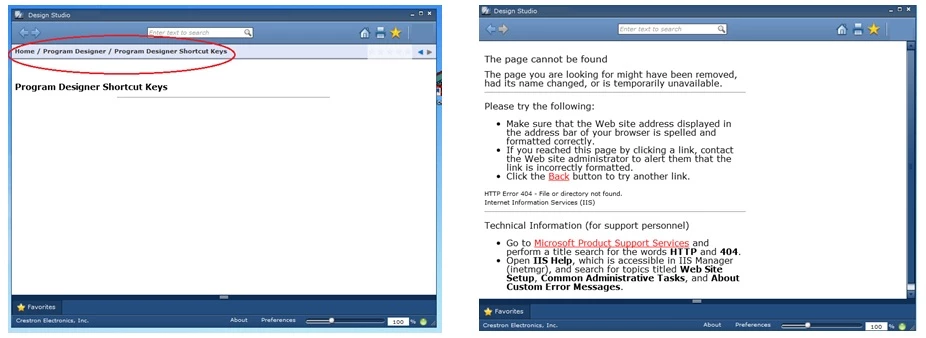
I noticed that the problem only exists when the topics in the Project Manager are organized into subfolders. If all the topics in the Project Manager reside in the top-level folder, the links navigate properly. Also, the links are only clickable when in online mode, not in local mode. I've been unable to either disable the navigation links entirely, or make them un-clickable in online mode.

I'm running RH9, Windows 7 (64-bit).

Any help would be appreciated.

This topic is closed to new replies. Start a new post to keep the conversation going.
Correct answer Peter Grainge

Just to update the thread, I believe I have found the solution to this and will post the answer once Meliset has confirmed it is working for her.


See www.grainge.org for RoboHelp and Authoring tips

@petergrainge


It seems the answer is not to generate browser based AIR help for the online element.

I generated webhelp instead making sure the Show Navigational Links option was deselected. With that done the breadcrumbs all worked fine in both the online and offline help. The user opens the help and if a connection is available the help defaults to the online content in the view, which is local. Without a connection or when the user elects to go offline, they stay in the view but with the local content.


See www.grainge.org for RoboHelp and Authoring tips

@petergrainge

16 replies

Participating Frequently
July 24, 2013

I also encountered the broken breadcrumbs links when generating "Air Help and Browser Based Help" and tried the solution proposed here.

Although this resolves the problem that has been described, I'm finding that in my AirHelp application it introduces another one when online.

When using browser based Air Help for the online content, the AirHelp search function worked ok.

After substituting the webhelp files I find that the seach function does not return any results when viewing online content.

Has anybody else encountered this and is there a simple solution?

Alternatively, I was wondering if there is any way in which the breadcrumbs can be displayed, but not be active - if that were possible I'd be able to continue working with the original Air Help and Browser Based Help files.

Thanks

Peter Grainge
Community Expert
Community Expert
February 27, 2012

I am not sure what the problem is at this stage but I don't think it is a bug as no one else has hit the problem.

Please open one of the sample projects and generate some AIR help from that to establish the links work there. That rules out a bug and tells us it is something in your project. What it is will still need to be determined but we will know we are looking in the right place.

Probably the first thing I would do is apply another skin and not make any changes to the default.

Post back how you get on. I'm going offline soon but will pick up your reply tomorrow if no one else has waded in.


See www.grainge.org for RoboHelp and Authoring tips

@petergrainge

Use the menu (bottom right) to mark the Best Answer or Highlight particularly useful replies. Found the answer elsewhere? Share it here.
February 27, 2012

Thank you for the speedy reply.

I did test this with the sample "salesbuilder" project and got the same results. I tried it with different skins and templates (i.e., multi-tab accordian) and got the same results. The only remedy has been to move the topics from their subfolders in the Project Manager to the top-level folder.

Peter Grainge
Community Expert
Community Expert
February 27, 2012

Those projects are tested and known to work including the breadcrumbs and with the topics at many levels. Are your projects local when you are working on them?

If they are, then look at the AIR pages on my site to see if you can pick up something.

Post back. I can't think offhand what would cause this but will give it some time tomorrow.


See www.grainge.org for RoboHelp and Authoring tips

@petergrainge

Use the menu (bottom right) to mark the Best Answer or Highlight particularly useful replies. Found the answer elsewhere? Share it here.