


Inspiring
May 12, 2014 2:23 PM UTC
Answered

All cross references of a new project start with  , text insets

I'm working with RH 9. I produce Webhelp projects based on FM related books.

This new book is based on existing projects and formats.

But one thing is new: There are many text insets.

My problem: The file that includes text insets has corrupt crossreferences.
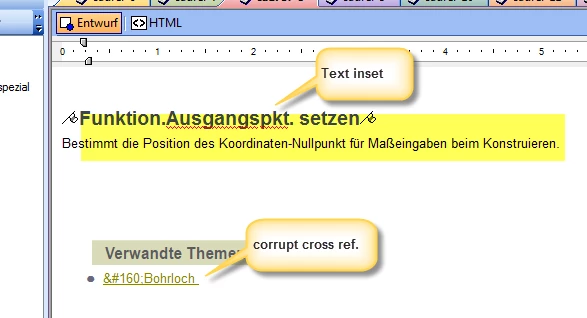
They are underlined and have the right color, but do not work. Every cross reference starts with  

What can I do? Any known work around? Is it a known problem?

This topic is closed to new replies. Start a new post to keep the conversation going.
Jeff_Coatsworth
Jeff_CoatsworthCorrect answer
Community Expert
May 13, 2014 12:11 PM UTC

If you can reproduce this behaviour with a small dummy set of FM content, report it as a bug and send the files to the TCS Support guys.

9 replies

Jeff_Coatsworth
Community Expert
Community Expert
May 12, 2014 6:44 PM UTC

You might be running into the invisible limit to the length of the path and file name of the xrefs in FM when bringing content over to RH - try to keep it under 35 characters in length. There also are issues with xrefs after Text Insets too, which I don't know have been fixed in TCS5.

Translate
A-BelAuthor
Inspiring
May 13, 2014 8:38 AM UTC

Thank you for your replies!

I tested some more details and found the real cause:

  1. The cross refs are working well, the "&#160," is a sort of "ornamental padding" of Robohelp (which I do not want!)
  2. Cross references to a paragraph in a text inset causes this padding in Robohelp for inserted FM texts!
  3. The "&#160," does not disappear when you convert/solve the text inset. The cross reference will appear unchanged.
  4. The "&#160," will disappear if you  set the cross reference marker new.
  5. The "&#160," does not disappear when you convert the file to mif and back to fm.

Here is another screenshot:

Is it a bug? Is there a work around (script that deletes the &#160, output) Does FM12 solve the problem?

We want to modularize text in FM, but working with RH gets more and more critical.

Cheers,

Annette Bellut

Translate
Jeff_Coatsworth
Community Expert
Jeff_CoatsworthCommunity ExpertCorrect answer
Community Expert
May 13, 2014 12:11 PM UTC

If you can reproduce this behaviour with a small dummy set of FM content, report it as a bug and send the files to the TCS Support guys.

Translate
Peter Grainge
Community Expert
Community Expert
May 12, 2014 6:35 PM UTC

I have moved this item to the FrameMaker Integration forum.

Hopefully someone with Fm/Rh knowledge can help.


See www.grainge.org for RoboHelp and Authoring tips

@petergrainge

Translate
Use the menu (bottom right) to mark the Best Answer or Highlight particularly useful replies. Found the answer elsewhere? Share it here.