Participant
June 7, 2016
Answered

All text in all RH topics have yellow highlight. How do I correct this?

  • June 7, 2016
  • 1 reply
  • 355 views

I was notified today that our online help had the text highlighted in yellow. I opened RH11, checked multiple topics, and every one of them had all the text highlighted in yellow. Do any of you know how I may have accidentally done this and how set it back to normal (non highlighted text)?

Thank you,

Eric
This topic has been closed for replies.
Correct answer Captiv8r

Hi Eric

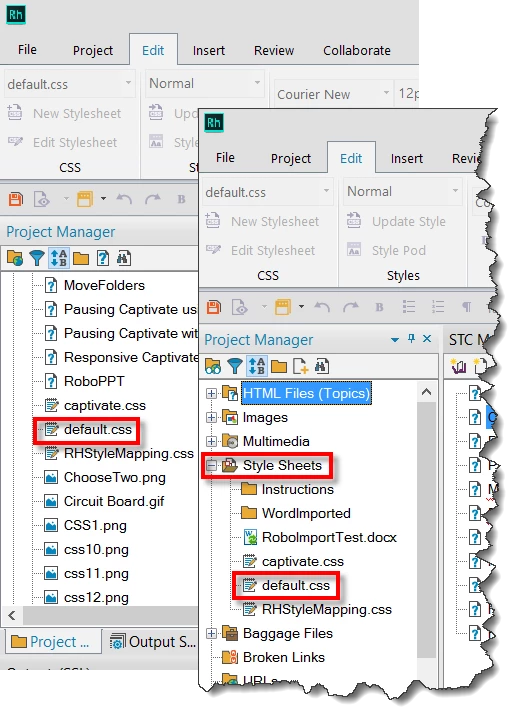
I'd suspect that something changed in the CSS associated with the topics. So I'd suggest examining the CSS. Look for the file in your Project Manager. (Depending on your viewing choice)

Double-click the CSS and it should open in the RoboHelp Styles editor.

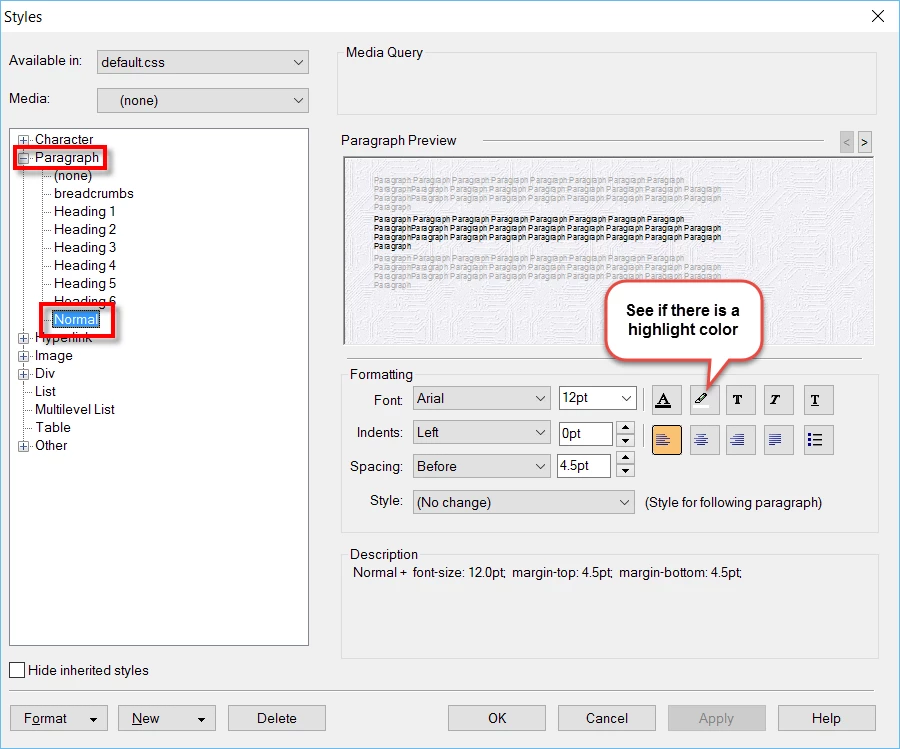
Look for the appropriate style. I'm guessing Normal?

Cheers... Rick

1 reply

Captiv8r
Captiv8rCorrect answer
Legend
June 7, 2016

Hi Eric

I'd suspect that something changed in the CSS associated with the topics. So I'd suggest examining the CSS. Look for the file in your Project Manager. (Depending on your viewing choice)

Double-click the CSS and it should open in the RoboHelp Styles editor.

Look for the appropriate style. I'm guessing Normal?

Cheers... Rick