
Known Participant
June 25, 2019
Answered

Another Dreaded Malformed Topics Problem

  • June 25, 2019
  • 2 replies
  • 939 views

I am using RoboHelp 2019 Classic, and our help project has been around for a long time in RH.  Many years ago, we had the Malformed Topics failure with generating a Word docx from RH, which we resolved by using the RHStyleMapping.CSS.  So we haven't had this failure in generating a Word doc in years.  until now.

There are several small topics, plus a gigantic one that we are trying to convert to Word. The gigantic topic is a 25-page table that is generated in Word where it is then converted into HTML.  We all know what happens with that conversion (!!), but we had no choice for this particular list. (This list is important, since it is given to our customers and is required - it is a list of all the fixes in our application covering 4 different versions, thus the 25-page length.)  So, anyway - I am suspecting all those Word codes in there as well as just the sheer length of that one table.  We are getting the infamous "Warning: The Word Document became corrupt when attempting to append a malformed topic:", says it failed, and RH just can't generate it.

Here's what I've tried already - with no success yet:

  1. Read Peter Grainge's excellent write-up for "Print Issues" on his site.  Very helpful in what I tried.
  2. Searched through the table in HTML mode to find the MS Word codes. There are MSO-Normal and the "mso-bookmark" codes everywhere, in every row.
  3. Removed with Find/Replace a <span> tag that has “mso-bookmark: RH_PD_TOC_BK;”. But the HTML still has segments of the <span> because of line breaks, so a bunch of the mso-bookmarks (978) are still there. 
  4. Checked that we are using RHStyleMapping.CSS to generate and for that topic, since this was another big recommendation for malformed topics error.  I made sure that this CSS is applied to the topic and that it is specified for the RH-to-Word process.
  5. Tried generating a PDF from RH, instead of to a DOCX.  Still got the malformed topics error.
  6. When I attempt to open the file in Word, I get errors in Word.

I do think that if this gigantic table were smaller, it could handle the Word generation.  We have done this for several years now - with this excessively big table - and without problem.  So I'm posting for any updated ideas - some fantastic utility maybe??  Any magical way to strip away all the Word codes?? I am stumped here.

I would gratefully appreciate any ideas or solutions.  If it were up to me, this table would be much smaller - but it's not up to me!!

Susan Tabnik
This topic has been closed for replies.
Correct answer Peter Grainge

Thanks, Peter, for your information.  We will definitely look into that!  That may be a very helpful thing for us to do!!

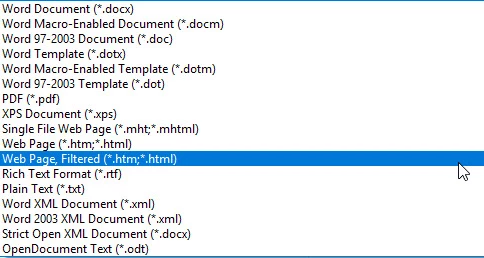
I actually realized what my mistake was, that could have saved me a ton of frustration!  When I saved the DOCX to HTM/HTML, I used the wrong option - I should have used the Web Page, Filtered option to save as HTM.  When I re-did it with that option, the resulting HTM file did NOT have the "mso-bookmark" <span> tag!!  The only lingering code was MSO-Normal class - but the generation completed correctly after that point.

Not sure if that option helps anyone else in this situation, but saved us and may work.

I appreciate everyone's help here!

Susan


Why do that in Word? If you use the Import process, that's the first thing it does on the fly and it deals with some other stuff too.

Take a look at Importing on my site.


See www.grainge.org for free RoboHelp and Authoring information.

@petergrainge

2 replies

Peter Grainge
Community Expert
Community Expert
June 25, 2019

I have edited your post to correct the version, from the details you must be using RoboHelp 2019 Classic that is very different from 2019.

In the third page of layout you can add a Word document. A workaround could be to exclude the topic with the table using tags but insert the original Word document.

See if that works for you.


See www.grainge.org for free RoboHelp and Authoring information.

@petergrainge

Use the menu (bottom right) to mark the Best Answer or Highlight particularly useful replies. Found the answer elsewhere? Share it here.
Jeff_Coatsworth
Community Expert
Community Expert
June 25, 2019

What about RH to PDF, PDF to Word?

Known Participant
June 25, 2019

Thanks, Jeff.

Yes, I did try to generate just that one topic from RH to PDF with the exact same error. It also failed.

Susan

Sent on my Samsung Galaxy S® 6.

Known Participant
July 2, 2019

Thanks, Peter, for your information.  We will definitely look into that!  That may be a very helpful thing for us to do!!

I actually realized what my mistake was, that could have saved me a ton of frustration!  When I saved the DOCX to HTM/HTML, I used the wrong option - I should have used the Web Page, Filtered option to save as HTM.  When I re-did it with that option, the resulting HTM file did NOT have the "mso-bookmark" <span> tag!!  The only lingering code was MSO-Normal class - but the generation completed correctly after that point.

Not sure if that option helps anyone else in this situation, but saved us and may work.

I appreciate everyone's help here!

Susan