
Inspiring
October 24, 2014
Answered

Any way to link link between merged projects on RH Server?

  • October 24, 2014
  • 1 reply
  • 462 views

Hi. Me again.

Is there any way to maintain links between pages of different merged projects in RH Server?

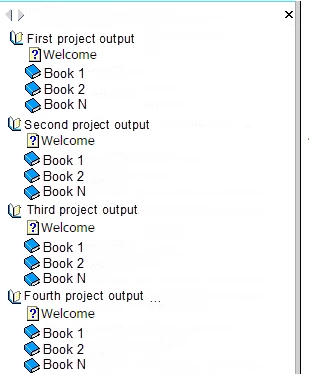
To clarify, consider the crude sample presentation of a projects merged in RH Server. Say that the author(s) of the projects have an agreement that project names (eg, "Second project output") and the first topic ("Welcome") will have static names. Is there a way to, for example, create a link in the Welcome page of the First project output which opens the Welcome page of the Second project output? If so, please suggest the correct syntax.

Note: I found that right click on a navigation item, copy the link, then paste the link the browser address line, then the project that contains the link opens up outside the context of the merged environment. Only the project's own navigation is shown.

Thanks in advance.

-Kurt
This topic has been closed for replies.
Correct answer kdeuler

Answered own question with further experiment.

While I stated this in the original message:

> Note: I found that right click on a navigation item, copy the link, then paste the link the browser address line, then the project that contains the link opens up outside the context of the merged environment. Only the project's own navigation is shown.


... If you take that copied link and use that as a the hyperlink address, instead of simply copying it into the browser address line and browsing to it directly, the link WILL work. For example, this hyperlink will work for the original query:


http://192.168.231.128:8080/robohelp/robo/server/general/projects/Second%20project%20output/Welcome.htm

1 reply

kdeulerAuthorCorrect answer
Inspiring
October 24, 2014

Answered own question with further experiment.

While I stated this in the original message:

> Note: I found that right click on a navigation item, copy the link, then paste the link the browser address line, then the project that contains the link opens up outside the context of the merged environment. Only the project's own navigation is shown.


... If you take that copied link and use that as a the hyperlink address, instead of simply copying it into the browser address line and browsing to it directly, the link WILL work. For example, this hyperlink will work for the original query:


http://192.168.231.128:8080/robohelp/robo/server/general/projects/Second%20project%20output/Welcome.htm