
Participating Frequently
September 15, 2020
Question

Application error doesnt allow to establish Sharepoint Connection

  • September 15, 2020
  • 11 replies
  • 1132 views

Hi,

I first tried to upgrade the 2019 project to 2020. The files were successfully upgraded.

I then tried to Collaborate a connection with Sharepoint. The Sharepoint had the latest 2020 project files. It showed me the following error.
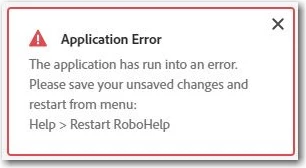
It allowed me to Login and save the collaboration. When I tried to select the folder from the Sharepoint, it selects and clears the check box automatically. SOmehow I selected the folder location, created the repo on my laptop, and initiated the process. The folders and files were getting downloaded on my laptop but I lost the collaboration with Sharepoint and the error kept coming. Once the files were downloaded, it asked me upgrade the project again. Even though the files were latest, it asked me to upgrade. I upgraded but neither I could establish the Sharepoint connection nor I could edit the files. The error keeps reappearing. Even if I try to Restart RoboHelp, it keeps reappering.

Has anyone faced this issues? Any solution?

    This topic has been closed for replies.

    11 replies

    AthensSlim
    Inspiring
    September 16, 2020

    No solutions, just commiseration...


    I've had all manner of bad behavior trying to use the version control/collaboration in RH2020 with SharePoint Online. I've contacted Adobe support, sent them copies of my project, and for weeks I've heard nothing at all from them. I'd hoped something with this had been addressed in Update 1, but no luck. I've sent a follow-up inquiry and support can't even be bothered to tell me whether they've reproduced the issue, they're working on it, or that just simply I'm out of luck. It's been incredibly frustrating and unimpressive. 


    This part actually did seem to work (albeit with glitches) in the "new" RH2019, so it's all that more frustrating that one of the things that did work in that generation has been broken. 


    Good luck to you. Please post back if you get anywhere. 

    Jeff_Coatsworth
    Community Expert
    Community Expert
    September 17, 2020

    Did you log an issue in the Tracker (https://tracker.adobe.com/)? That would let you keep up with any progress of the issue.

    AthensSlim
    Inspiring
    September 19, 2020

    Jeff, I haven't because it never occurred to me initially that an issue raised with support would simply go dormant and ignored. It's now obvious that I can't go to them (or at least not only to them) with obvious bugs. It seems like a duplication of effort and a definite customer service breakdown on Adobe's end, but I guess I will have to go through and log all of my unresolved support cases as Tracker issues. Thanks for the tip.